

WordPress Installation
Add Simple Commenter to your WordPress website. Choose the method that works best for your setup.
Method 1: Simple Commenter Plugin (Recommended)
The official plugin handles everything automatically — no code needed. It also gives you full comment management directly inside WordPress admin.
Install the official Simple Commenter plugin from WordPress.org to connect your site without editing theme files.
Installation
- Search "Simple Commenter" in your WordPress plugin directory, or download from WordPress.org. Click Install, then Activate.
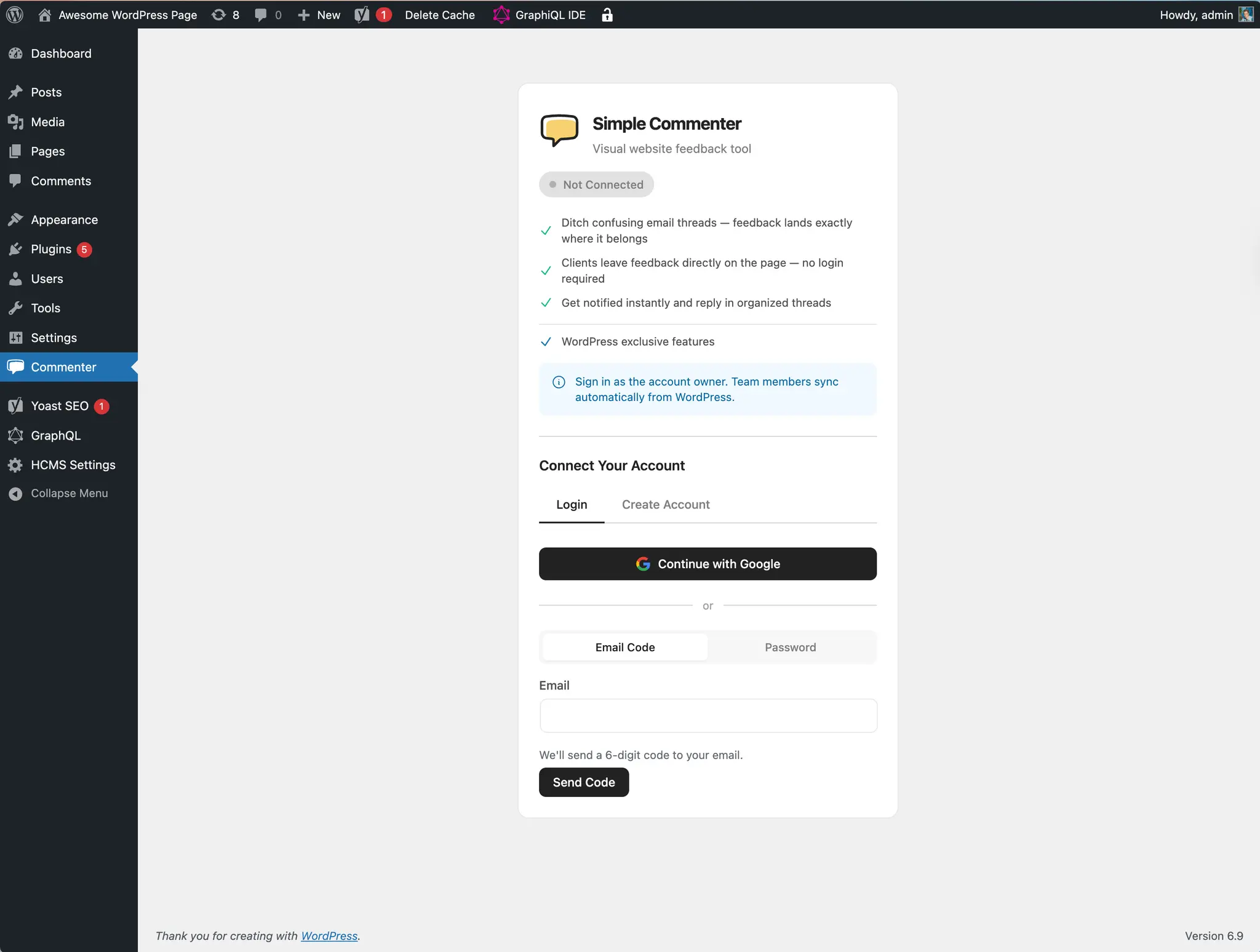
- Go to the Commenter menu in your WordPress admin and connect your account. Sign in with Google or enter your email for a verification code. If you do not have an account yet, create one from the same screen and choose where the workspace lives (Europe, United States or Australia). Existing accounts keep their workspace region.
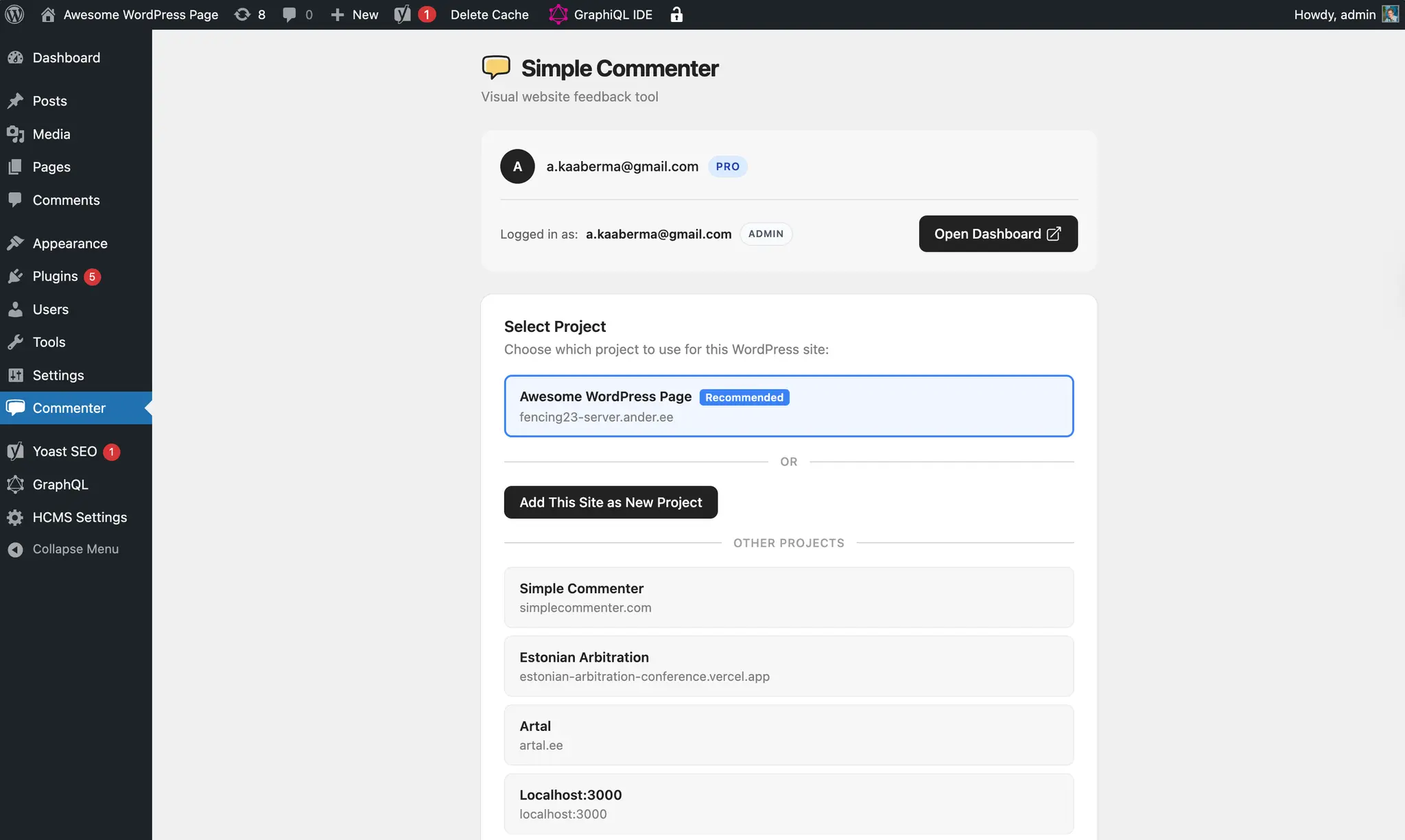
- Choose an existing project or create a new one. The widget automatically appears on your site.
Comment Management
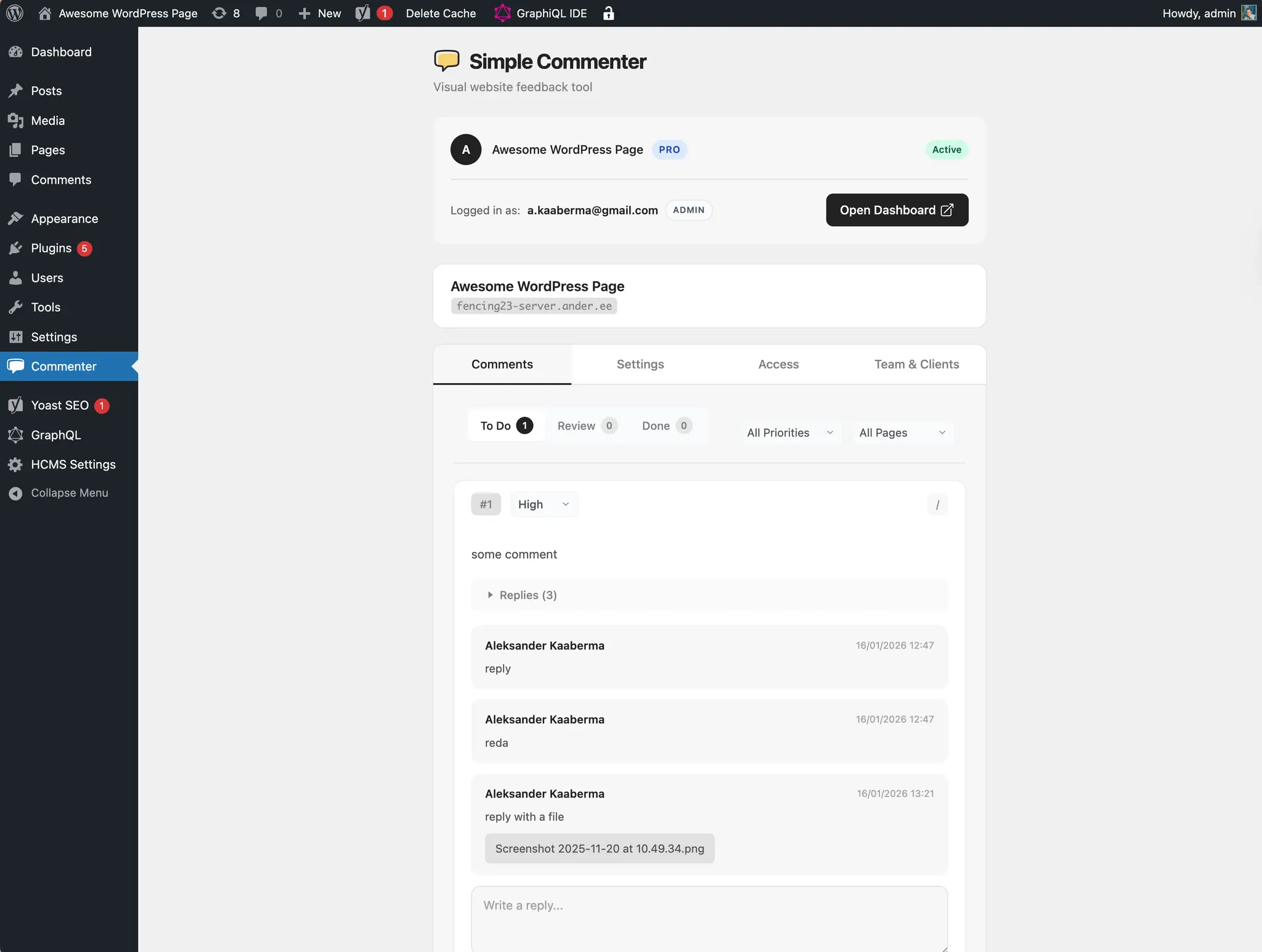
Once connected, you can manage all feedback directly from WordPress admin:
- View, filter, and search comments
- Update status (To Do, In Progress, Done) without leaving WordPress
- Set priority levels (Low, Normal, High)
- Reply to comments with file attachments
- Track unread comments with badge notifications in your admin menu
WordPress User Sync
With Sync users automatically on, the plugin creates a Simple Commenter account for a WordPress user the first time they open a page where the widget loads. Sync all users now creates them in one go. Only users in the roles your Access page allows to see the widget are synced, and the result says how many were left out.
Sync never hands out a team seat on its own:
- Every synced WordPress user becomes a client of the project and can leave feedback.
- WordPress administrators and roles with management permission are listed under Suggested team members on the plugin's People page and on the dashboard's Members page. Approve each one as Admin or Team Lead, or keep them as a client. Approving uses the same seat limit as inviting a member.
- Team members created by earlier plugin versions keep their roles.
Logged-in WordPress users are signed in to the widget automatically, so admins and team members keep their role on the site and clients never see a login.
Role-Based Widget Visibility
Control who sees the feedback widget:
- Everyone (including guests)
- Logged-in users only
- Specific WordPress roles (Administrators, Editors, Authors, etc.)
- Conditional loading via
?feedback=trueURL parameter for testing. The check runs in the visitor's browser, so it works on sites with full page caching (LiteSpeed, WP Rocket, Cloudflare)
This is useful for keeping the widget visible on staging but hidden from public visitors on production.
WordPress visibility is an additional restriction. If the plugin is set to Logged-in WordPress users, WordPress does not load the widget for logged-out visitors. Selecting Visible to all in the Simple Commenter dashboard does not remove that WordPress restriction.
To show the widget to every visitor while requiring a Simple Commenter account:
- In WordPress, open Commenter > Access and choose Everyone who visits under widget visibility.
- In the Simple Commenter project's Access settings, choose Visible to all, but requires login.
- Set Client registration to Open Registration so new clients get access without admin approval.
- Clear the WordPress page cache and check the site in a private window. The widget should appear and ask the visitor to register or sign in.
WordPress accounts and Simple Commenter client accounts are separate. Visitors do not need a WordPress account for this setup.
Method 2: Code Snippet Plugins
If you prefer to embed the script manually using a code snippet plugin, this keeps your code safe when updating themes.
Using WPCode (Free)
- Install and activate the WPCode plugin (or "Insert Headers and Footers")
- Go to Code Snippets > Header & Footer
- Paste this in the Footer section:
<script
  src="https://simplecommenter.com/js/comments.min.js?id=sc_your_project_key"
  defer
></script>
- Click Save Changes
Use your project public key (sc_...) from the dashboard with ?id=.
Using Insert Headers and Footers
- Install Insert Headers and Footers by WPBeginner
- Go to Settings > Insert Headers and Footers
- Paste the script in the Scripts in Footer box
- Save
Method 3: Theme Editor
Changes in the theme editor are lost when you update your theme. Consider using a plugin or child theme instead.
- Go to Appearance > Theme File Editor
- Select your active theme
- Open
footer.php(or your theme's footer template) - Add this code before
</body>:
<script
  src="https://simplecommenter.com/js/comments.min.js?id=sc_your_project_key"
  defer
></script>
- Click Update File
Method 4: Child Theme
The safest method for theme modifications.
Add this to your child theme's functions.php:
function add_simplecommenter_widget() {
    ?>
    <script src="https://simplecommenter.com/js/comments.min.js?id=sc_your_project_key" defer></script>
    <?php
}
add_action('wp_footer', 'add_simplecommenter_widget');
Method 5: Elementor
If using Elementor Pro:
- Go to Elementor > Custom Code
- Click Add New
- Set location to Body - End
- Paste the script:
<script
  src="https://simplecommenter.com/js/comments.min.js?id=sc_your_project_key"
  defer
></script>
- Set display conditions and publish
Verifying Installation
- Clear any caching plugins (WP Super Cache, W3 Total Cache, etc.)
- Visit your site in an incognito/private window
- Look for the feedback widget button
- Check browser console (F12) for any errors
Troubleshooting
Widget not appearing
- Check Commenter > Access in WordPress. A WordPress login or role restriction can prevent the widget script from loading, even when the dashboard says Visible to all.
- Clear your WordPress cache
- Clear any CDN cache (Cloudflare, etc.)
- Check that the script wasn't removed by a security plugin
- Verify the embed identifier matches your dashboard project (
sc_...preferred)
Widget shows when logged in, but not in incognito
First check Commenter > Access. If visibility is restricted to logged-in WordPress users or selected roles, the missing widget is expected. Choose Everyone who visits if logged-out visitors should see it; the project's required-login setting still controls access to feedback.
If WordPress visibility already allows everyone, check JavaScript optimization. Optimization plugins can skip logged-in administrators, making a loading problem visible only to logged-out visitors.
The feature responsible is usually called Combine JavaScript, JS Combine External and Inline, or Merge JS. It merges external scripts into a single file hosted on your own domain. That rewrite drops the ?id=sc_... project key from the widget's script URL, and without that key the widget cannot tell which project it belongs to, so it stops silently with no console error.
Plugins known to do this: LiteSpeed Cache, WP Rocket, Autoptimize, W3 Total Cache, SG Optimizer, and Jetpack Boost.
Excluding the widget from LiteSpeed Cache, WP Rocket, and Autoptimize
The fix is to exclude simplecommenter.com from JavaScript combining, so the widget script keeps its own tag and its ?id= project key. This is standard practice for third-party widgets and has a negligible effect on page speed scores, since the script is a 3KB loader.
- LiteSpeed Cache — Page Optimization > Tuning > JS Excludes, add
simplecommenter.comon its own line. If JS Delay is enabled, add the same line to JS Delayed Excludes. - WP Rocket — File Optimization > Excluded JavaScript Files, add
simplecommenter.com. - Autoptimize — JavaScript Options > Exclude scripts from Autoptimize, append
simplecommenter.comto the list. - W3 Total Cache — Performance > Minify > Never minify the following JS files.
- SG Optimizer and Jetpack Boost — turn off JavaScript combining, or add the same exclusion where the plugin allows one.
After adding the exclusion, purge the CSS/JS cache, not just the page cache. The combined file is stored on your own server, so a page-only purge leaves the old merged copy in place and the widget stays broken. In LiteSpeed Cache, use Toolbox > Purge > Purge All.
To confirm the fix, open your site in a fresh incognito window and view the page source. You should see the script tag with the project key intact:
<script
  src="https://www.simplecommenter.com/js/comments.min.js?id=sc_your_project_key"
  defer
></script>
If the ?id= is gone, inspect the optimizer's exclusions. If the entire tag is missing, also check that the plugin is active and connected, its visibility allows the visitor, and the page cache has been cleared.
Conflicts with other plugins
- Try disabling other JavaScript optimization plugins temporarily (see the section above for the usual culprit)
- Check if a security plugin is blocking external scripts
- Ensure no duplicate scripts are loaded
WooCommerce sites
The widget works on WooCommerce pages. If you only want it on certain pages:
function add_simplecommenter_widget() {
    // Only load on non-cart/checkout pages
    if (is_cart() || is_checkout()) return;
    ?>
    <script src="https://simplecommenter.com/js/comments.min.js?id=sc_your_project_key" defer></script>
    <?php
}
add_action('wp_footer', 'add_simplecommenter_widget');
Need help? Contact support.