6 Best Pastel Alternatives in 2026
Pastel does static design review well, but the 72-hour comment window and the integration paywall hurt at scale. Six alternatives worth shortlisting first.

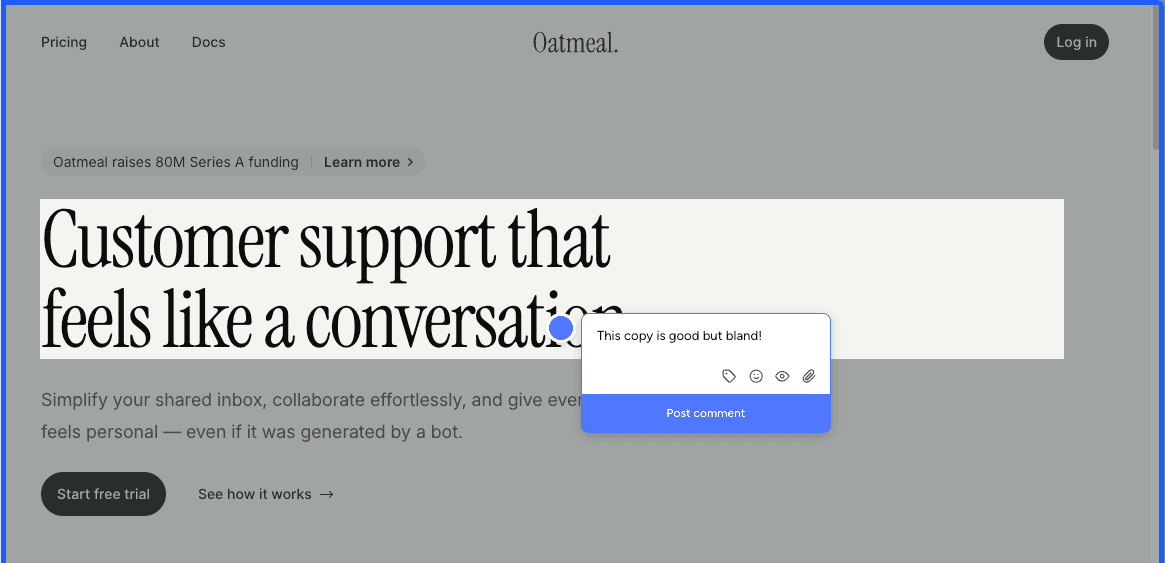
Pastel has done static design review well since 2016 — a mature iframe-style canvas tool with a polished UI, asset feedback on images and PDFs, and unlimited guest reviewers on every plan.
There are four recurring reasons people start shopping for an alternative:
- Iframe-only feedback. Reviewers comment on a Pastel-hosted snapshot, not your live site. Pages behind Basic Auth or inside a SaaS app will not load, and mobile review runs through a desktop-emulated viewport rather than a real device.
- Missing integrations on lower tiers. Trello, Asana, Jira, Zapier, and webhooks are gated to the $119/mo Team tier — Pro at $35/mo ships none of them.
- Steep price jumps. Pro is $35/mo, Team is $119/mo, Enterprise is $450/mo. Each step up is a real budget conversation, and the gap from Pro to Team is hard to justify if integrations are the only thing you want.
- Weak Chrome extension. The extension only spins up new canvases — it is not an on-page commenting overlay like the ones MarkUp.io or Simple Commenter ship.
Most teams leaving Pastel still want to keep the things that made it work in the first place. Not every alternative on this list ships all three, but at least one will line up with what you actually liked:
- Easy for clients — no login required
- A tested, reliable tool that has been around long enough to trust
- Comfortable with iframe loading and its trade-offs
The five alternatives below each fix one of those pain points while keeping at least one of the things you liked.
Simple Commenter#
Built for: Agencies · Freelancers · QA teams · SaaS teams
Best for: Agencies and SaaS teams who want non-technical reviewers to comment without signing up, while still giving the team a real dashboard, integrations, and a deep WordPress story.
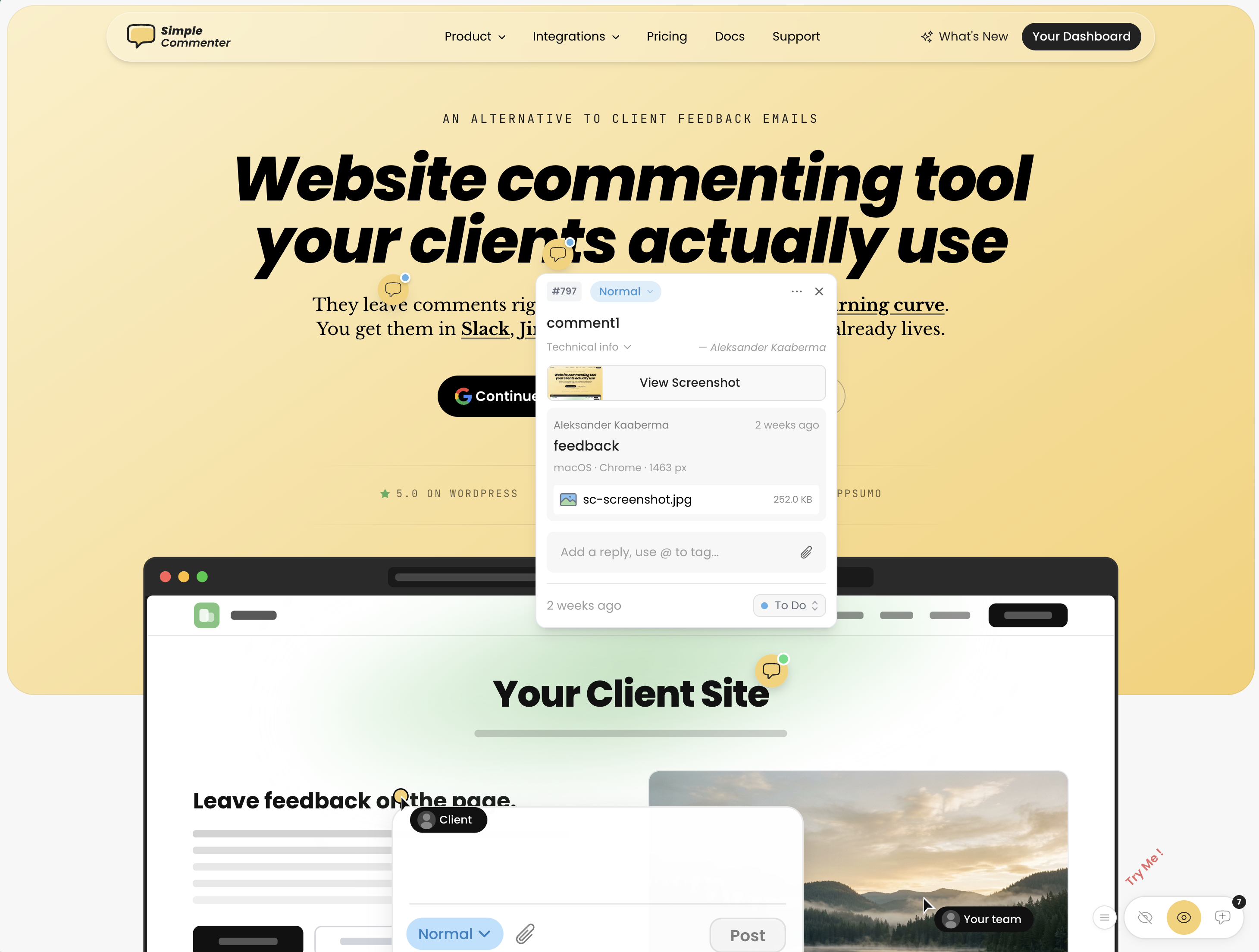
Simple Commenter is built around one idea: a non-technical client should be able to drop feedback on a website without an account, an install, or a learning curve. Pick a spot, type a comment, you're done. No signup, no extension, no walkthrough. Every other feature on the platform sits on top of that one principle.
When a project needs more structure, clients can register in two clicks or accept an invite into a dedicated client portal. From that point on, every comment they leave is named, threaded, and they get a notification the moment you reply. The surface stays low-friction — just with the structure a reviewer needs once a project is moving.
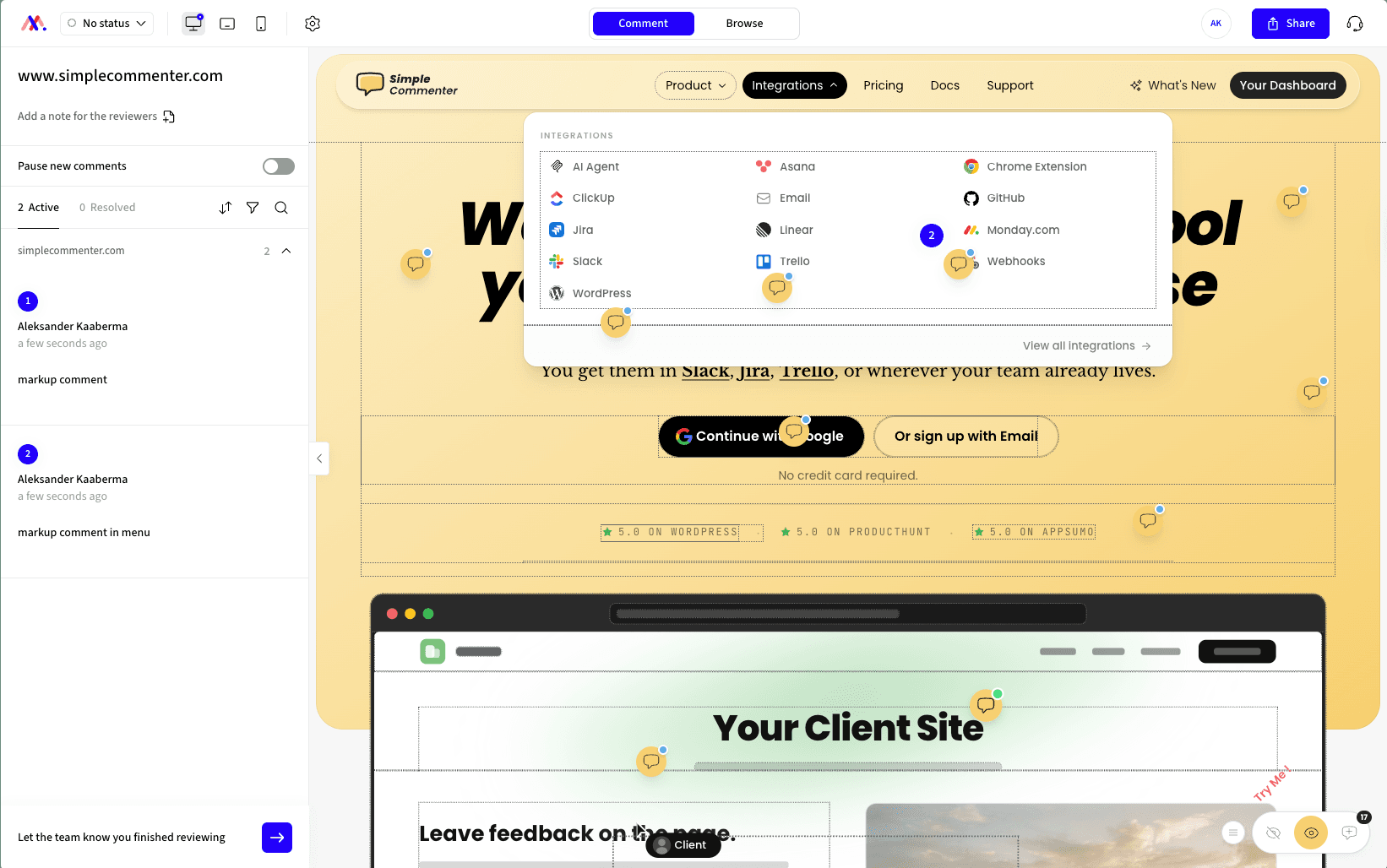
On the team side, members sign in to a shared dashboard that pipes comments into the rest of your stack. The integration list covers Slack, Trello, Asana, ClickUp, Linear, Jira, Monday, GitHub, email, and outbound or inbound webhooks — plus a native MCP server so Claude Code, Cursor, and other AI agents can pull and reply to comments directly.
The widget loads on every page type: marketing sites, authenticated SaaS apps, staging environments, and WordPress. Access scales with the use case — open for public review, token-gated for staging, login-gated for client work, or SSO auto-login for SaaS teams whose internal reviewers are already signed into the product.
Against Pastel specifically, the relevant differences are that feedback lives on the actual site instead of an iframe canvas, integrations are included from the $34.99 per month Agency tier instead of the $119 Team tier, and there is no time-boxed commenting window. Web professionals switching from Pastel consistently mention how much faster review cycles run once the canvas-and-link step is gone.
Key features:
- No-signup commenting — clients pin and reply without creating an account
- Optional client portal with invitations, named comments, and reply notifications
- Script-based widget that works on SaaS apps, staging, and marketing sites
- Three access modes — open, token-gated, login-gated — plus SSO with auto-login from your own site
- WordPress plugin with full in-WP management of comments, members, replies, and settings
- Integrations with Slack, Trello, Asana, ClickUp, Linear, Jira, Monday, GitHub, email, and webhooks
- Read, search, organize, and export feedback with your AI through the MCP integration
- Chrome extension for reviewing sites you do not own
- Automatic screenshots, file attachments, PDF and image review
Pricing:
- 14-day free trial, no credit card required
- Agency $34.99/mo (10 users, integrations, automatic screenshots, custom themes, 50 GB storage, 500 MB per file)
- Business $149.99/mo (25 users, 500 GB storage, 5 GB per file, SSO, custom domain, custom email domain, whitelisting, priority support)
- Enterprise custom (unlimited users and projects, SSO/SAML, advanced permissions, dedicated CSM, API user provisioning, SLA)
- 2 months free on annual billing
Pros:
- Lowest client friction in the category — no signup, no install, no tutorial
- Optional client portal when you do want named, notified, structured feedback
- Works on every page type: marketing, SaaS behind auth, staging, WordPress
- Only tool on this list with native in-WP comment management
- SSO and auto-login from your own site — internal reviewers never see a separate login
- Per-plan seats instead of per-seat pricing — adding clients does not raise the bill
Cons:
- Lacks full project management features like boards or kanban — feedback flows into your existing PM tool instead
- Newer to the market than BugHerd or Marker.io, so the integration list is still expanding
Reviews:
Simple Commenter holds a 5.0 average across Product Hunt and AppSumo, with 600+ agencies, freelancers, and enterprises in production. The single most repeated theme in customer reviews is the no-signup flow — variations of "finally, a feedback tool my clients actually enjoy" and "life changed in under 5 minutes" land across dozens of testimonials. People who switched from Markup, Pastel, and BugHerd consistently note how much faster client review cycles run once the login step disappears — one Jim Langman review describes a year-long stalled project that launched three weeks after Simple Commenter joined the stack. The most common feature request is a kanban board, which lines up with the trade-off above: Simple Commenter is a feedback widget, not a PM tool. Support response time is the second-most-praised aspect; "fixed my issue in literal seconds from emailing them" is a phrase that recurs verbatim in multiple reviews.
BugSmash#
Built for: Freelancers · Agencies
Best for: Solo creators and small teams reviewing design assets, PDFs, and websites in one place. A weak fit for live-site review on authenticated or interactive web apps.
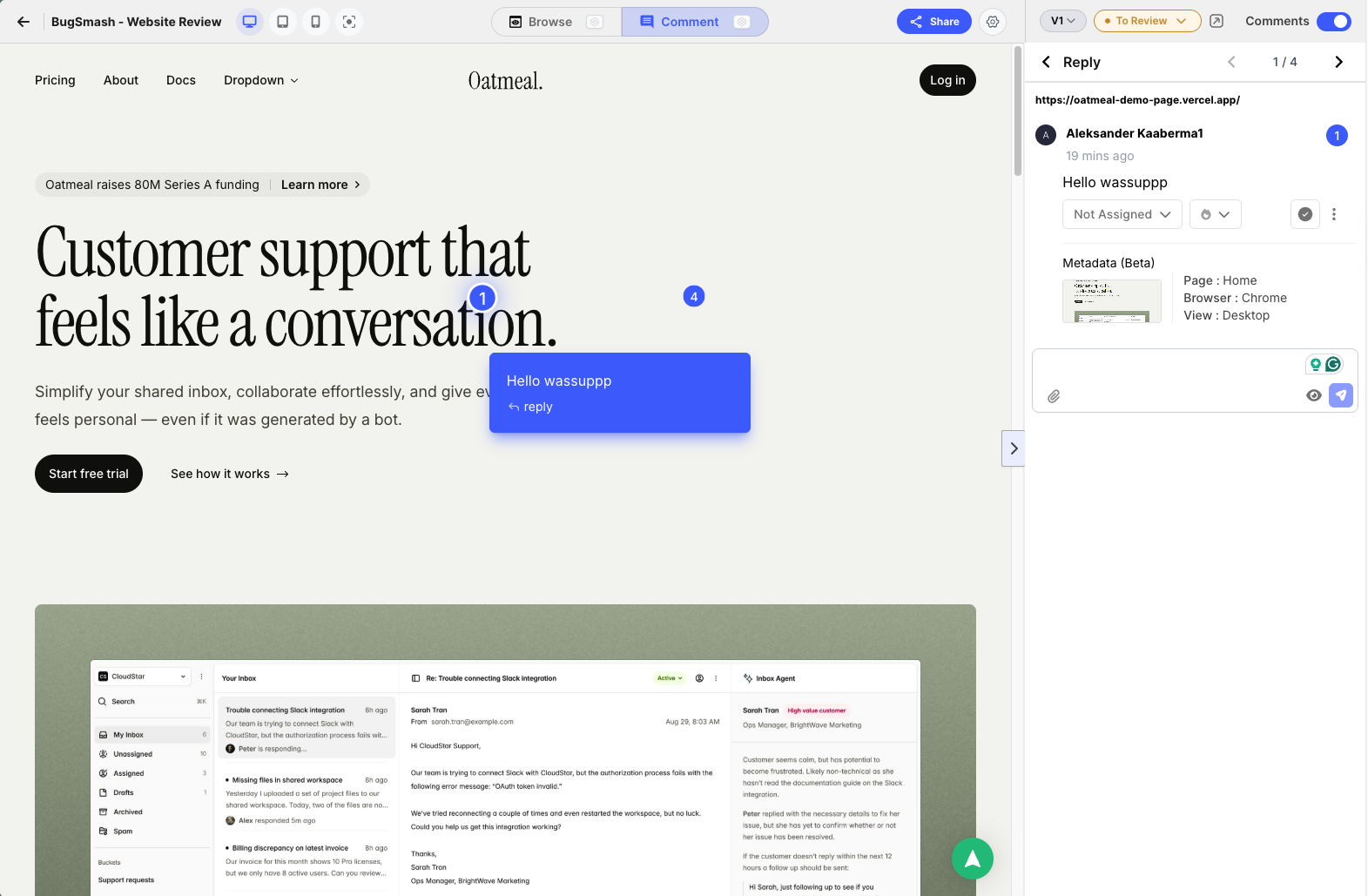
BugSmash is one of the newer names on this list (launched in 2025), and despite the name overlap with BugHerd it sits in a different category entirely. It is much closer to Pastel, Markup.io, and Ruttl — an iframe-style review tool where reviewers leave comments on a BugSmash-hosted snapshot of your asset rather than on your live website.
The iframe model brings the same trade-offs covered elsewhere on this list. Static marketing pages and design files load cleanly. Sites behind Basic Auth, anything that refuses to render in an iframe, and complex authenticated SaaS apps do not. Mobile feedback runs through a desktop-emulated viewport that behaves differently from a real phone. For static pages and design files, the iframe is fine. For an actual product, expect to run into walls.
What separates BugSmash in this group is its scope. It does more than website feedback. You can pin comments on web pages, design files, PDFs, images, video, audio, and mobile app screens — all from the same dashboard. The Figma plugin is the headline feature: pull frames straight from Figma into a BugSmash project with no manual screenshot work. No other iframe tool on this list ships a Figma plugin.
The friction we hit in testing is account-gated commenting. The iframe URL itself can be public, but anyone who wants to leave a comment has to sign up first. That breaks one of the patterns clients quietly enjoy about Pastel and Markup-style tools — drop a link, drop a note. With BugSmash, that same link drop hits a "create an account" wall. Script-based tools like Feedbucket and Simple Commenter push this further still: share a preview link of your actual site and the reviewer never has to notice a feedback tool exists.
If you are weighing Markup.io, Pastel, or Ruttl for design and asset review, BugSmash deserves a slot on the shortlist. Same iframe model, wider asset coverage, the only Figma plugin in the group, and a free tier that is genuinely usable.
Key features:
- Iframe-based feedback on websites, plus dedicated commenting on PDFs, images, videos, audio, and mobile app screens
- Figma plugin to export design frames directly into BugSmash projects
- Automatic screenshot on every comment
- AI review summaries (limit varies by plan)
- Slack and ClickUp integrations on Starter; full integration list on Team
Pricing:
- Free $0/mo (2 projects, 2 members, unlimited guest reviewers, 5 GB storage, 2 AI reviews)
- Starter $19/mo (50 projects, 2 members and 5 external collaborators, 50 GB storage, 20 AI reviews/month, Slack and ClickUp)
- Team $59/mo (unlimited projects, members, and collaborators, 300 GB storage, unlimited AI reviews, custom branding with subdomain/name/logo, all integrations)
- Enterprise $299/mo (multiple workspaces, 1 TB storage, custom domain, API access, SSO)
- 30% off on annual billing
- 7-day free trial on paid plans
Pros:
- Broader asset support than any other iframe tool on this list (web, PDF, image, video, audio, mobile app)
- Figma plugin is unique among iframe-style competitors
- Free tier is genuinely usable, not a trial-in-disguise
- Automatic screenshot on every comment
- Custom branding on the Team tier without an enterprise upgrade
Cons:
- Iframe-only commenting: reviewers leave feedback on a BugSmash-hosted snapshot, not your live site
- Anyone leaving a comment has to sign up — no anonymous guest commenting
- Sites behind Basic Auth and pages that refuse to load in iframes are out of scope
- No real-device mobile feedback, only desktop-emulated viewports
- Slim integration list on lower tiers (Slack and ClickUp on Starter; full list locked to Team)
- AI review limits on every tier below Team
- Small public review base outside of AppSumo
Reviews:
The bulk of public reviews live on AppSumo, where BugSmash ran a lifetime-deal campaign during launch. Reviewers consistently frame it as a strong alternative to Markup.io and Pastel, and credit the support team for fixing reported bugs within a day or two — a contrast they explicitly draw against the larger incumbents in the category. One representative quote: "It's new, so there may still be a few bugs to squash, but when I've found one I reported it and it got fixed within a day or two, which is more than I can say for the larger companies that BugSmash competes against."
The honest caveat is that a full assessment will have to wait until subscriber reviews land on G2 or Capterra. AppSumo reviewers paid a one-time lifetime fee, not the current $19 to $59 monthly subscription, so the price-to-value math in their reviews does not translate to teams signing up today. As a starting point, though, BugSmash looks promising — the product itself, the responsiveness of the team, and the early sentiment all point in the right direction.
Huddlekit#
Built for: Agencies · Freelancers
Best for: Agencies and freelancers reviewing WordPress, Squarespace, and Webflow sites. A weak fit for SaaS apps or teams with stricter security needs.
Huddlekit launched in 2025 and has been shipping fast since. Installation is one of the smoothest we tested. The iframe loaded cleanly, setup took minutes, and bugs were rare across the testing window. That level of polish is unusual for a tool this new.
The headline feature is the four-screen responsive canvas. Huddlekit shows a project at mobile, tablet, laptop, and desktop sizes side by side, all in a single view. No other iframe tool on this list ships anything close. For agencies building marketing websites — where responsive testing actually matters — this is a real differentiator. A misaligned hero on mobile and a stretched headline on desktop both surface in the same review pass, no viewport switching required.
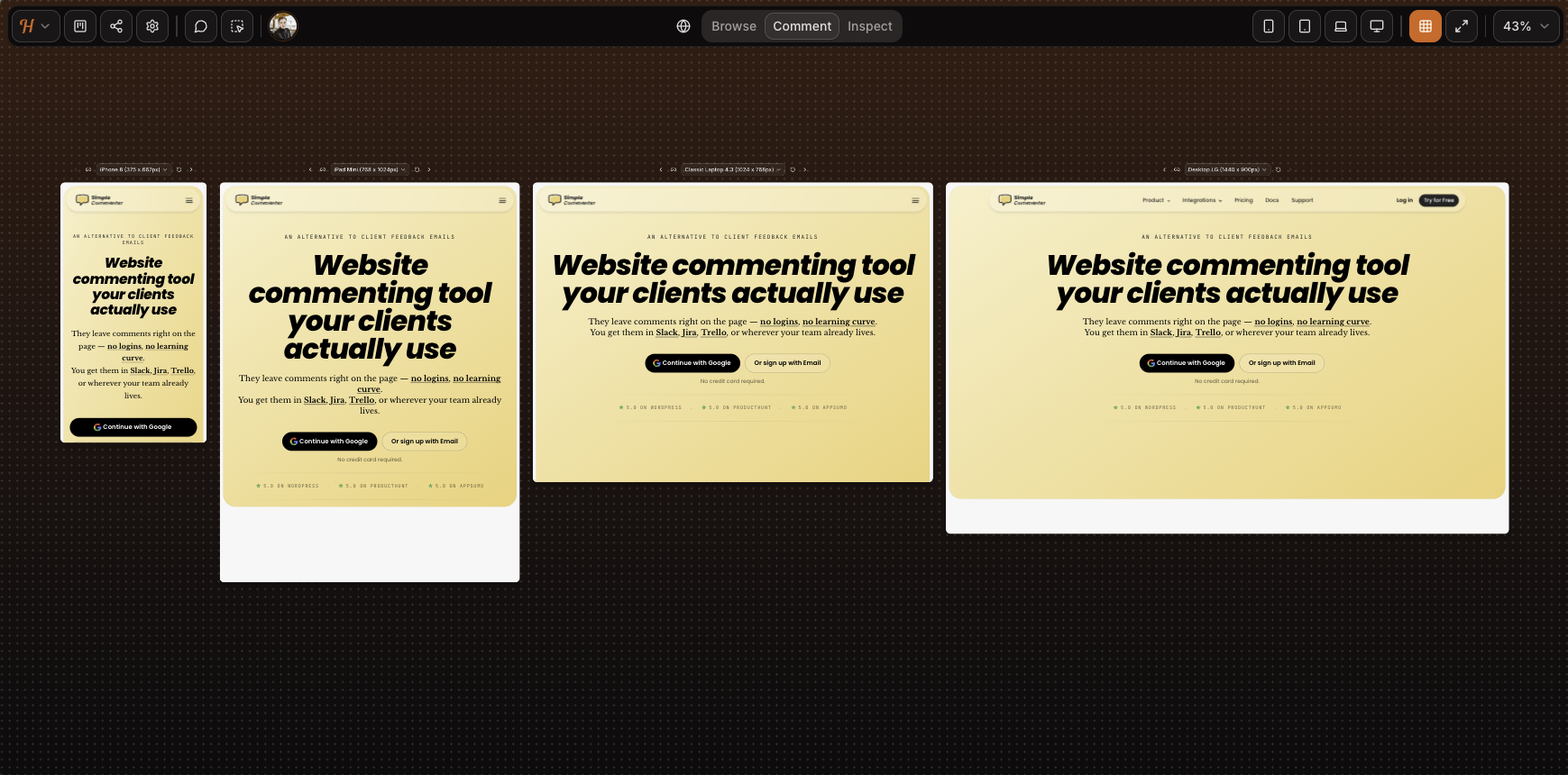
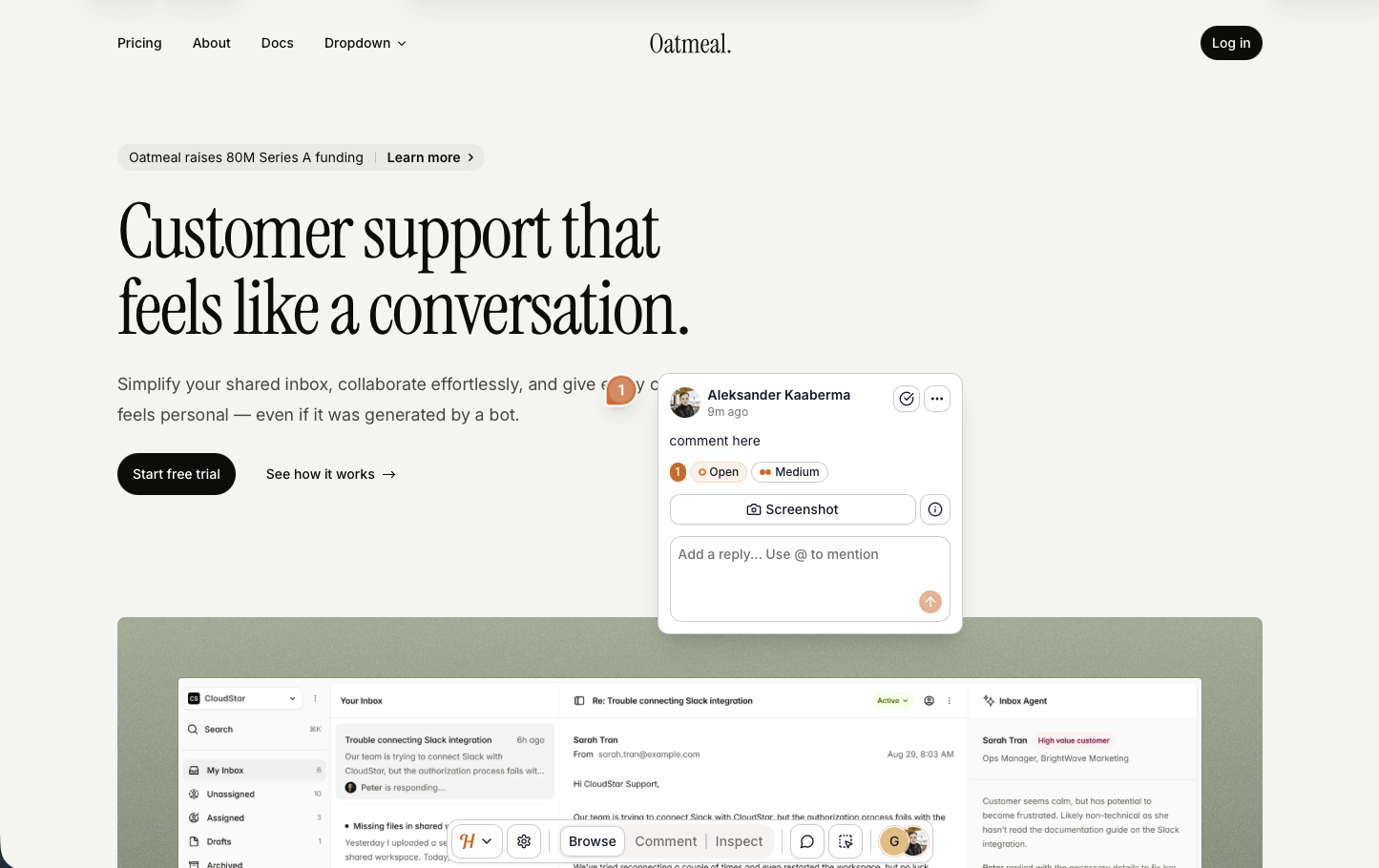
The iframe trade-offs from the rest of this list still hold. Mobile feedback runs through a desktop-emulated viewport instead of a real device — as the screenshot shows, the SVG animation on our homepage drops out entirely. Complex authenticated apps do not load inside the canvas, and while iframe tools can sometimes be configured to push past Basic Auth, Huddlekit has not added that path yet. Our auth-protected test page refused to load. For a marketing site or a CMS page on WordPress, Squarespace, or Webflow, the iframe is fine. For a SaaS product or anything behind a login, expect the friction.
Script loading is the second install path, still in beta. On our test pages it worked well — setup was clean, every comment captured an automatic screenshot, and the screenshot landed on the spot the comment was placed (a real gap on tools like Markup, where it can land somewhere else entirely). It is close to ready for general release. The rough edges that remain show up on heavier elements like dropdowns and drawers.
Sharing is simple either way. The iframe gives you a public link; the script flow on a live site is parameter-only. Neither path layers in login-gated access, so anyone with the link can open the project and read existing feedback. The only gated step is leaving a comment, and Huddlekit asks for a name and email instead of a full account. Lightweight, but not fully anonymous.
Email-based auto-association also means anyone who knows a team email can comment under that member's name. For freelancers and small agencies that simplicity-over-security swap is fine. For larger corporates that need login-gated access, audit trails, or control over who can read feedback at all, it falls short. With pricing tiers capping at "Agency," enterprise clearly is not the target.
The integration story is the other gap. None are live yet. The marketing leans into that positioning, pitching explicitly against a "screenshot-and-Slack workflow." The kanban board reinforces it: Huddlekit wants to be your PM tool, not feed one. That works for teams with no existing tracker. Most agencies and larger companies already live inside Jira, Trello, or ClickUp, and asking them to manage feedback in a second tool with no two-way sync is a tall order.
White-labeling is not offered on any tier. Every comment, shared link, and dashboard view carries the Huddlekit logo — a real consideration for agencies that hand work to clients under their own brand.
Key features:
- Iframe-based feedback with script loading in beta
- Four-screen responsive view (mobile, tablet, laptop, desktop side by side)
- Media commenting (images, PDFs, video) alongside web pages
- Automatic screenshot on every comment
- Kanban board, comment pausing, private comments, inspect mode on every paid tier
- Public-mode widget loading for live-site feedback
- Forever free tier suited to solo work
Pricing:
- Free tier (3 team members, 1 project, 100 MB storage, 2 MB image/PDF, 10 MB video), suited for solo and side projects
- Pro $19/mo, $190/year (3 team members, unlimited projects, unlimited guests, 5 GB storage, unlimited custom tags, 50 MB image/PDF, 500 MB video)
- Team $39/mo, $390/year (15 team members, unlimited projects, unlimited guests, 50 GB storage, unlimited custom tags, 250 MB image/PDF, 2 GB video)
- Two months free on yearly billing
Pros:
- Smooth installation and a polished feel for a tool this new, with very few bugs in our testing
- Four-screen responsive view (mobile, tablet, laptop, desktop side by side) is unique to Huddlekit in this category
- Script loading works well even in beta, with screenshots captured from the correct spot — better than several incumbents we tested
- Forever free tier, genuinely usable for solo work
- Public-mode widget is a clean fit for live-site feedback collection
- Automatic screenshot on every comment
- Kanban, comment pausing, private comments, and inspect mode included from Pro
- Active development cadence
- Simple sharing on either install path
Cons:
- Iframe model breaks on Basic Auth, authenticated SaaS, and pages that refuse to render in iframes
- Mobile feedback is desktop-emulated, not real-device
- Anyone with the link can open the project and read existing feedback — no view-level access control, gating only kicks in when leaving a comment
- Every comment requires a name and email, so there is no fully anonymous flow
- No integrations
- No white-label or custom branding on any tier
- Security model is not a fit for enterprise compliance needs
- No third-party reviews on G2, Capterra, or Product Hunt yet to verify the tool's rating
Reviews:
Huddlekit's own site shows a 5/5 rating, but we could not find third-party reviews on G2, Capterra, or Product Hunt to triangulate against. The on-page testimonials match what we saw in testing: a clean iframe experience, a fast iteration cadence, and a viable alternative to Markup.io, Pastel, and Ruttl for asset review on simple sites.
The same caveat as BugSmash applies — a full assessment has to wait for subscriber reviews to land on G2 or Capterra. As a starting point, though, Huddlekit looks promising: the same iframe feature set as the incumbents, an active development cadence, and a script-loading path that already outperforms several of them in our testing. The beta label is not a reason to hold off. It is already good enough to lean on, which puts Huddlekit in the more versatile install category we recommend.
MarkUp.io#
Built for: Agencies · Freelancers
Best for: Design agencies reviewing client work on WordPress or Squarespace. Hard to recommend for Basic Auth sites or teams that want to test before paying.
MarkUp.io sits in the same bucket as Ruttl and Volley: you cannot fully test the tool without handing over a card. There is no free tier and no card-free trial, which makes it a real chore to evaluate before committing. We paid for it, so this section comes from hands-on time rather than marketing pages.
Installation has two paths. The first is the proxy: paste a URL into MarkUp.io and it serves your site through a MarkUp-hosted address that reviewers comment on. The win is no script to embed; the catch is that any site behind Basic Auth refuses to load through the proxy.
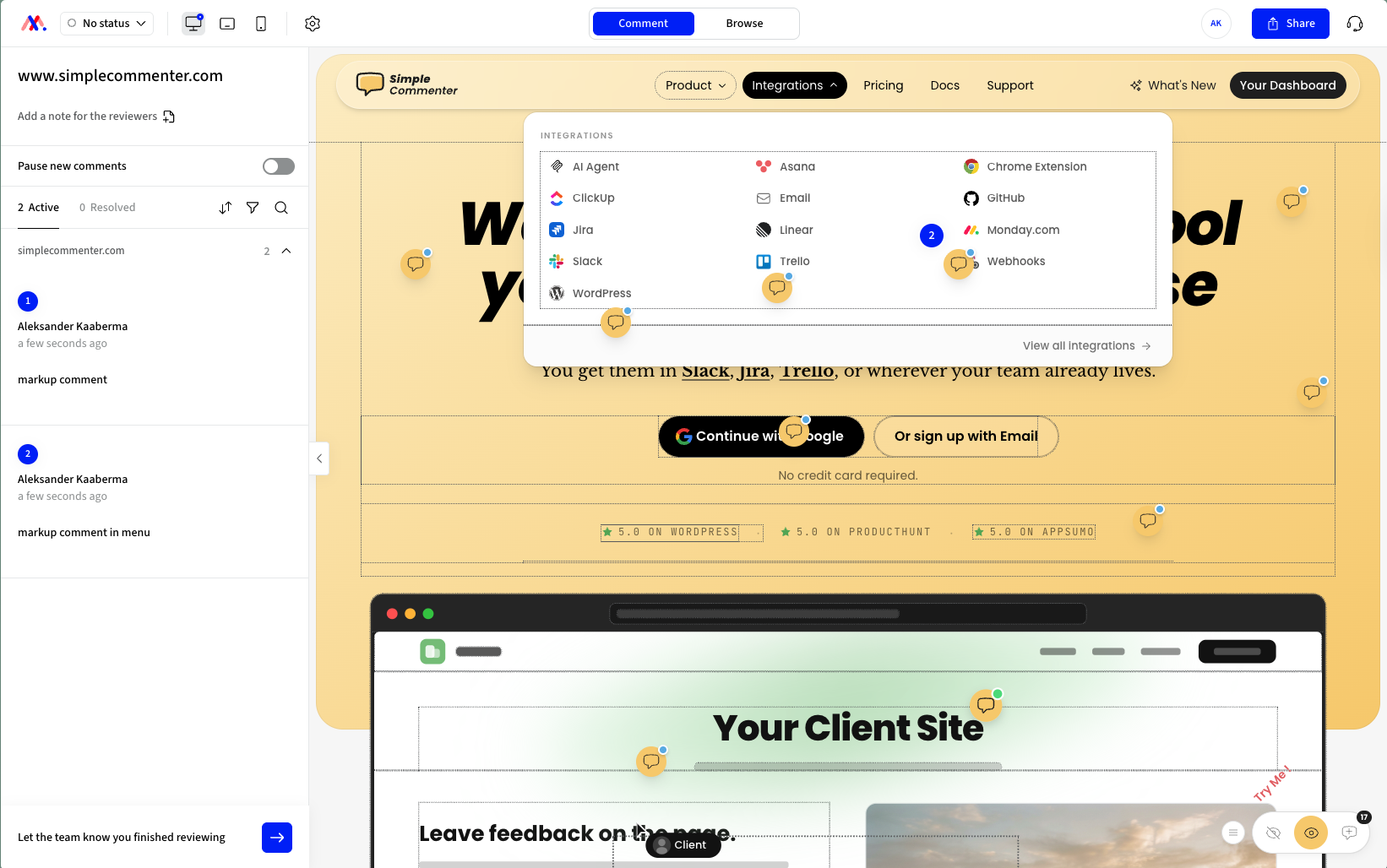
The second path is the Chrome extension, which runs on the live page and is the better of the two. It has one visible bug: hovering on the page draws a border around every div under the cursor. Even with that, it is a more useful extension than the ones from Pastel and Volley. MarkUp's extension is a full overlay that makes the live site commentable, while Pastel and Volley use the extension only to spin up a new project.
The downside is the one common to every Chrome-extension-first tool we have reviewed: onboarding clients is hard. Asking a stakeholder to install a browser extension before they can leave a single comment is friction most clients will not push through. And there is no mobile path at all, since the extension only runs on desktop Chrome.
Every comment is supposed to attach an automatic screenshot, but in our testing the screenshot was captured from a different spot on the page than the comment itself. That is not a small bug for a tool whose primary capture format is a screenshot.
The integration list is thin for a tool at this price point. Zapier, Slack, Microsoft Teams, Loom, and a Chrome extension — that is the full list. ClickUp is still flagged as "coming soon." There is no Jira, Linear, Asana, Trello, or webhook story past Zapier. The dashboard is bare-bones and the settings are minimal. Their public roadmap lists more integrations as a future item, and across all of 2025 the team shipped only six features. For a tool that has been around for years with a sizeable user base, that pace of work is hard to square with the price.
Pricing is the strongest part of the offer. One Pro plan at $79/mo with unlimited users, one workspace, unlimited markups, 500 GB storage, folders, and shareable links. No per-seat math. That is genuinely useful for larger teams, but for smaller teams or solo reviewers, $79/mo with no entry tier is a steep place to start when other tools on this list begin at $29 to $39.
Key features:
- Proxy-based review (no script required) plus a Chrome extension for live-page commenting
- Automatic screenshot on every comment
- Unlimited users on a single flat plan
- Folders, shareable links, and basic workspace management
- Loom integration for video and screen recordings inside comments
Pricing:
- Pro $79/mo (unlimited users, 1 workspace, unlimited markups, 500 GB storage)
- No free tier, credit card required to create an account
- No free trial without payment details
Pros:
- Flat pricing with unlimited users, no per-seat scaling
- Two install paths: proxy (no script) or Chrome extension
- Loom integration ships out of the box
Cons:
- Paid-only with a credit card required just to create an account
- Screenshots captured from the wrong spot on the page in our testing
- Chrome extension draws a border around every div on hover, looks unfinished
- Proxy mode does not work on sites behind Basic Auth
- Short integration list (Zapier, Slack, Teams, Loom, Chrome extension); ClickUp still "coming soon"
- Bare-bones dashboard with limited settings
- Slow pace of product development: roughly six features shipped across all of 2025
- $79/mo entry price is steep for smaller teams compared to alternatives at $29–$39
Reviews:
Public reviews on G2 lean positive overall, and the recurring praise lands on the same handful of things: ease of use, the self-service setup with no sales call, and how quickly non-technical clients pick the tool up the first time they use it. Agencies and freelance designers in particular describe it as the kind of tool you can hand to a client and trust them to leave useful, in-context feedback. Reviewers also call out the rich-text commenting, shareable links, and the ability to review across desktop, tablet, and mobile inside the browser as the features that keep them on the platform.
The criticism in those reviews is consistent and matches what we ran into during testing. Pricing is the most common complaint, with multiple reviewers saying the single tier is too steep for most use cases. Reviews flag specific gaps that have still not been addressed: data is locked inside the platform with no export, the Zapier integration does not support historical sync, and page load times can drag inside the proxy view.
A note on review freshness: a chunk of the public reviews date back to early 2023 and reference a free tier with unlimited users that no longer exists. Since then the pricing model has tightened, and reviews from 2024 and 2025 spend more time on what is missing than on how generous the free plan was. Combine the slowed product cadence, the price increase, the Basic Auth gap on the proxy, and the screenshot bug we ran into, and the reviews land where you would expect: the tool still gets the basic job done, but it is no longer the obvious pick it was three years ago.
Feedbucket#
Built for: Agencies · QA teams · SaaS teams · In-house product teams
Best for: Teams that want feedback to flow straight into a project management tool. Less ideal if you want a self-contained dashboard for triaging feedback.
Feedbucket installs through a script, with one-click installers for WordPress and Shopify. We rate script-based install as the most flexible loading method, and Feedbucket nails it. The WordPress plugin itself is a clean script installer and nothing more — no in-plugin dashboard for managing members or settings. That is a deliberate trade-off. The contrast is Simple Commenter, whose WordPress plugin lets you manage comments, members, and settings inside the WP admin.
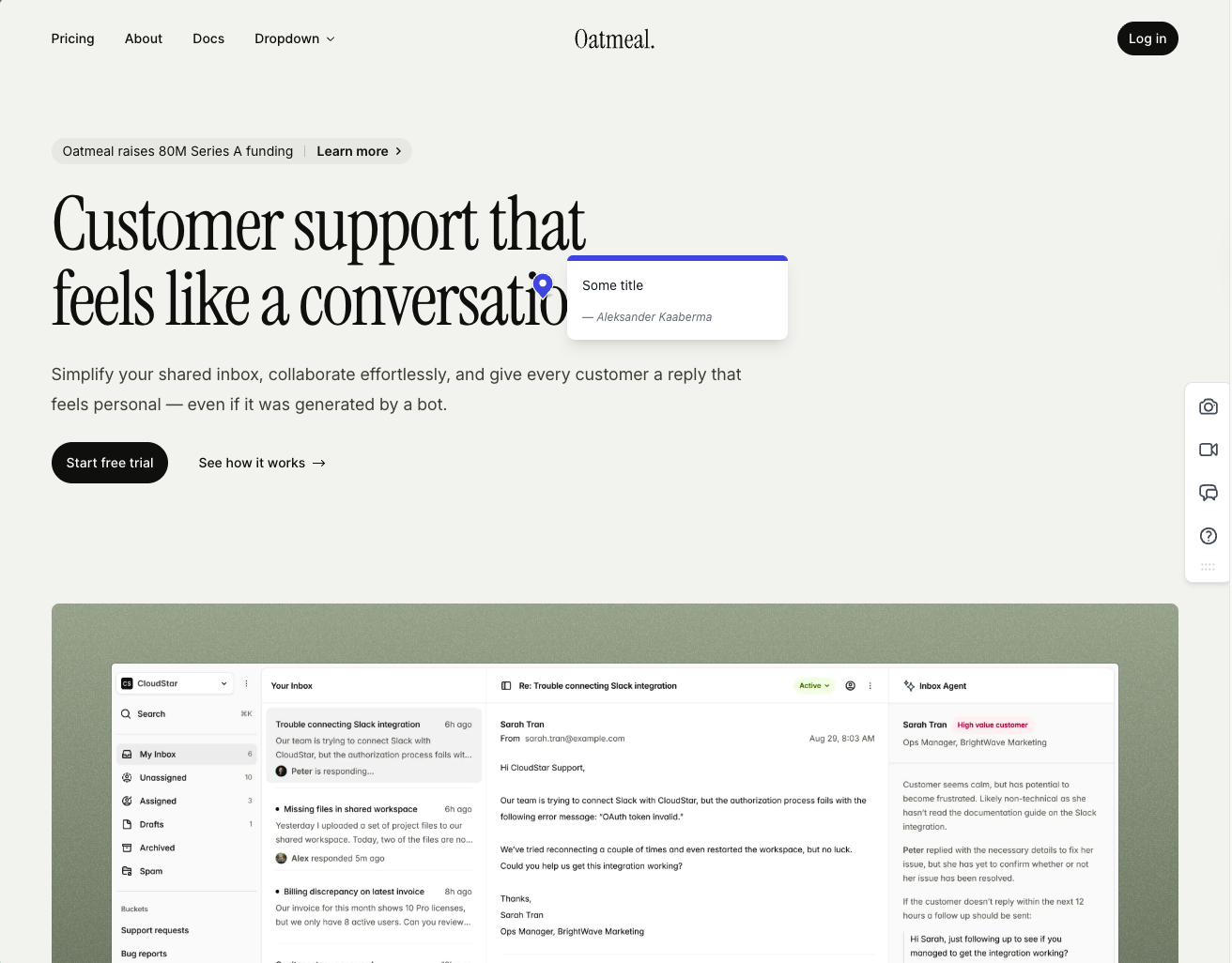
Onboarding is one of the smoother flows we tested. Clients are not asked to sign up, every comment carries an automatic screenshot, and those screenshots pin exactly where the comment was made.
The integration pool is one of the strongest on this list. Just about every project management tool you would want to pipe feedback into is supported, and the workflow is built around that. Feedbucket is meant to sit as the layer between your website and your PM tool of choice — not as a replacement. The dashboard reflects it. You can filter comments by tags and page, but there is no native priority, ordering, or board view. If you live in Jira or Trello, fine. If you wanted Feedbucket as the home for triaging feedback, it is going to feel thin.
The one quirk that surfaced in user reviews and matched our own testing: every comment requires a title by default. It is an annoying extra step for clients who only want to drop a quick note about a misaligned button.
A few other limits worth flagging. Customization is light unless you upgrade, and on a WordPress stack Simple Commenter offers a deeper plugin experience with member, settings, and integration management inside the WP admin. Past those nitpicks, this is one of the most functionally complete tools we have tested. Fair price, accurate screenshots, and a real integration story.
Key features:
- Script-based installation with one-click installers for WordPress, Shopify, and other major platforms
- Automatic screenshot capture, pinned exactly where the comment was placed
- Video feedback and screen recordings on every plan
- Wide integration pool covering most major PM tools
- No client signup required, guests can comment via a link
Pricing:
- Pro $39/mo (5 team members, unlimited reporters, screenshot and video feedback, integrations)
- Business $89/mo (25 team members, console logs, JavaScript API, custom branding, custom metadata, data export)
- Enterprise $259/mo (dedicated success manager, priority support, pay by invoice, SSO coming soon)
- 20% discount on yearly billing
- 14-day free trial, no credit card required
Pros:
- Clients don't need to sign up to leave feedback
- Screenshots are accurate, pinned to the right spot, and generated quickly
- Wide integration pool with pretty much every PM tool you'd want
- One-click installers for WordPress, Shopify, and other CMS platforms
- 14-day trial with no credit card asked up front
- Fair price for the feature set
- Developed in EU
Cons:
- Title field is mandatory by default on every comment (can be turned off, but it is on out of the box)
- Native dashboard is limited: filter by tags and page only, no priority or ordering
- WordPress plugin is a pure script installer with no member or settings management inside WP
- Customization options are light unless you upgrade to Business
- Built around piping feedback into a PM tool, not as a standalone home for triaging
Reviews:
Public reviews lean strongly positive and match what we saw in testing. Users consistently call out two things: the no-signup flow for clients, and how reliable the tool feels day-to-day. The "bug-free" experience comes up a lot, which is rarer in this category than you would expect. Integration depth is the other recurring praise — teams that already live in Jira, Trello, or Asana describe Feedbucket as the missing layer between their site and their tracker. The criticism is light and tends to focus on the same nitpicks we ran into: the thin dashboard, and the lack of customization on lower tiers.
Ruttl#
Built for: Freelancers (force-fit, see review)
Best for: Small teams or solo creators using the free tier.
Signup is easy and the free tier gets you running fast. The catch is that the free tier is iframe-only — feedback lives inside Ruttl's own tool, not on your live site. It is the same shape MarkUp.io, Pastel, and Volley use: fine for a one-off review, but reviewers open a Ruttl link instead of your actual site, and guest access is capped.
Testing script loading — the feature most people actually want — requires paying first. There is no trial for the script feature. You commit financially before you can verify the tool works on your own site.
Writer's warning... I have to flag what happened while writing this one. To include Ruttl in this post, I had to pay for two seats at $18 each, because there is no free way to test the script integration. That is $36 just to confirm whether the core feature works. For comparison, Simple Commenter (our tool, fair disclosure) is $34/mo for 10 seats.
The price is not even the real problem. Katelyn Dekle warned about this in her post mentioning Ruttl, which I unfortunately read only after I had already handed over my credit card...
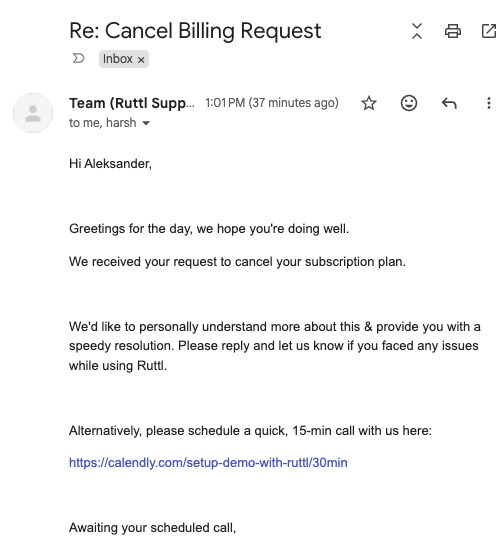
Then when trying to cancel by email, they wanted to schedule a meeting with me instead of just cancelling. EU Consumer Rights Directive 2011/83/EU anyone?
Billing runs on Stripe, but Ruttl does not expose a customer portal, so there is no self-serve way to cancel. This bad practice is done on purpose.
I'm a competitor who tested Ruttl. I wasn't planning on a refund. But the trouble they gave me cancelling pushed me to ask for one anyway. It is my legal right (14-day EU withdrawal). They refused. Where are my lawyers?
So I paid, tested it, and the main feature did not work. Just know what you are walking into.
Key features:
- Free iframe-style feedback (no install required)
Pricing:
- Free tier: iframe feedback only, no script integration
- Paid: $18 per seat per month (two seats minimum in practice, so $36/mo floor)
- Cancellation by email only, no Stripe portal
Pros:
- Easy signup and free iframe flow
Cons:
- You cannot test the script integration without paying
- Core paid features were broken in our test (screenshot capture threw errors, every ticket bounced)
- $18 per seat is steep for what is on offer
- No cancellation UI; cancel by email even though Stripe handles billing
- Multiple public reports of continued charges after cancellation and account lockouts
Reviews:
Recent reviews flag that support has gone quiet and the product has become buggy. Users still appreciate how easy guest commenting is without a signup, and the all-in-one kanban appeals to small teams that do not want to wire up Jira or Trello separately. But the trend line is not good. Combine the broken paid flow, the $18 seat minimum, and the third-party horror stories, and this is the one tool on the list I actively cannot recommend.
Which one should you pick?#
If you want to leave the iframe model entirely and run feedback on the live site, Simple Commenter and Feedbucket are the right shape — both kill the 72-hour window and include integrations at the entry tier. For static design canvases at a lower price than Pastel Pro, BugSmash is the cheaper, broader-asset newcomer worth a free-tier test. Huddlekit is the polished iframe alternative when you want a four-screen responsive view. MarkUp.io is the swap if you have outgrown Pastel's two-user cap, and Ruttl earns a mention only because the iframe category invites comparison — not as a recommendation.
Found this useful? Add us as a preferred source and Google will show you more of our guides in Search and AI Overviews.