5 Best Marker.io Alternatives in 2026
Five Marker.io alternatives compared on what reporters can see on the page, tracker sync, debugging data, and what a small team pays in 2026.

The strongest Marker.io alternatives keep the tracker sync and add what Marker.io leaves out, a conversation on the page that every reviewer can see. Feedbucket and BugHerd are the closest swaps for tracker-first teams, Userback adds session replay and surveys, and Ybug keeps the screenshot-to-ticket model at a lower price.
Full disclosure, Simple Commenter is our product and it is listed first. The Marker.io notes and screenshots come from our original hands-on test. On October 29, 2026 we re-checked prices and help docs for every tool here without re-running that test.
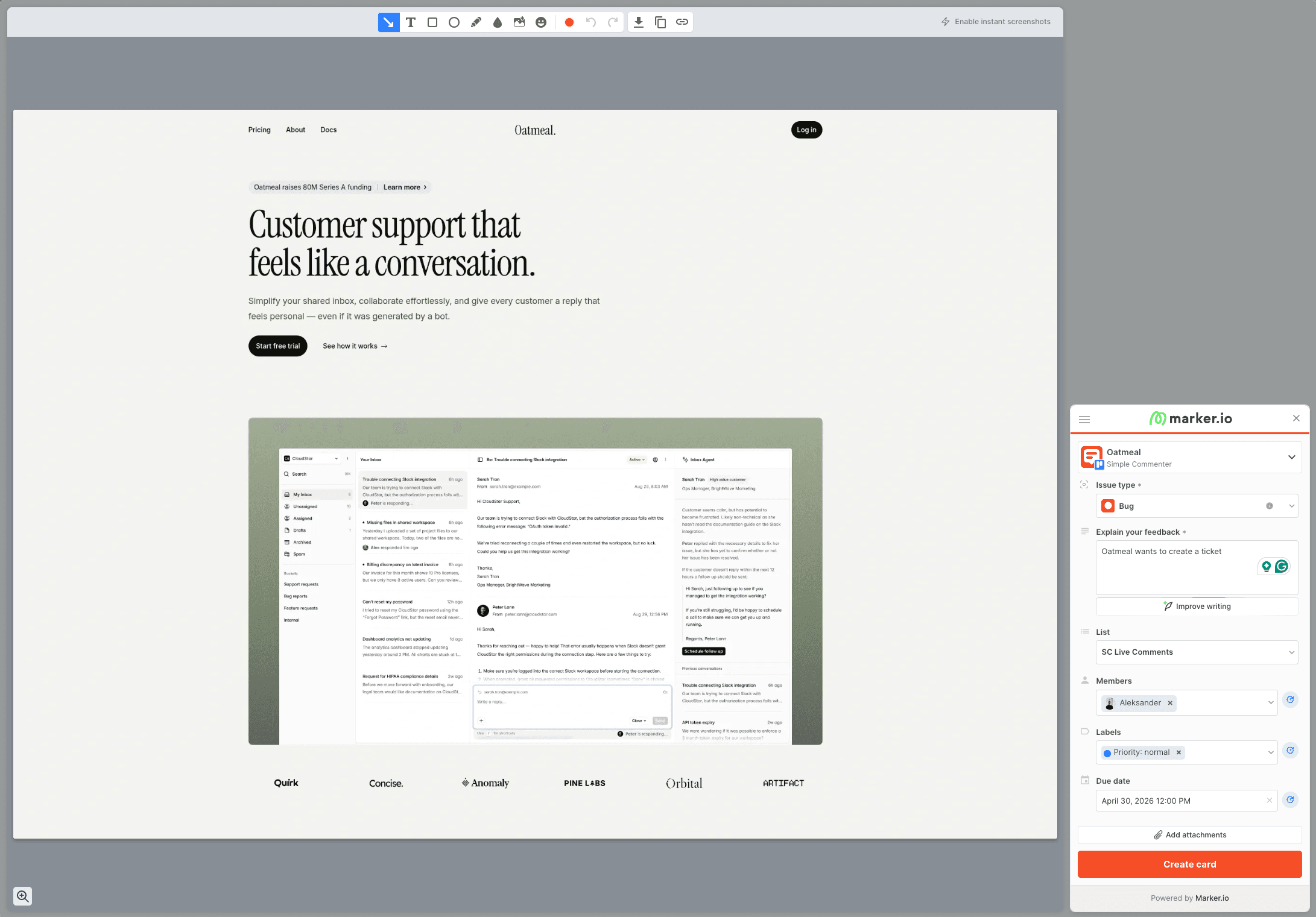
Marker.io is built to turn a screenshot into a ticket. A reporter opens the widget, fills in what looks like an issue form, and the report lands in Jira, Linear or whichever tracker you connected, with browser details and, on eligible plans, console logs and network requests attached.
Reporters are not locked out. Marker.io's roles documentation, checked September 14, 2026, confirms that an open widget accepts reports without an account, and reporters can follow up on their own reports. What a reporter cannot do is see what everyone else already flagged on that page, because reports live in the tracker and the Marker.io dashboard, not on the site.
That gap is the usual reason to look elsewhere. A point that keeps coming up in agency discussions is that clients engage less once leaving or reading feedback means switching into a separate portal, and the same broken button gets reported three times when nobody can see the first report.
Score each alternative on three questions before you trial it.
- Can a reporter see earlier feedback? If clients can read what others pinned, duplicates drop and your replies have somewhere to land.
- Does it keep your tracker in the loop? Marker.io syncs both ways with Jira, Linear, Asana, Trello, ClickUp and Monday. Decide whether you need status to flow back, or only need tickets to go out.
- Who actually reads the debugging data? If developers rely on console logs, network requests and replay, price the plan that includes them, not the entry tier.
Keep in mind what Marker.io gets right. It is one of the more polished and dependable tools in this category, its tracker integrations are deep, and the one report, one card habit suits teams that run everything from a backlog. A switch should not feel like a downgrade on any of those.
Two head-to-head posts can shortcut the decision. Read Marker.io vs BugHerd if you are torn between those two, and Markup.io vs Marker.io if you are not sure which of the two similarly named products you meant.
Simple Commenter#
Built for: Agencies · Freelancers · Client-facing product teams
Best for: Teams leaving Marker.io because clients never saw the conversation. Feedback stays pinned on the page, so the next reviewer finds it and your reply is right beside it.
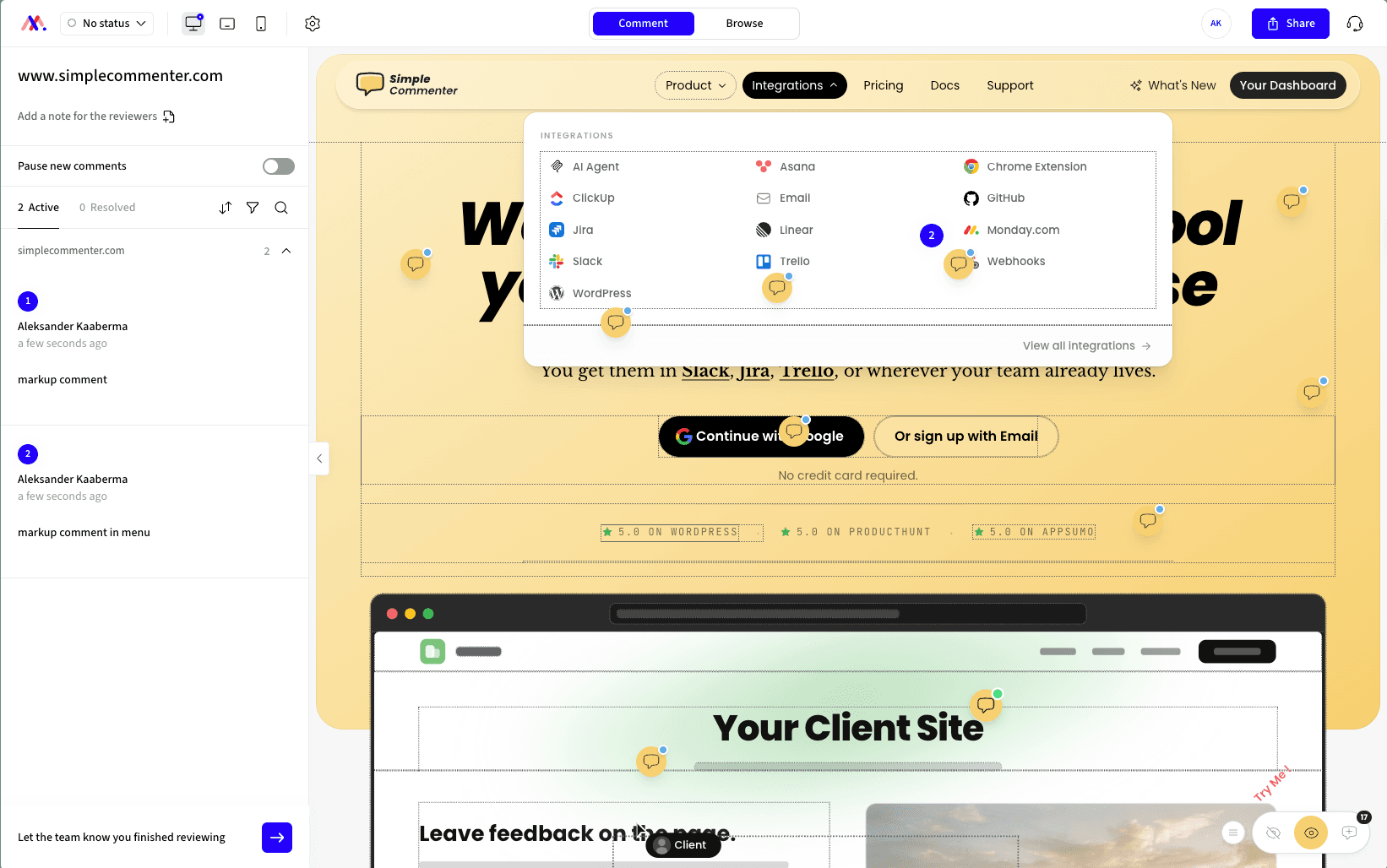
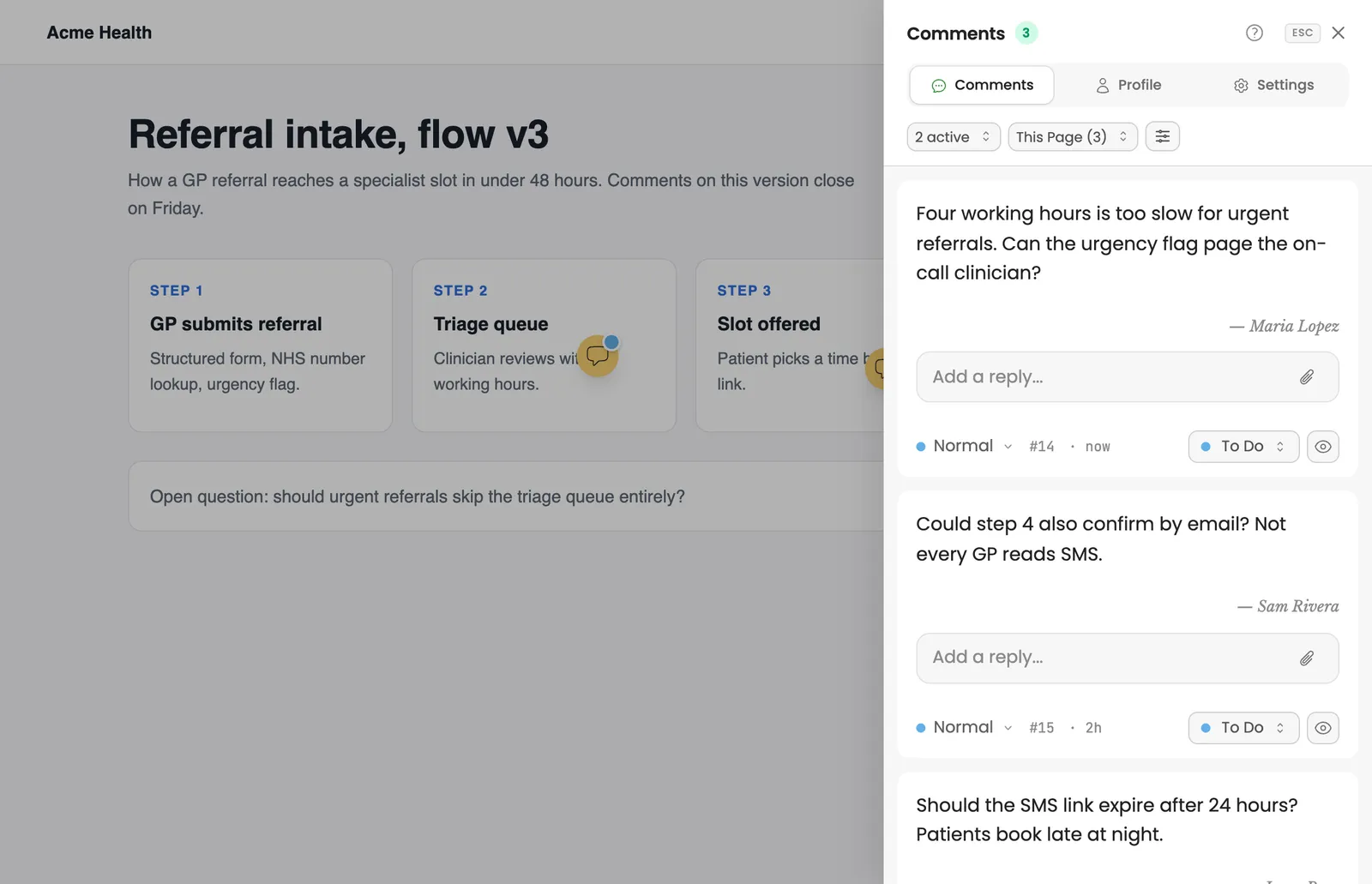
Simple Commenter turns Marker.io's model around. Instead of a ticket form that vanishes into a tracker, a reviewer clicks the element, types a note, and the comment stays pinned on the page with a screenshot and browser details. The next reviewer opens the comment list for that page, sees what is already reported, and adds to the thread instead of filing a duplicate.
Your tracker still gets the work. Pro includes the Jira, Linear, Asana, ClickUp, Monday.com, Trello, GitHub and Slack integrations, plus email and webhooks. The MCP integration lets an AI coding agent such as Claude Code or Cursor read the comments, fix the code, and reply on the thread.
Reporters stay account-free unless you want otherwise. You choose the reviewer access mode per project, from an open link to invited clients only, with an approval step in between. Invited clients leave named comments and get notified when you reply.
Two things Marker.io does not cover come built in. Clients can review PDFs and images in the same workspace, and the WordPress plugin lets your team answer comments and manage members from WP admin.
Here is what you give up. Simple Commenter has no session replay and no network request log, which Marker.io's Team plan attaches to reports. If your security review asks for SOC 2 Type 2, audit logs and data masking, Marker.io lists all three today. And if a central dev team supports hundreds of sites and wants every report shaped like a ticket, Marker.io remains the better fit.
Key features:
- Comments stay pinned on the page, so every reviewer sees what is already reported
- A per-page comment list with threaded replies, priority and status
- No account needed to comment, or invite named clients who get reply notifications
- Automatic screenshot and browser details on every comment
- Jira, Linear, Asana, ClickUp, Monday.com, Trello, GitHub, Slack, email and webhooks on Pro
- AI agent access over MCP for Claude Code, Cursor and other coding agents
- PDF and image review alongside website feedback
- Script tag, Chrome extension for sites you cannot edit, or a WordPress plugin with in-admin management
- Boards for sorting feedback by status
Pricing:
As of November 6, 2026, Pro is $34.99 a month (€29.99) with 3 team members, 10 active projects and every integration. Agency is $79.99 a month (€69.99) with unlimited team members and projects, your logo, your own feedback domain and emails from your address. Clients never take a seat on either plan. Both start with a 14-day trial without a credit card, and the pricing page shows your currency.
Pros:
- Reviewers see earlier comments on the page, which cuts duplicate reports
- Clients reply in a thread they can find again on the same element
- PDF and image review, which Marker.io does not offer
- No team member cap on Agency, and clients never need a seat
- WordPress teams can work through comments without leaving WP admin
Cons:
- No session replay or network request log like Marker.io's Team plan
- Feedback starts as a comment, not a ticket form with steps to reproduce
- Pro includes 3 team members, and each extra seat costs €9.99 a month
- A younger product than Marker.io, with fewer large-brand case studies
Reviews:
The review we would point a Marker.io user to came in on X from craigfenton, titled "Finally, a feedback tool my clients actually enjoy". He names client friction, meaning sign-ups and browser extensions, as the biggest hurdle with other tools. On Product Hunt, Chris Carp writes that his team uses it with clients and internally on the same builds, which is the mixed setup Marker.io teams often run. Every review we have collected is on the testimonials page.
Feedbucket#
Built for: Agencies · QA teams · SaaS teams · In-house product teams
Best for: Marker.io users who like the tracker-first model but want pins on the page and reporters who never sign up.
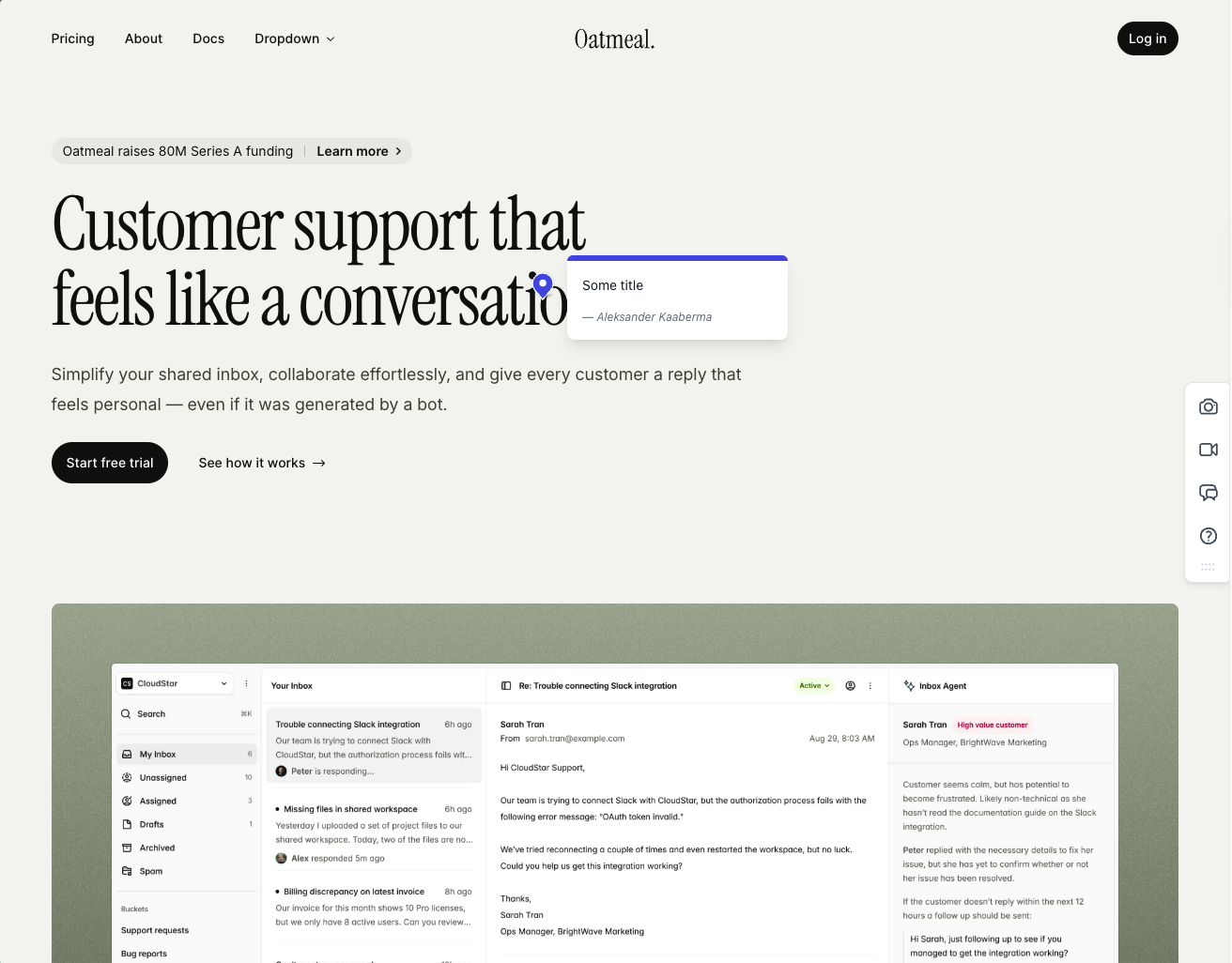
Feedbucket is the closest like-for-like swap. It sits where Marker.io sits, between your site and your tracker, but feedback is pinned on the page and each comment carries an automatic screenshot taken at the spot the reporter clicked. Reporters comment through a link without creating an account.
The trade is depth on the developer side. Marker.io's Team plan bundles session replay and network requests. Feedbucket lists console logs on Business and leaves the rest of the debugging to your tracker. If your developers lean on replay, file one real bug in both tools before you move.
Feedbucket's own dashboard is thin on purpose. In our test you could filter by tag and page, with no priority, ordering or board, which is fine as long as Jira or Linear stays home base. Out of the box every comment also asks for a title, a setting you can switch off. Installation is a script with one-click installers for WordPress and Shopify, and the WordPress plugin only adds that script.
Check the plan math before you switch. As of October 29, 2026, Pro costs $49 a month for 2 team members, so a 3-person team coming from Marker.io Starter lands on Business at $89 for 25 members.
Key features:
- Script install with one-click installers for WordPress, Shopify and other platforms
- Screenshot captured automatically at the pinned spot
- Video feedback on every plan
- Integrations with most project management tools, plus API access and an MCP connector
- Link-based reporting with no sign-up for clients
Pricing:
- Pro, $49 a month, 2 team members, unlimited projects and client reporters
- Business, $89 a month, 25 team members, console logs, JavaScript API, branding, data export
- Enterprise, custom price, success manager, invoicing, security reviews, SSO coming soon
- 20% off with yearly billing, and a 14-day trial with no card
- Prices from the Feedbucket pricing page, as of 2026-10-29
Pros:
- Same site-to-tracker role as Marker.io, with pins that stay on the page
- Screenshots land on the right spot and render quickly
- Reporters never need an account
- Wide integration list, so your existing tracker stays in place
- Developed in the EU
Cons:
- The title field is required by default until you turn it off
- Dashboard filters by tag and page only, with no priority or ordering in our test
- Console logs sit on Business, and there is no session replay
- The 2-member Pro plan is smaller than Marker.io Starter's 3 users
- The WordPress plugin installs the script and nothing more
Reviews:
Public reviews lean positive and match our test. People praise the no-signup flow for clients and how rarely the tool breaks, and teams already living in Jira, Trello or Asana describe it as the missing layer between site and tracker. For someone leaving Marker.io that is reassuring, since reliability is the thing you least want to lose. The complaints are small and familiar, a thin dashboard and limited customization on lower tiers.
BugHerd#
Built for: QA teams · Agencies · In-house product teams
Best for: Marker.io users who want to keep tracker sync but add a visible task board and pins on the page.
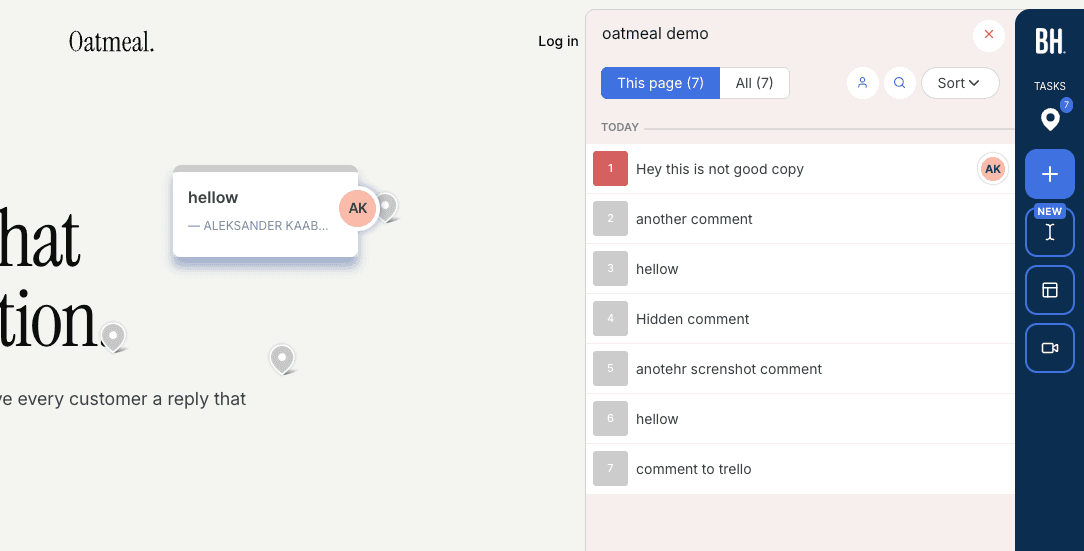
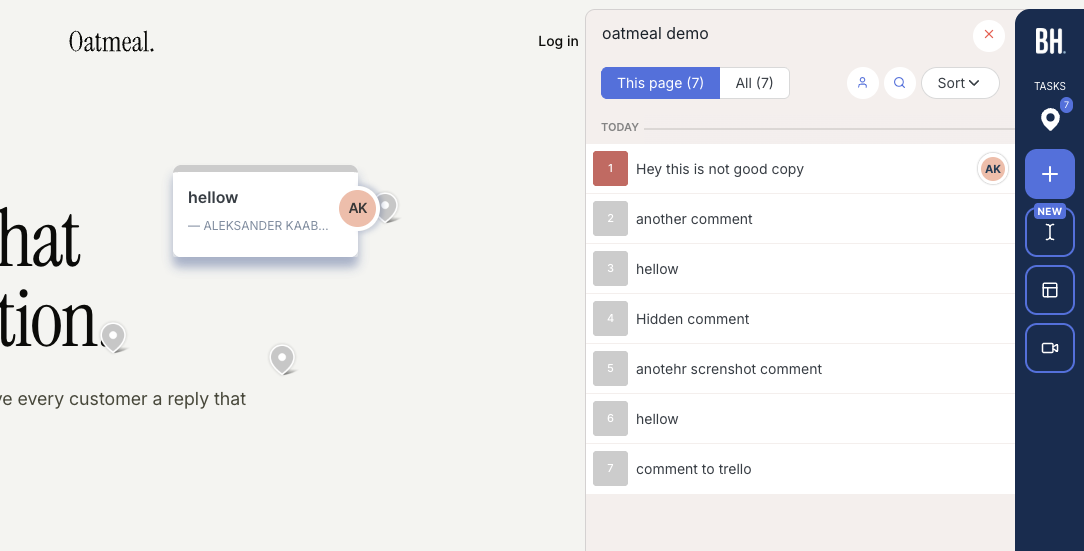
BugHerd keeps the part of Marker.io you probably like, two-way sync with Jira, Asana, Linear, ClickUp and Monday, and adds the part Marker.io lacks, comments pinned on the page with a kanban board behind them. Each comment arrives as a task with an automatic screenshot plus browser, OS and screen size, ready to assign.
Those premium integrations decide the price. As of October 29, 2026, they sit on Premium at $150 a month for 25 members, which is close to Marker.io's Team plan at $149 billed annually for 15 users. Standard ($50, 5 members) and Studio ($80, 10 members) cover Slack, Trello and GitHub style integrations, but not the Jira and Linear sync a Marker.io team usually needs.
Client access is easier than it used to be. BugHerd's support article on client feedback, updated July 11, 2025, says clients can follow a share link and leave feedback without logging in. They type a name and email on their first comment, and BugHerd creates a guest account for them in the background and sends a welcome email. If the BugHerd script is not on the site, clients are asked to install the extension instead.
One thing BugHerd does better than most is screenshots. In our test a comment left inside an open dropdown produced a screenshot with that dropdown still open, which is hard to get right in a browser. The widget itself carries BugHerd branding until Premium.
Key features:
- Screenshot and technical details on every comment
- Kanban board where comments become assignable tasks
- Two-way sync with Jira, Asana, Linear, ClickUp and Monday on Premium
- Install with a script, the Chrome extension or the WordPress plugin
- Video feedback on every plan
Pricing:
- Standard, $50 a month ($42 yearly), 5 members, 10 GB storage
- Studio, $80 a month ($67 yearly), 10 members, 25 GB storage
- Premium, $150 a month ($125 yearly), 25 members, premium integrations, custom branding
- Custom plan on request, and extra members cost $8 a month each
- Plans as listed on BugHerd pricing as of 2026-10-29, when the former Deluxe plan was no longer offered
Pros:
- Keeps deep tracker sync while adding pins and a board
- Screenshots capture open menus and dropdowns
- Clients can comment from a share link without logging in
- Quick onboarding for the team
- A mature, well-reviewed product
Cons:
- Jira, Linear and Asana sync need the $150 Premium plan
- Clients enter a name and email, and get a guest account and welcome email
- BugHerd branding on the widget below Premium
- Member-based tiers grow quickly if many teammates need access
Reviews:
Our original review counted 179 BugHerd reviews on G2 with a 4.7 average. Reviewers like how easy it is to use, the screenshots and technical details on every comment, and the board with task assignment. The common complaints are price as the team grows and clients needing a little guidance on their first visit. For a Marker.io team the price point is the one to model, since the integrations you rely on sit on the top published tier.
Userback#
Built for: In-house product teams · QA teams · SaaS teams
Best for: Product teams leaving Marker.io who want session replay, surveys and AI summaries in one tool. It will not fix client engagement, because Userback also keeps reports off the page.
Userback is the move up, not the move sideways. It covers what Marker.io does, visual reports routed to a tracker, then adds session replay, user surveys, behavioral targeting and AI Feedback and Insights on Business and above. If you were outgrowing Marker.io as a product team rather than an agency, that bundle is the reason to look.
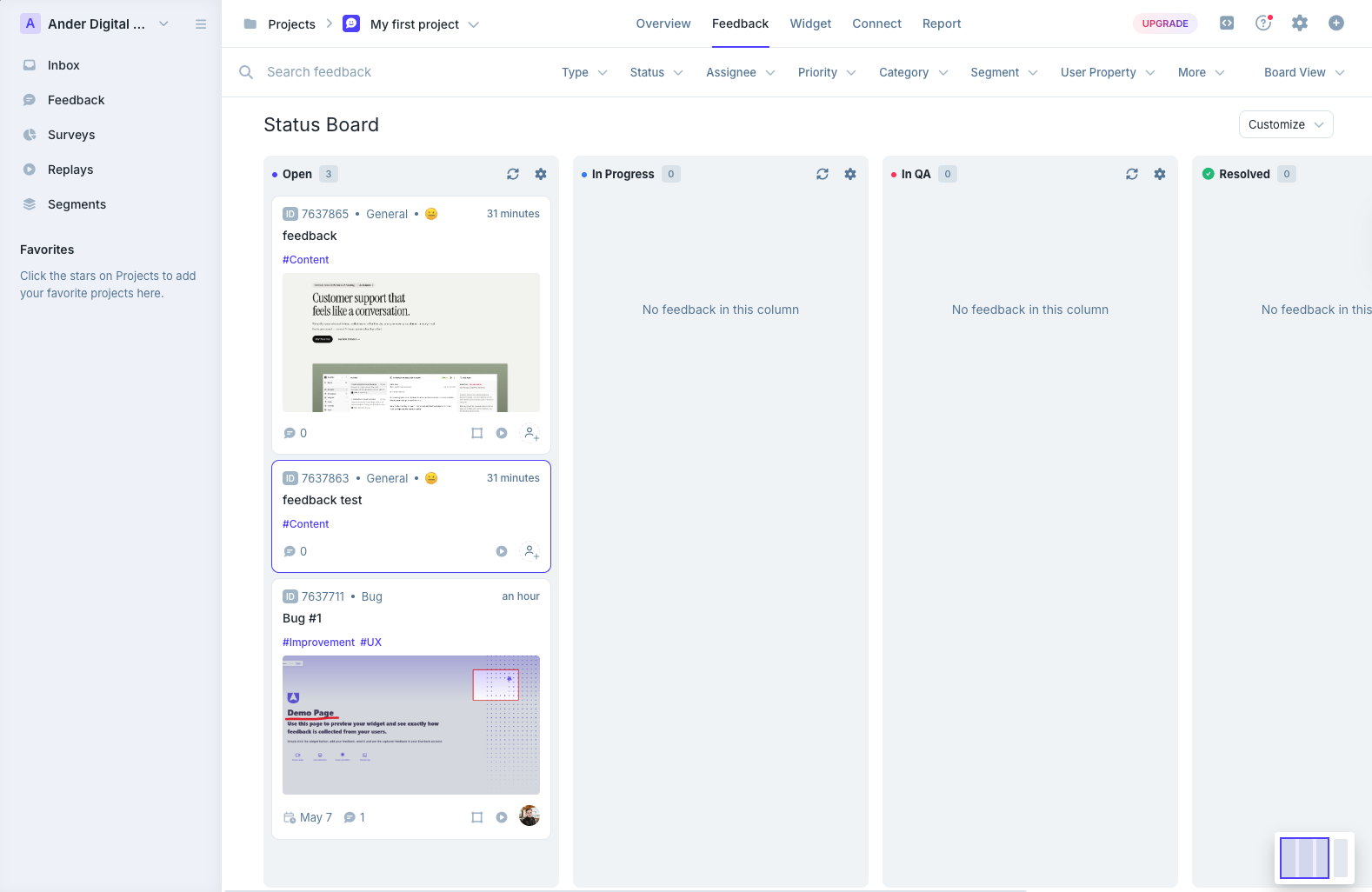
The dashboard reflects the scope. An inbox for notifications, a status board, a project overview and session replays all compete for space, and on day one that is a lot to learn. Once a team settles in, the triage options are among the richest we tested.
The capture model has the same blind spot as Marker.io. Reviewers cannot see existing feedback on the page, so duplicates still arrive. In our test not every report got a screenshot automatically, captured screenshots did not mark where the comment was placed, and pinning required attaching a screenshot in the same step.
Plan math runs on seats and sites. Team at $39 a month billed annually covers 5 seats and 5 sites, Business at $89 has 15 seats, 25 sites, replay and developer context, and Business Plus at $159 has 25 seats and 50 sites. Business matches Marker.io Team's 15 users at a lower price. Do not confuse it with Usersnap, a different product with a similar name.
Key features:
- Long integration list including major trackers and Zapier
- Kanban boards and an email-style inbox for triage
- Session replay, surveys and behavioral targeting on Business and above
- AI Feedback and Insights on Business and above
- REST API and webhooks on Business Plus, SSO on Enterprise
Pricing:
- Free Forever, 2 projects, 2 seats, feedback kept for 7 days
- Team, $39 a month yearly or $49 monthly, 5 seats, 5 sites, two-way Jira and ClickUp
- Business, $89 a month yearly or $119 monthly, 15 seats, 25 sites, replay
- Business Plus, $159 a month yearly or $199 monthly, 25 seats, 50 sites, REST API and webhooks
- Prices from Userback pricing, checked November 2, 2026
Pros:
- Adds replay, surveys and AI summaries that Marker.io does not bundle
- 15 seats on Business, the same as Marker.io Team at a lower price
- Flexible triage with board and inbox views
- A Free Forever tier for trying it on a side project
Cons:
- No on-page view of existing feedback, the same gap as Marker.io
- Screenshots are not automatic on every report and carry no pin marker
- A heavy dashboard for small teams or quick client reviews
- REST API only on Business Plus
- The WordPress plugin only installs the script
Reviews:
Userback's headline review averages sit at 4.8 for ease of use and 4.9 for customer service. QA teams praise how efficiently they can test sign-up flows and site components before launch, and setup plus the routing menu get frequent mentions. The criticism is fit and price. Some reviewers say the feature surface is bigger than they need, and API access on the top tier frustrates smaller teams who want to script around it.
Ybug#
Built for: QA teams · In-house product teams · SaaS teams
Best for: Teams that like Marker.io's screenshot-to-ticket flow and console data but want a smaller bill and EU hosting.
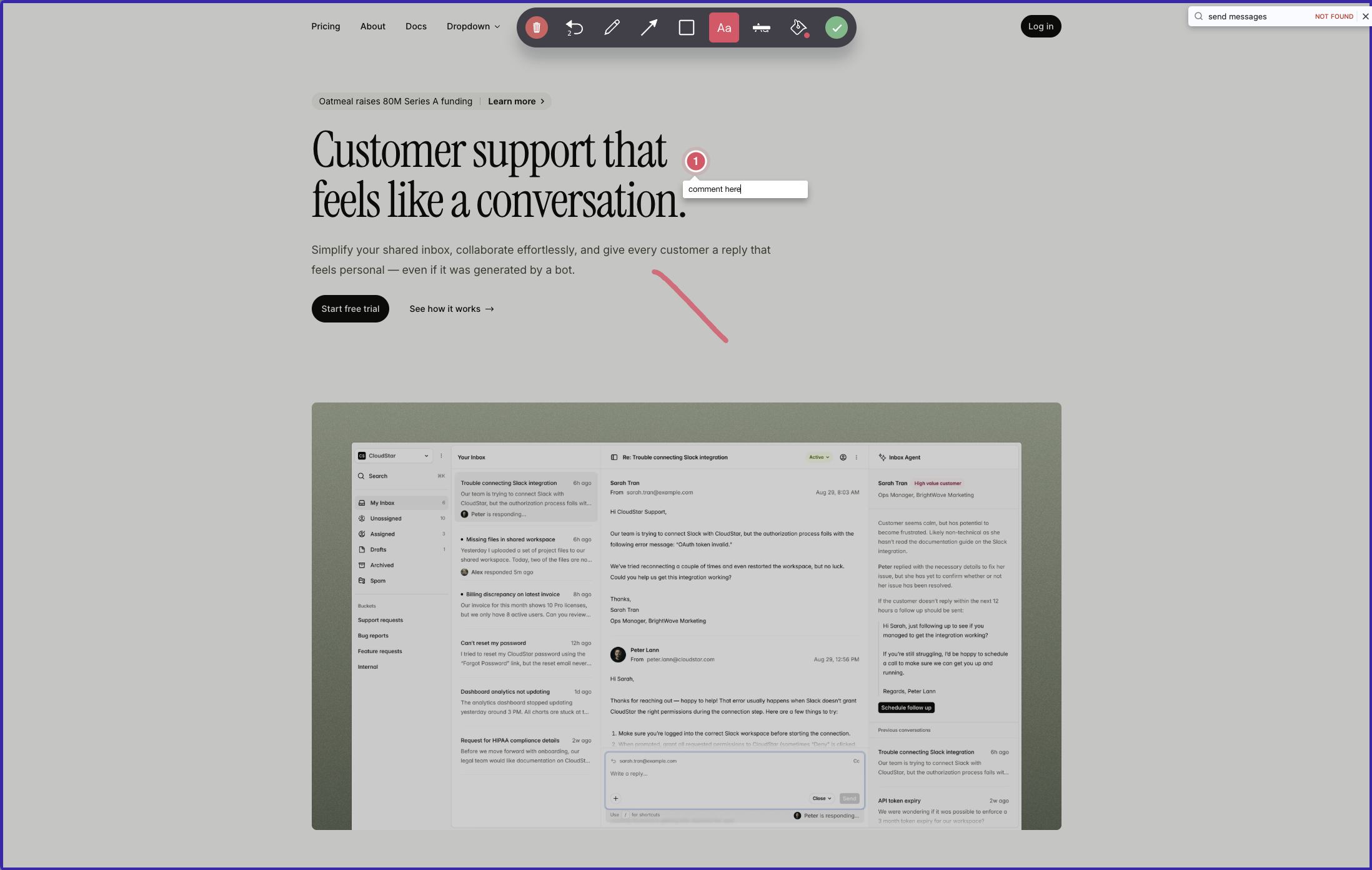
Ybug is Marker.io's workflow at a lower price. A reporter captures the whole page or a screenshot, draws and pins notes on that image, and the package becomes a ticket in Ybug or in your connected tool, with browser, OS and screen size attached. Console recording is limited on Basic and full from Startup.
The differences show up after the ticket is filed. Ybug pushes to 25+ destinations plus Zapier and webhooks, but nothing syncs back, so a status change in Jira never reaches Ybug. Marker.io's two-way sync is stronger here. Notes also live on the captured screenshot rather than the live page, so, as with Marker.io, a later visitor cannot see what is already reported.
Collaboration needs accounts. Every team member and stakeholder who wants to read reports or join a discussion needs a Ybug login. Project-level permissions are granular, which helps if you separate clients or environments.
Price is where Ybug wins. As of October 29, 2026, Startup is €23 a month billed annually for 7 projects and 7 members, and Company is €47 for 15 of each with extra projects at €3. Company also adds custom branding and hides Ybug's branding, while full white label is still listed as coming soon. Hosting is in the EU with a GDPR-ready DPA on every plan.
Key features:
- Script tag or Chrome extension
- Whole-page feedback, or a screenshot with drawing and pinned notes
- Report fields you can customize per project
- Project-level permissions
- Console recording and environment details, full from Startup
- Video, replies and file attachments from Startup
- 25+ one-way integrations plus Zapier and webhooks
- EU hosting with a GDPR-ready DPA on every plan
Pricing:
- Free, 1 project, 1 member, 50 screenshots a month
- Basic, €10 a month yearly or €13 monthly, 3 projects, 3 members, one integration per project
- Startup, €23 yearly or €29 monthly, 7 projects, 7 members, video, replies, attachments
- Company, €47 yearly or €59 monthly, 15 projects, 15 members, REST API, custom branding
- 10-day trial with no card, per Ybug pricing as of 2026-10-29
Pros:
- Lower entry price than Marker.io for a similar report shape
- Console logs and environment data on paid plans
- Broad integration catalog
- EU hosting and a DPA even on Free
- Support known for replies within a business day
Cons:
- One-way integrations, where Marker.io syncs both ways
- Notes sit on screenshots, not on the live page
- Everyone who reads reports needs a Ybug account
- Seats and projects rise together, so tiers jump in steps
Reviews:
Ybug rates well on G2, and reviewers keep coming back to how easily non-technical reporters file useful bugs, with screenshots, environment data and console logs attached. Support gets frequent credit for answering within a business day. The repeated complaint is that stakeholders need an account to see anything. For a Marker.io team that already treats feedback as a pipeline into a tracker, that will feel familiar.
Which one should you pick?#
If clients stopped engaging because feedback disappeared into a portal, trial Simple Commenter or Feedbucket, which both keep comments on the page. If tracker sync is the thing you will not give up, compare BugHerd Premium with Marker.io's Team plan at your real headcount. Product teams that want replay and surveys should try Userback, and teams that only want the same reports for less should start with Ybug. Whichever you pick, file the same real bug in it and in Marker.io before you cancel.
Found this useful? Add us as a preferred source and Google will show you more of our guides in Search and AI Overviews.