8 Best Design Feedback Tools for Client Reviews in 2026
Eight design feedback tools for mockups, images, PDFs, prototypes and live sites. What each reviews, whether clients need an account, and verified prices.

TL;DR. Your clients review a logo as a PNG, a style guide as a PDF, a prototype in Figma and the finished site on staging, and no single kind of design feedback tool is best at all four. The tools on this list fall into three groups. Proofing platforms such as Filestage, Ziflow and ProofHub take uploaded files and run them through comments, versions and approvals. Figma's own comments work on design files and prototypes while the design is still being made, but every commenter has to be signed in to Figma. Live-site tools such as Markup.io, Pastel and BugHerd put comments on the real web page once it's built. Pick the group by what your clients will actually look at, then check whether they can comment without creating an account. Every price below was read on the vendor's own pricing page on 2026-10-29.
Fair disclosure before the list. Simple Commenter is our product and has its own entry, in the live-site group. We say where it fits and where another tool fits better, and every claim about a competitor links to that vendor's own page with the date we checked it.
What a design feedback tool does#
A design feedback tool gives reviewers one place to comment on a design, pinned to the exact spot they mean, and gives the designer one list of changes instead of an inbox full of annotated screenshots. The better ones also keep versions, show who approved what, and ask as little as possible of the client.
Where they differ is what they let you review. That is the first decision, and most lists skip it.
Three kinds of design feedback tool#
- Proofing platforms for files. You upload an image, a PDF, a video or a document, reviewers comment on it, and the tool tracks versions and approval decisions. Strong for brand, print, ad and video work with formal sign-off. Filestage, Ziflow and ProofHub are in this group.
- Comments inside the design file. The design tool's own comments, on the canvas or the prototype. Strong while the design is still changing every day. Figma is the one most teams use.
- Live-site review tools. Comments pinned to the real web page, on a staging or live site. Strong once the design is built, because only the real page shows how text wraps on a phone, how fonts load and how menus behave. Simple Commenter, Markup.io, Pastel and BugHerd are in this group, and all four also take some files.
You may end up with two, one for mockups and one for the built site. If you want one tool, choose by where most of your review rounds happen.
One tool you won't find here is InVision. Older roundups still list it, but InVision closed its design collaboration services on December 31, 2024 (announcement coverage, as of 2026-10-29).
How we compared them#
- What you can review comes from each vendor's product, pricing and help pages.
- Client access means whether a reviewer can comment without creating an account with the vendor. Where a vendor's page and our own earlier testing disagree, we say so.
- Price is the lowest paid plan as listed on the vendor's pricing page on 2026-10-29, in the currency the page showed us.
- No star ratings. We couldn't verify current review counts on the day, so we left ratings out rather than copy them from another list.
Design feedback tools compared#
| Tool | Kind | What clients review | Clients comment without an account | Lowest paid plan (as of 2026-10-29) | Free plan or trial |
|---|---|---|---|---|---|
| Simple Commenter | Live site | Live and staging websites, PDFs, images | Yes | See current plans | 14-day trial, no card |
| Markup.io | Live site | Websites, images, PDFs, video | Yes, guests don't sign up | Pro $79/mo | 14-day trial, no free plan |
| Pastel | Live site | Websites, plus files | Yes | Pro $35/mo, or $29/mo billed yearly | Free plan (1 canvas), 14-day trial |
| BugHerd | Live site | Websites, Figma designs, PDFs, images | Yes, per its homepage | Standard $50/mo, or $42/mo billed yearly | Trial, length not stated |
| Filestage | Proofing | Images, video, PDFs and documents, audio, websites, interactive HTML | Yes, email only | Starter €199/mo | Free plan (1 project), 14-day trial |
| Ziflow | Proofing | 1,200+ file types, including live websites | Guests open a shared proof link | Standard $199/mo, billed yearly | Free plan (2 users) |
| ProofHub | Proofing inside project management | PDF, JPG, PNG, GIF, BMP | Name and email at a proofing link | Essential $50/mo, or $45/mo billed yearly | 14-day trial, no card |
| Figma | Design file | Figma design files and prototypes | No, commenters sign in to Figma | Collab seat $3/mo, Full seat $16/mo | Free Starter plan |
Live-site review tools#
Simple Commenter#
Built for: Agencies · Freelancers · Web teams running client review rounds
Best for: Teams whose clients review the built site on staging and won't create an account to do it, who also want logo, PDF and image reviews in the same tool.
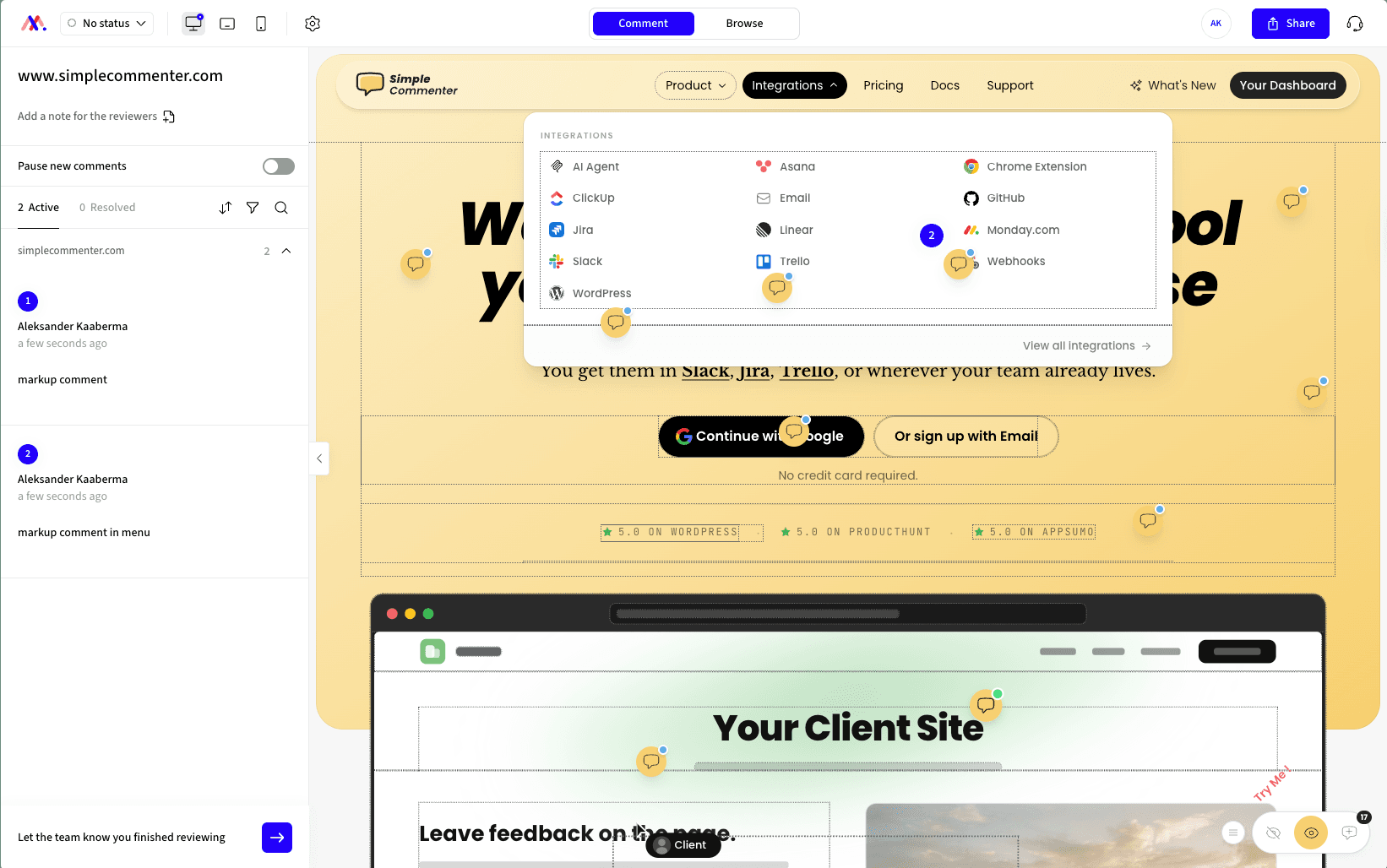
Simple Commenter is the tool we build, so read this entry knowing that. It puts a comment widget on your live or staging site, added with a script tag, the WordPress plugin or the Chrome extension, with setup guides for Webflow, Wix, Shopify, Squarespace, Framer, Next.js and more. You send the client the link. They click the headline, button or image they mean, type, and the comment is pinned to that element with a screenshot and their browser details attached. There is no signup and nothing to install, and clients never need an account or a paid seat.
That makes it a fit for the part of design review the other groups handle least well, the rounds after the design is built. Reviewing the real page catches what a mockup can't, a headline that wraps onto three lines on a phone, a web font that loads late, a menu that covers the button below it. Our guide to website design feedback covers how to run those rounds and what to ask clients to check.
Earlier rounds don't need a second tool. Simple Commenter also reviews PDFs, images and other creative assets, so logo concepts and PDF style guides are reviewed in the same tool as the site. Clients can write in any language, and comments are translated by AI.
Your team works through the feedback in a dashboard and sends it to Asana, ClickUp, Jira, Linear, Monday.com, Trello, GitHub, Slack, email or a webhook. An MCP server lets an AI coding agent such as Claude Code or Cursor read the feedback and help with fixes.
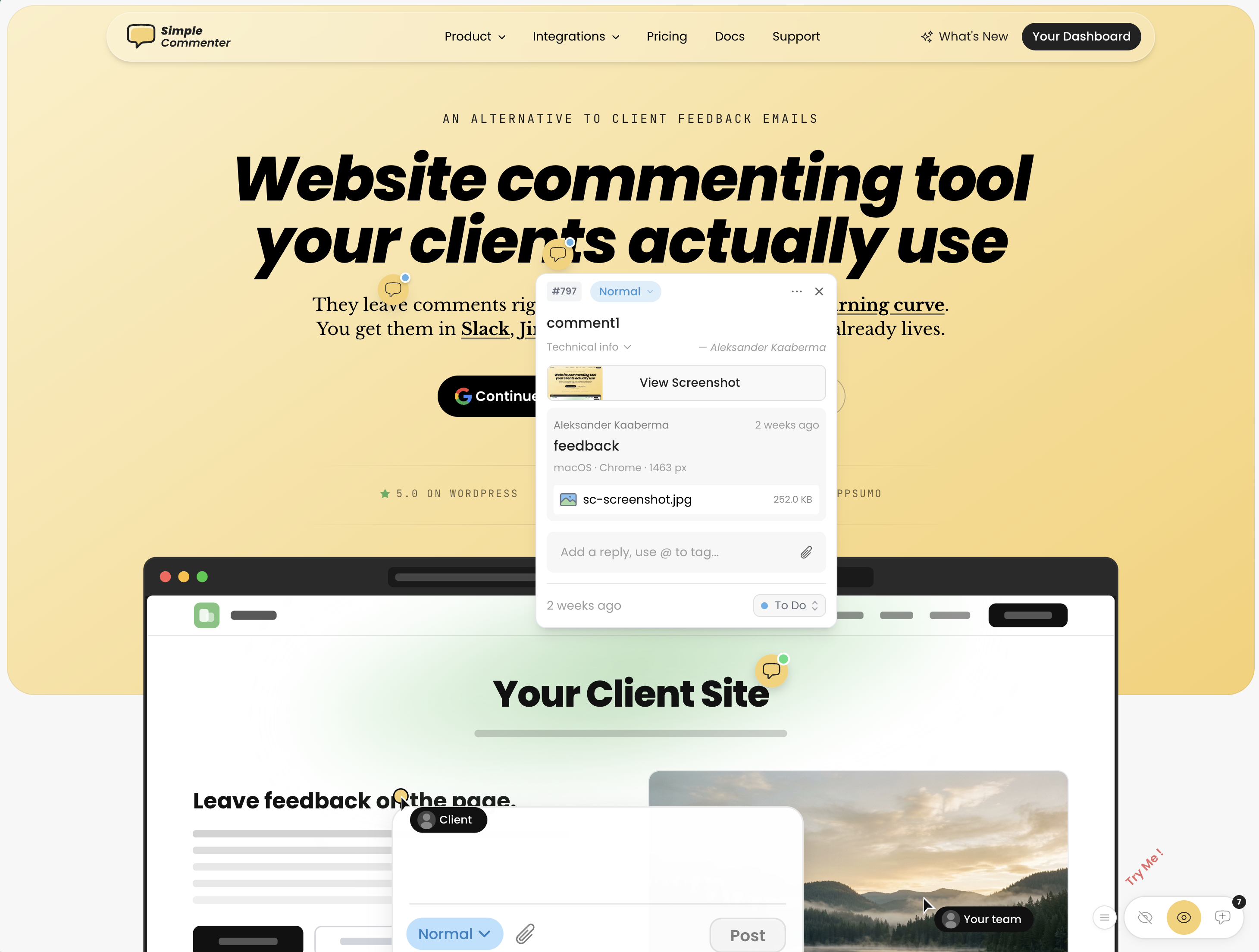
Key features:
- Clients comment on the live or staging page without an account or a paid seat
- Screenshot and browser details attached to every comment
- Script tag, WordPress plugin or Chrome extension, with guides for common site builders
- PDF, image and asset review alongside websites
- Comments in any language, translated by AI
- Integrations with Asana, ClickUp, Jira, Linear, Monday.com, Trello, GitHub, Slack, email and webhooks, plus MCP for AI agents
Pricing:
- Pro, 3 team members with paid extra seats, 10 active projects, 50 GB storage
- Agency, unlimited team members and projects, 500 GB, white label and your own domain
- Enterprise, custom
- Unlimited clients and reviewers on every plan
- 14-day free trial with no credit card, which does not turn into a paid plan by itself, and a 14-day money-back guarantee
See current plans and prices for your currency and billing period.
Pros:
- The lowest effort for the client, who clicks and types on the page they already know
- One tool for the built site and for PDFs, images and other assets
- Feedback flows into the task tools and AI agents your team already uses
Cons:
- Built around the website. If most of your reviews are video, print artwork or multi-stage approval chains, Filestage and Ziflow advertise more workflow control for that work
- If the design still lives in Figma, Figma's own comments are the shorter path for those rounds
- Pro includes 3 team members, so larger teams pay per extra seat or move to Agency
Markup.io#
Built for: Teams reviewing a mix of websites and files
Best for: Teams that want websites, images, PDFs and video reviewed in one place, with guests who never sign up, and who don't need a formal approval step.
Markup.io opens a live website from its link, or a file you upload, and lets reviewers pin comments to it. The homepage lists websites, images, PDFs and videos, says it handles over 30 file types, and advertises guest access with no sign-up. Its pricing page lists pinned comments, threads, notifications and native PDF handling, and describes no formal approval or sign-off step (both as of 2026-10-29).
Pricing is metered in MarkUps rather than seats, which is good news for large teams and something to watch in a busy month. Our Markup.io alternatives page compares it with other tools in more depth.
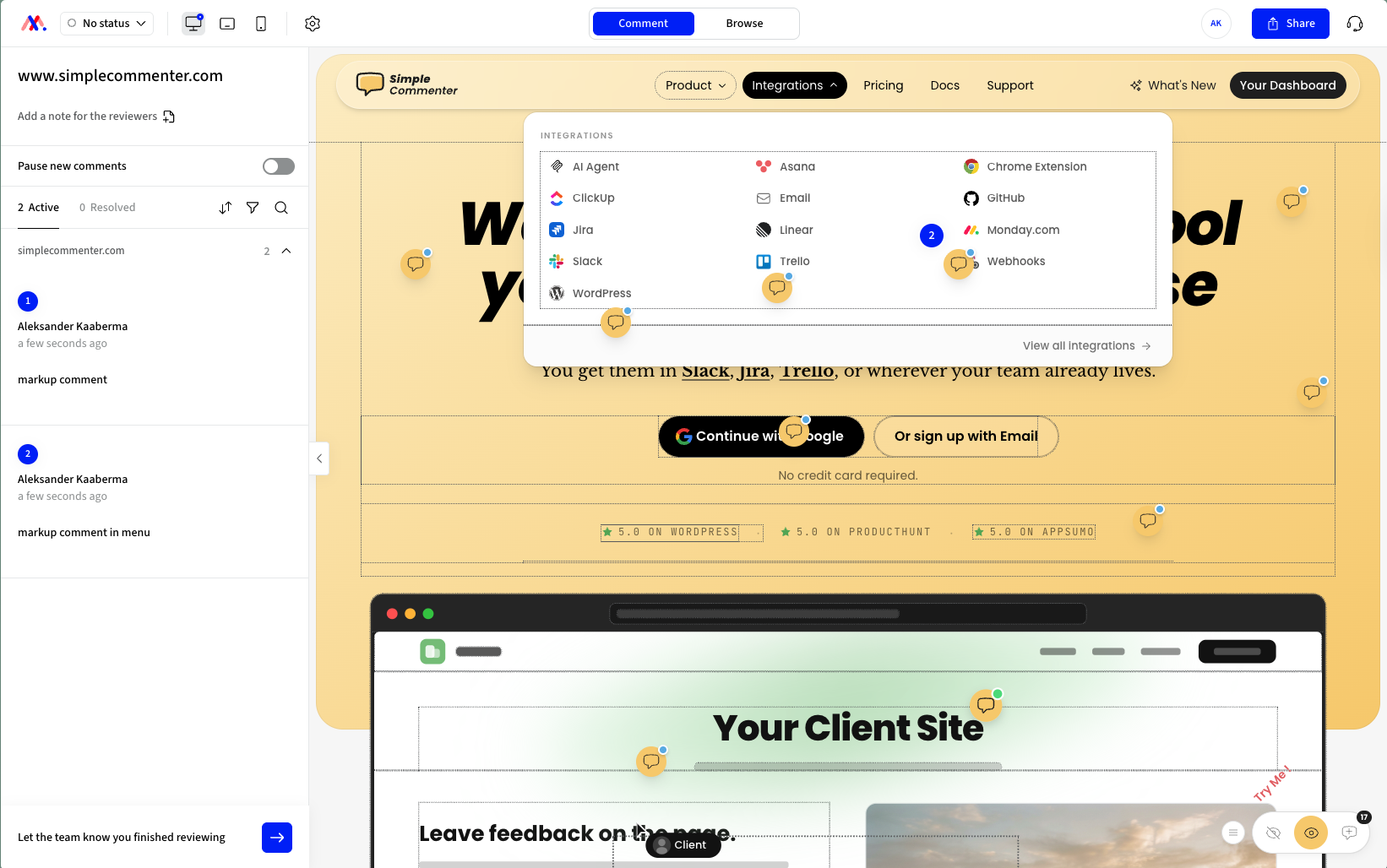
Key features:
- Websites, images, PDFs and video in one tool
- Guest access with no sign-up
- Pinned, threaded comments with notifications
- Unlimited users on every plan
Pricing:
- Pro from $79 a month for 50 MarkUps, with $99 and $129 tiers for more, and yearly billing from $990 advertised as two months free
- Business from $499 a month
- Enterprise, custom
- Extra MarkUps at $4 each
- 14-day free trial, no free plan
Source, Markup.io pricing, as of 2026-10-29.
Pros:
- Widest file range in the live-site group
- Unlimited users instead of per-seat pricing
- Guests comment without signing up
Cons:
- Usage-based allowance, so heavy months cost more
- No free plan
- No approval step described, so check how you'd record sign-off during the trial
Pastel#
Built for: Agencies running time-boxed website reviews
Best for: Teams that want deadlines, reminders and approvals on website review rounds, and want to start on a free plan.
Pastel loads your website so reviewers can comment on it in place, and its plans page says it accepts all types of websites, including responsive ones. The same page says you can let anyone comment or view without needing an account, and that guest reviewers can only leave comments and replies. The homepage also lists PDFs, design work, videos and wireframes among things you can review (both as of 2026-10-29).
What makes Pastel a design round tool rather than a bug tracker is already on the free plan. Feedback deadlines, deadline reminders, pause commenting, approvals and a responsive tester. The Pastel alternatives page covers where it falls short for larger teams.
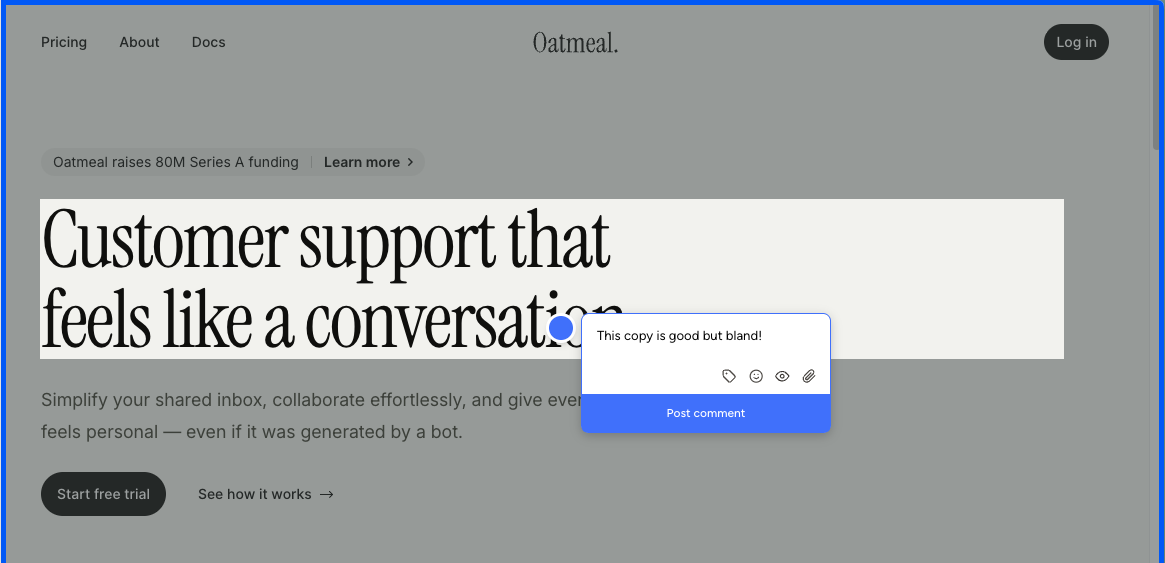
Key features:
- Comment on any website in place, no account for reviewers
- Feedback deadlines, reminders and pause commenting
- Approvals and a responsive tester on every plan
- Trello, Asana, Jira, ClickUp, Monday and Zapier integrations on Team
Pricing:
- Free, 1 user and 1 active canvas
- Pro $35 a month, or $29 a month billed $350 a year, 2 users and 3 active canvases
- Team $119 a month, or $99 a month billed $1,190 a year, from 5 users at $24 per extra user, unlimited canvases
- Enterprise $450 a month, billed $5,400 a year
- 14-day free trial, no credit card
Source, Pastel plans, as of 2026-10-29.
Pros:
- Review-round controls (deadlines, reminders, pausing) built in
- Free plan you can run a real project on
- Clients need no account
Cons:
- Pro allows 3 active canvases, so an agency with several live projects lands on Team
- Integrations start on Team
- Team adds $24 for each user over five
BugHerd#
Built for: Website build teams that triage feedback on a board
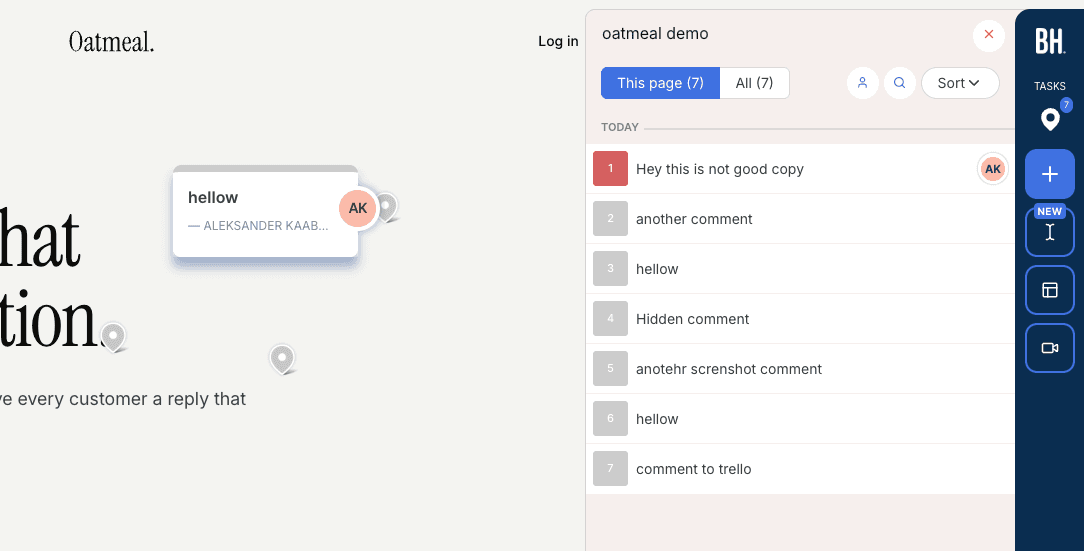
Best for: Teams that want every comment on a kanban board with screenshots and browser details, and occasional feedback on Figma designs, PDFs and images on the same account.
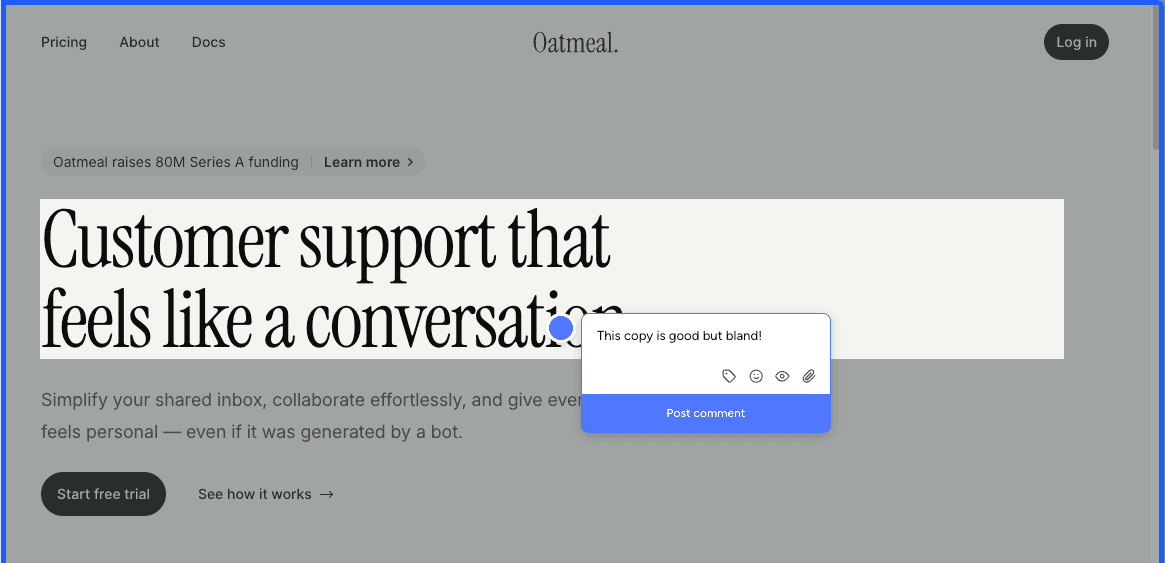
BugHerd's pricing page lists feedback on websites, Figma designs, PDFs and images on every plan, with screenshots and technical details (browser, OS, screen size) on each comment and an integrated kanban board. Clients are unlimited on all plans. Its homepage says there's no need for accounts or log-ins, you send clients a link and they comment (both as of 2026-10-29). Our own earlier test, written up in our WordPress feedback plugin roundup, had named reviewers logging in through BugHerd's hub first, so try the client flow yourself on the trial.
Integrations are split by plan. Trello, Slack and GitHub are on Standard, while Jira, Asana, Linear, ClickUp and Monday.com need Premium, as does the guest task board that lets clients see progress. More in our BugHerd alternatives guide.
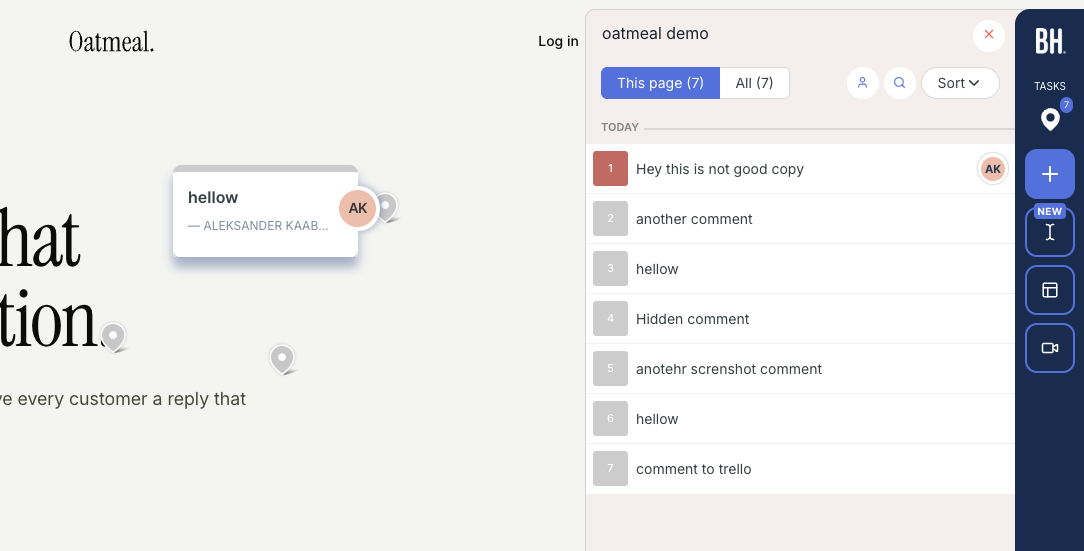
Key features:
- Websites, Figma designs, PDFs and images
- Automatic screenshots and browser, OS and screen size details
- Kanban board for managing feedback as tasks
- Unlimited client users on every plan
Pricing:
- Standard $50 a month, or $42 a month billed yearly, 5 members
- Studio $80 a month, or $67 billed yearly, 10 members
- Premium $150 a month, or $125 billed yearly, 25 members
- Custom plan on request
- Free trial offered, length not stated, and a 60-day money-back guarantee
Source, BugHerd pricing, as of 2026-10-29. The page lists the extra-member price three different ways, so confirm it for your billing period.
Pros:
- Kanban board included on every plan
- Website and file feedback on one account
- Long refund window
Cons:
- Jira, Asana, Linear, ClickUp and Monday.com integrations need Premium at $125 a month or more
- Client experience differs between its homepage and our earlier test, so verify it
- Per-member pricing adds up for larger teams
Proofing platforms for files#
Filestage#
Built for: Marketing and creative teams with formal approvals
Best for: Teams that push images, video, PDFs, documents and websites through review steps with due dates and recorded decisions.
Filestage is built around approval. You upload a file or import a website by its address, add reviewer groups, and reviewers approve or request changes, with every version kept. Its pricing page lists videos, images, designs, documents, websites, interactive HTML and audio, and says reviewers don't need to make an account to give feedback, they enter an email address for notifications. Its help centre says website review loads the original page live, and each comment saves a screenshot with the URL, screen size and browser (both as of 2026-10-29).
For an agency whose main deliverable is websites, it can feel heavy. For a team that also ships packaging, ads and video, it is the shape of tool you want.
Key features:
- Approve or request changes on every plan, with more decision types on Business
- Unlimited versions with earlier comments kept
- Reviewer groups for staged review
- Due dates and reminders from Starter
- Reviewers comment with an email address, no account
Pricing:
- Free, 10 seats, 2 GB, 1 active project and 5 new files a month
- Starter €199 a month, 10 seats, 1 TB, unlimited projects
- Business €329 a month, 10 seats, 3 TB
- Enterprise, custom
- Yearly billing advertised as two months free
- 14-day free trial, no credit card
Source, Filestage pricing, as of 2026-10-29. The page showed euros when we loaded it, so your currency may differ.
Pros:
- The widest range of content in this list, including audio and interactive HTML
- Approval decisions and versions on every plan
- Reviewers need no account
Cons:
- Paid plans start at €199 a month, well above the live-site tools' entry prices
- Due dates and reminders are not on the free plan
- The free plan's single active project is closer to a trial than a plan
Ziflow#
Built for: In-house creative and marketing operations teams
Best for: Teams that need multi-stage review workflows across many file types, with deadlines and reminders.
Ziflow is an online proofing platform. Its pricing page says it reviews over 1,200 file types, including Adobe Creative Cloud files, documents, video and audio, static website snapshots, live websites and HTML5 banners, and that an unlimited number of people inside and outside your organisation can review and approve. You add guests by sending a proof's shareable link (as of 2026-10-29).
Workflow stages are the real product. One stage on Free, two on Standard, three on Pro and unlimited on Enterprise, with deadlines and manual reminders from Standard and automatic reminders on Enterprise.
Key features:
- 1,200+ file types, including live websites
- Workflow stages, up to three on Pro and unlimited on Enterprise
- Unlimited reviewers on every plan
- Deadlines, reminders and decision reasons on higher plans
Pricing:
- Free forever, 2 users, 2 GB, 1 workflow stage
- Standard $199 a month billed yearly, 15 users, 1 TB, 2 stages
- Pro $329 a month billed yearly, 20 users, 2 TB, 3 stages
- Enterprise, contact sales
Source, Ziflow pricing, as of 2026-10-29. The page we loaded showed yearly prices only.
Pros:
- The deepest approval workflow on this list
- Unlimited reviewers on every plan
- Free plan for a small team
Cons:
- Paid plans start at $199 a month, billed yearly
- Built for creative operations, more process than a small agency's site build needs
- Monthly prices weren't shown on the page we loaded
ProofHub#
Built for: Teams that already run projects in one app
Best for: Teams that want image and PDF proofing next to their tasks, at a flat price with unlimited users.
ProofHub is a project management app with proofing built in, which is why it turns up on so many design feedback lists. Its help centre lists PDF, JPG, PNG, GIF and BMP as the formats that support proofing, and other files can still get comments. External reviewers open a proofing link, enter their email and name, and click Log in, then review, comment and approve. Website and prototype review are not part of what ProofHub documents (as of 2026-10-29).
Key features:
- Markup and approval on PDFs and images
- File versions
- Tasks, discussions and proofing in one app
- Flat pricing with no per-user fee
Pricing:
- Essential $45 a month billed yearly, or $50 monthly, unlimited users, 15 GB, 40 projects
- Ultimate Control $89 a month billed yearly, or $99 monthly, for the first three months, then $135 or $150, unlimited users, 100 GB, unlimited projects
- 14-day free trial, no credit card
Source, ProofHub pricing, as of 2026-10-29.
Pros:
- Flat price, unlimited users
- Proofing sits next to the tasks it creates
- Approvals on files
Cons:
- Proofing covers PDFs and common image formats only
- No documented website or prototype review
- Ultimate Control's price rises after the first three months
Comments inside the design file#
Figma#
Built for: Designers and product teams
Best for: Feedback on mockups and prototypes while the design is still being made, from reviewers who already have a Figma login.
If the design lives in Figma, its built-in comments are the shortest path from feedback to change. Comments sit on the canvas or the prototype, next to the frame they are about. The catch for client work is access. Figma's help centre says you can comment if you're signed in to Figma and have at least view access to the file. Its pricing page says that on a paid plan you can let others view and comment without buying extra seats (both as of 2026-10-29). So commenting is free for the client, but each client needs a Figma account.
Comments on a design file can't catch what only shows up once the site is built, such as real content, font loading and how a layout behaves at every screen width. For the later rounds, pair it with one of the live-site tools above.
Key features:
- Comments on design files and prototypes
- Viewers can comment without a paid seat on paid plans
- Feedback lives where the design is made
Pricing:
- Starter, free
- Professional, Full seat $16 a month, Dev seat $12, Collab seat $3
- Organization, billed yearly, Full seat $55 a month
- Enterprise, billed yearly, Full seat $90 a month
Source, Figma pricing, as of 2026-10-29.
Pros:
- No hand-off between the feedback and the file
- Free commenting for viewers on paid plans
- Works on prototypes, not only static frames
Cons:
- Every commenter needs a Figma account and has to sign in
- Comments are on the design, not on the built site
How to choose a design feedback tool#
Your clients review the built site on staging. Use a live-site tool. Simple Commenter, Markup.io and Pastel let clients comment without an account. BugHerd says the same on its homepage, so test the flow. Pastel's deadlines and approvals suit time-boxed rounds. Simple Commenter suits teams that want comments routed to their task tools or an AI agent.
You run formal approvals on images, PDFs and video. Ziflow if you need several workflow stages with deadlines. Filestage if you want approvals and reviewer groups with a gentler setup and a free plan to start.
You review a mix of websites and files and want one tool. Markup.io covers websites, images, PDFs and video. Simple Commenter covers websites, PDFs, images and other assets. BugHerd lists websites, Figma designs, PDFs and images.
The design is still in Figma. Use Figma's comments for those rounds, and accept that clients need a Figma account. Move to a live-site tool once there is a staging link.
You already manage projects in one app and only proof images and PDFs. ProofHub keeps proofing next to the tasks, at a flat price.
Whatever you shortlist, test it as the client, not as the admin. Open the review link in a private window, leave a comment, find the reply, and see how many steps it took. Those ten minutes tell you more than any table, including this one.
Frequently asked questions#
What is the best design feedback tool? It depends on what your clients review. For uploaded files with formal approvals, Ziflow and Filestage. For mockups and prototypes still in progress, Figma's own comments. For the built website, a live-site tool such as Simple Commenter, Markup.io, Pastel or BugHerd. The comparison table above shows content types, client access and starting prices side by side.
What is the difference between a design feedback tool and an online proofing tool? Online proofing tools are a kind of design feedback tool built around uploaded files, versions and approval decisions, often with several review stages. Design feedback tool is the wider term, and also covers comments inside design files and tools that put comments on a live website.
Can clients give design feedback without creating an account? Yes, with most tools here. Simple Commenter, Markup.io and Pastel let clients comment without an account, Filestage asks only for an email address, and Ziflow guests open a shared proof link. ProofHub asks external reviewers for a name and email at the proofing link. Figma requires every commenter to be signed in to a Figma account.
Is there a free design feedback tool? Several tools on this list have a free plan. Filestage's covers 1 active project, Ziflow's covers 2 users, Pastel's covers 1 user and 1 canvas, and Figma's Starter plan is free. To try commenting on a live page without any signup, Simple Commenter's free website feedback tool works on any public URL.
Which design feedback tool works on both live websites and design files? Markup.io reviews websites, images, PDFs and video. Simple Commenter reviews websites, PDFs, images and other assets. BugHerd lists websites, Figma designs, PDFs and images. Filestage and Ziflow are file-first but also review live websites.
Can I get design feedback in Figma without a Figma account? Not with Figma's own comments. Its help centre says you need to be signed in with at least view access to comment. If your clients won't create an account, review exported images or PDFs in a proofing tool, or wait for the staging site and use a live-site tool.
Final thoughts#
Most design feedback tool lists mix proofing platforms, design apps, screenshot tools and bug trackers, and leave you to work out which is which. Split them by what your clients look at and the shortlist gets short fast. Files with formal sign-off go to a proofing platform. Work in progress stays in the design tool. The built site gets reviewed on the site.
Then ask the question that decides whether feedback arrives at all. Will your clients create an account to give it? If the answer is probably not, the tools that skip the signup are the ones worth a trial.
Simple Commenter is our tool, and it is the one we built for agencies whose clients review the built site without an account. Try it on a real staging site with a real client, and do the same with whichever alternative you shortlist.
Found this useful? Add us as a preferred source and Google will show you more of our guides in Search and AI Overviews.