For design review rounds with clients
Clear website design feedback, pinned to the real page
Your client clicks the headline, button or image they mean and types a note. It lands on that exact spot with a screenshot and their browser details. No account for the client, no screenshot threads for you.
No credit card required.



Trusted by 600+ agencies, freelancers, and enterprises







What is website design feedback?
Website design feedback is what clients and stakeholders tell you about a site’s layout, look and content while it is being designed, so you can change it before launch. Good feedback names the element, says what is wrong, and explains why it matters for the site’s goal. The quickest way to get feedback like that is to let reviewers comment on the page itself, so every note is already attached to the thing it is about.
Most design feedback goes wrong before anyone opens the design. It arrives as an email with six screenshots, a call where “can you move that a bit left” means three different things, and a spreadsheet nobody updates after Tuesday. Below is what good feedback looks like, how to run the rounds, what to check, and how to collect it on the real page.
What good design feedback looks like
Useful comments have four parts. Where it is, what the reviewer sees, why it matters, and how much it matters. Share that with clients before the first round and you’ll spend less time decoding what comes back.
- Where. The page and the element, for example the main headline on the pricing page. When the comment is left on the live page, this part fills itself in.
- What you see. The problem, not the fix. “The button disappears into the photo” leaves your designer room to solve it well. “Make the button red” doesn’t.
- Why it matters. A link to the brief or the audience. “Our buyers are mostly retired and the body text is hard to read” gives the designer a reason, and “make the text bigger” gives them a guess.
- How much. Must fix before launch, or nice to have. Without it, a typo and a broken booking form look equally urgent.
Three rewrites worth sending to a client who is new to this.
- Instead of “make it pop”, try “the headline is the same size as the menu, so nothing tells me where to look first.”
- Instead of “I don’t like the colours”, try “the dark green feels like a bank, and the brief asked for something warmer.”
- Instead of “can we move this up?”, try “most visitors won’t scroll this far, and the booking form is the reason the page exists.”
Run the design review in rounds, not one long thread
Feedback that arrives all at once arrives in the wrong order. A reviewer who spends round one on comma placement may want to rethink the homepage layout in round three, after the copy is final. Give each round one question, one deadline and one person who decides.
- Round 1, direction. The homepage and one inner page. Do the layout, the visual hierarchy and the style fit the brief and the audience? Skip copy edits here, the words will change anyway.
- Round 2, content and detail. Every page template with real copy and real images. Typography, spacing, image choices, wording and anything that feels off-brand.
- Round 3, phones and states. The same pages on a phone and a tablet, plus menus, forms, hover effects, error messages and empty states.
- Sign-off. The decision maker confirms that every open comment is either done or deliberately moved to after launch.
Put the deadline in the invitation itself. “Comments on this round close Friday at 5pm” is a clearer ask than “let us know what you think”, and it gives you a natural point to stop collecting and start fixing.
Review the design on the real page, not a screenshot of it
Mockups are right for early direction. Once the design is built, even on a staging site, review it there. A screenshot can’t show you that the headline wraps onto three lines on a phone, that the web font loads a beat late, or that the dropdown menu covers the button under it. The live page shows all of that, and a comment left on it already carries the page, the element and the screen size.
If round one still happens on Figma files, PDFs or image mockups, that’s fine. Our comparison of design feedback tools covers tools for mockups, images, PDFs and prototypes as well as live sites, so you can see where each one fits.
What to check in a website design review
Hand reviewers a short list so everyone looks at the same things. This one works for rounds one to three.
- First impression. Is it obvious who the site is for and what to do next?
- Layout and hierarchy. Does the most important thing on each page look the most important?
- Typography. Is the body text comfortable to read, and do headings look the same from page to page?
- Colour and contrast. Do the colours match the brand, and can you read text on every background, including over photos?
- Images. Do the photos and illustrations fit the brand? Are any blurry, stretched or badly cropped?
- Copy. Does the wording sound like the business, and is any placeholder text left?
- Navigation. Can a first-time visitor find every important page from the menu?
- Phone and tablet. Does anything overlap, wrap awkwardly or disappear at smaller sizes?
- Interactive states. Menus, buttons, forms, error messages and hover effects.
- Accessibility basics. Text contrast, readable font sizes, and links that look like links.
Broken links, forms that don’t send and browser bugs belong to a separate QA pass. Use the website QA checklist for that, and the staging site review checklist in the week before launch.
When stakeholders disagree
Five reviewers bring five opinions, and two of them will contradict each other on the same headline. Three habits stop that from stalling the project.
- Name one decision maker per round, before it starts. Everyone can comment. One person decides.
- Keep every comment on the page. When two notes sit on the same element, the conflict is visible to everyone, instead of hiding in two separate email threads.
- Settle it against the brief. “The brief says first-time buyers” ends more arguments than taste does.
How a review round works in Simple Commenter
Simple Commenter adds a comment widget to your live or staging site with a script tag, the WordPress plugin or the Chrome extension. You send your client the link. They click the element they mean and type, and the comment is pinned to that spot with a screenshot and their browser details attached. They never create an account, and clients never take up a paid seat.
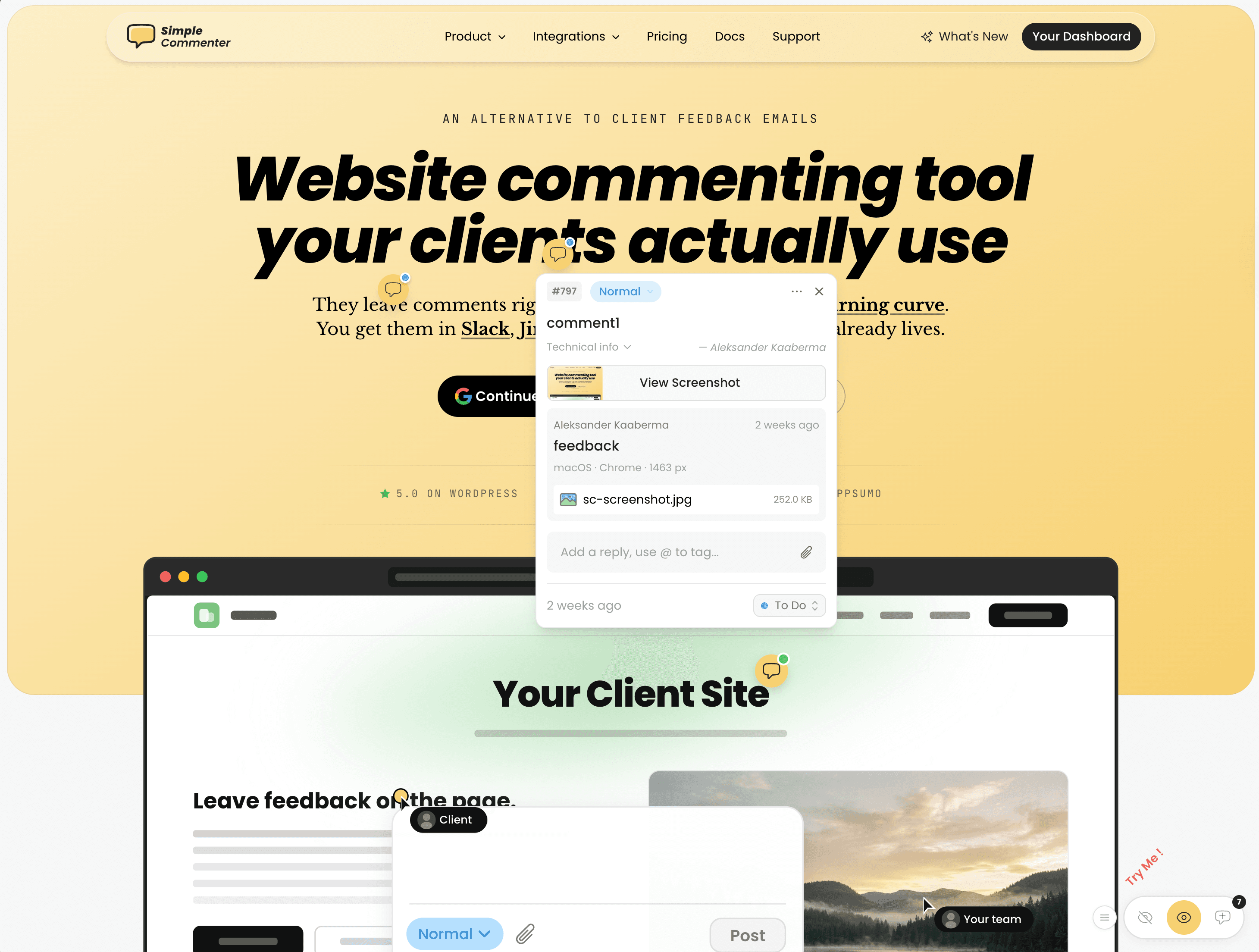
Your team works through the comments in a dashboard and sends them on to Asana, ClickUp, Jira, Linear, Monday.com, Trello, GitHub, Slack, email or a webhook. If an AI coding agent such as Claude Code or Cursor makes the fixes, it can read the feedback over MCP.
Logo concepts, PDF style guides and image mockups can be reviewed with the same tool, so round one and round three happen in the same tool. Clients can write in any language, and comments are translated by AI.
Integrates with every tool your team already uses. View all →









All-in-one feedback stack
Everything your team needs to collect, triage, and resolve website feedback
Client access
Two ways in — both ship real feedback
No login needed for quick review rounds. Flip on Login for verified clients with email reply notifications.
footer copy feels off
- Instant
- No signup
- Zero friction
Threaded comments
Every comment, one thread
Replies, mentions, and follow-ups stay grouped under the original comment — from first question to resolved.
- SSarah commented5m ago
Can we update this image?
- JJames replied4m ago
Hey, you forgot to attach the image.
Sarah was notified by email.
3m ago- SSarah replied1m ago
Sorry! Uploaded it now

James marked the comment done.
just now
MCP & AI connections
Bring feedback into your AI workflow
Find open comments, read the context, and keep replies and statuses in sync. A coding agent with repository access can prepare fixes for your review.
Theme & branding
Styled for your brand
Match the widget to your site — pick a color, toggle light or dark, and minimize it. Changes preview instantly.
Integrations
Comments that sort themselves
Set one rule and every new comment lands on the right board — by @mention, priority, or status.
Save time & money
Fewer revision rounds
Visual feedback eliminates back-and-forth emails. Teams ship faster and clients pay less.
Compatible with Any Website Platform
Paste a code snippet, and you're set! Simple Commenter functions smoothly on all platforms—including WordPress, Shopify, Webflow, Next.js, and more.
No matter what CMS or framework you use, the tool enables seamless website annotation, markup, and direct feedback—making it one of the most easy-to-use and versatile website commenting tools and website feedback tools available.
Code











No-Code











Try it before you touch a client site
Paste any public URL into the free website feedback tool and comment on it the way your client would. No signup, nothing to install. When you’re ready for a real round, the 14-day trial needs no credit card.
FAQ
Questions people ask before they try it
Something missing? Email info@simplecommenter.com and you’ll get an answer from the person who built it.
- What is website design feedback?
- It is what clients and stakeholders say about a website's layout, visual style and content while it is being designed. Good design feedback names the exact element, describes the problem rather than the fix, and explains why it matters for the site's goal or audience.
- How do you give good feedback on a website design?
- Say where the issue is, what you see, why it matters and how much it matters. Describe the problem instead of prescribing a solution, tie it to the brief or the audience, and look at the overall layout before small details.
- How many rounds of feedback should a website design get?
- There's no fixed number. A good default is three focused rounds and a sign-off. Direction first, then content and detail, then phones, tablets and interactive states. Give each round a deadline and one decision maker.
- Should clients review mockups or the live site?
- Mockups for early direction, the live or staging site once the design is built. Only the real page shows how text wraps on a phone, how fonts load, and how menus and forms behave.
- Do clients need an account to leave design feedback?
- Not with Simple Commenter. Clients open the link to your site, click the element they mean and comment. There's nothing to sign up for or install, and clients never use a paid seat. How client access works.
- Can clients give feedback on a staging site?
- Yes. The widget runs on live and staging sites. You install it with a script tag, the WordPress plugin or the Chrome extension, and there are setup guides for Webflow, Wix, Shopify, Squarespace, Framer and more. See the install guides.
- Can I collect feedback on mockups, PDFs and images too?
- Yes. Simple Commenter also reviews PDFs, images and other assets, so early mockups and the built site are reviewed with the same tool. See asset feedback.
- How much does it cost?
- Pro covers 3 team members and 10 active projects. Agency has unlimited team members and projects, plus your own branding. Both include unlimited clients, a 14-day free trial with no credit card, and a 14-day money-back guarantee. See all plans and currencies.