For WordPress Agencies and Freelancers
WordPress feedback plugin for client website reviews
Client revisions on WordPress sites usually arrive as vague emails and confusing screenshots. The Simple Commenter WordPress feedback plugin lets clients click any element on the page and leave a comment pinned to that exact spot. Every comment ships with the page URL, browser, viewport, and OS already attached, so your team can fix issues without a follow-up call.
Get started for free
No credit card required.
Trusted by 600+ agencies, freelancers, and enterprises
Trusted by Agencies,
Loved by Clients
See why web professionals call Simple Commenter the best website feedback tool, and never look back.
/ Rated 5.0 on Product Hunt & 4.8 on G2
Simple. Effective. Game Changer
@Dsouldiva
Finally, a feedback tool my clients actually enjoy
@craigfenton
A Game-Changer for Web Feedback – Worth Every Penny!
@ryanbarilla
The tool I've been searching for
@alexs89
Simple, yet ingenious
@koen.kerkvliet
Great feedback app and so easy to use!
@iamvictor
Hidden Gem
@greg319
Fantastic tool for working with clients
@devdbydesign
An Essential Tool for Enhancing Communication with Clients
@Fiorenzomi
Great product!
@gramir
Very useful product and excellent support
@Ulrich86098
Simple Commenter has changed the way I work
@Jim Langman
Deserves +1000 tacos
@IgnacioJadue
Clients LOVED using Simple Commenter
@Katelyn
Phantastic
@user6961b
They fixed my issue in literal seconds from emailing them
@100587018771155070259
Super handy tool. The developer is very responsive.
@neposeda
I didn't realize how much I needed this tool!
@koen.kerkvliet
Life changed in under 5 minutes
@Dsouldiva
My clients have been engaged like never before
@Jim Langman
Simple. Effective. Game Changer
@Dsouldiva
Finally, a feedback tool my clients actually enjoy
@craigfenton
A Game-Changer for Web Feedback – Worth Every Penny!
@ryanbarilla
The tool I've been searching for
@alexs89
Simple, yet ingenious
@koen.kerkvliet
Great feedback app and so easy to use!
@iamvictor
Hidden Gem
@greg319
Fantastic tool for working with clients
@devdbydesign
An Essential Tool for Enhancing Communication with Clients
@Fiorenzomi
Great product!
@gramir
Very useful product and excellent support
@Ulrich86098
Simple Commenter has changed the way I work
@Jim Langman
Deserves +1000 tacos
@IgnacioJadue
Clients LOVED using Simple Commenter
@Katelyn
Phantastic
@user6961b
They fixed my issue in literal seconds from emailing them
@100587018771155070259
Super handy tool. The developer is very responsive.
@neposeda
I didn't realize how much I needed this tool!
@koen.kerkvliet
Life changed in under 5 minutes
@Dsouldiva
My clients have been engaged like never before
@Jim Langman
WordPress Install
Install in WP admin and connect your account in a minute
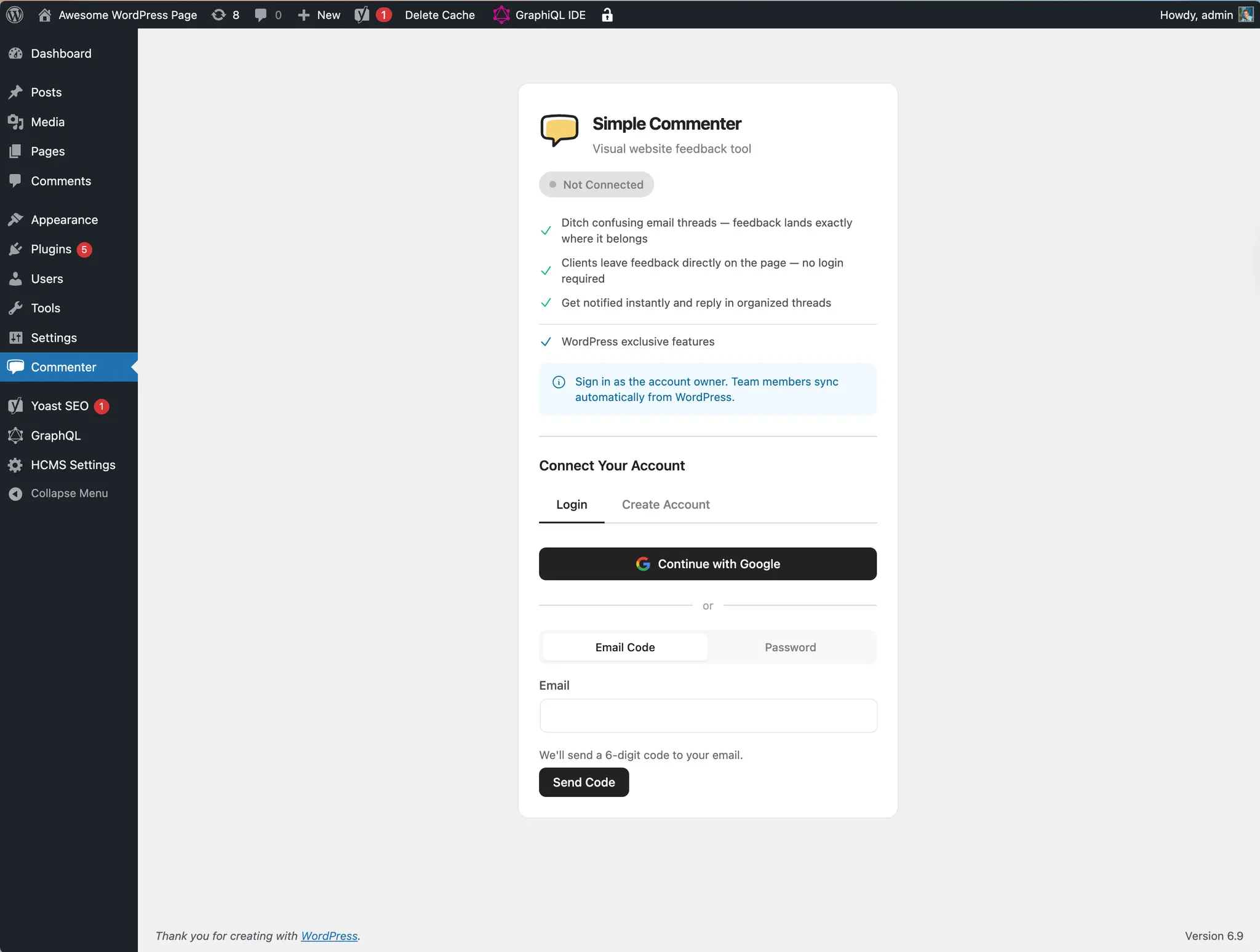
Search for Simple Commenter in the WordPress plugin directory, install, and activate. Open the Commenter menu in your WP admin, sign in with Google or an email code, and pick which Simple Commenter project to pair with the site. The feedback widget goes live immediately. From the same settings page you choose whether the comment button shows on the front end, the admin area, or both, and you can restrict it to logged-in users or specific WordPress user roles.
Zero Client Friction
Clients click any element and leave feedback as a guest
Most clients will not create another account just to give you revision notes. With the Simple Commenter WordPress feedback plugin, you share the staging URL and they start commenting immediately. They click on a button, image, headline, or any other element, type their feedback, and the comment is pinned to that exact spot. The plugin works on localhost, staging servers, password-protected WordPress installs, and live production sites.
Automatic Technical Context
Every comment ships with the details developers need
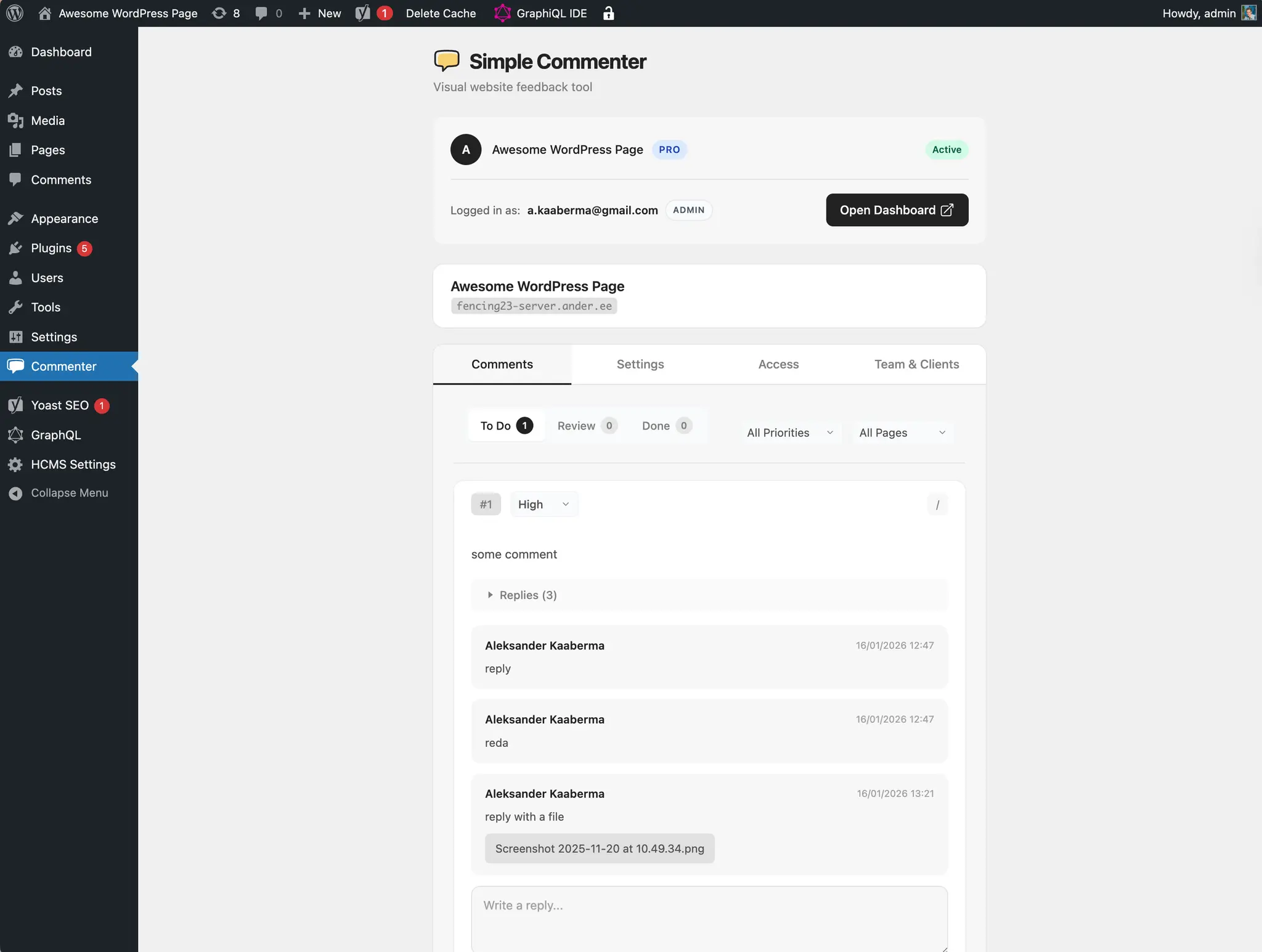
Every comment recorded through the WordPress feedback tool automatically captures the page URL, browser type and version, operating system, viewport dimensions, screen resolution, and console errors. When a client says a button looks broken, your developer already has the reproduction details. This eliminates the back and forth of asking which browser the client was using or whether they can resend a screenshot.
Two-way PM Tool Sync
Push WordPress feedback into the tools your team already uses
Simple Commenter syncs comments two ways with Jira, Trello, Asana, ClickUp, Linear, Monday, GitHub, Slack, and custom webhooks. New WordPress feedback creates tasks in your PM tool with the screenshot, browser context, and direct page link attached. When you reply to the task or close it, the update flows back to the website and the client gets notified. Your team manages WordPress revisions from the same board as the rest of their work.
 MCP & AI connections
Bring WordPress feedback into your AI workflow
Collect client comments on your WordPress pages, then let your AI read and organize that feedback through MCP. Replies and status updates stay in Simple Commenter, so the review conversation stays attached to the work.
- Find feedback
- Organize requests
- Keep clients updated
For coding tools including Claude Code, Cursor, Codex


Still not convinced?
Trusted by 600+ professionals
Great feedback app and so easy to use!
“I love the simplicity and efficiency of this app which is perfect for our web design agency. Best part is that it's easy to use for our non-technical clients.”
Hidden Gem
“Surprised more people aren't talking about this. It's absolutely amazing and a total steal at this price.”
Phantastic
“I just need not to say anymore. I'm in webdevelopment since years with clients and that makes my life much easier! Happy to be your customer keep on rolling!!!”
Pricing
Simple Pricing.
FAQ
Questions people ask before they try it
Something missing? Email info@simplecommenter.com and you’ll get an answer from the person who built it.
- What is a WordPress feedback plugin?
- A WordPress feedback plugin lets clients and stakeholders leave visual comments directly on a WordPress site without sending emails or screenshots. Simple Commenter installs as a standard WordPress plugin, adds a comment widget to your front end and admin area, and pins each piece of feedback to the exact element on the page. Your team sees every comment with the URL, browser, and viewport already attached.
- How does the Simple Commenter WordPress plugin work?
- Install the plugin from your WP admin, paste your integration token, and the feedback widget appears on your site. Visitors click any element, type a comment, and it shows up in your Simple Commenter dashboard. You control who can see the widget by user role and whether it appears on the front end, the admin area, or both.
- Do my clients need a WordPress account to leave feedback?
- No. Clients do not need a WordPress login or any account at all. They open the staging URL you sent them, click the comment button, and start leaving feedback as a guest. This removes the friction that usually pushes non-technical clients back to email and keeps every revision in one place.
- Does it work on staging sites and password-protected WordPress installs?
- Yes. The Simple Commenter WordPress feedback plugin works on local development environments, staging servers, password-protected sites, and live production WordPress installs. You can collect client feedback before launch, during QA, and after the site goes live without changing how you deploy.
- Can I control which user roles see the feedback widget?
- Yes. The plugin lets you show the feedback widget to everyone, only logged-in users, or specific WordPress user roles. You can also choose to display it on the front end only, the admin area only, or both. This is useful when you want clients to comment on the public site while your team triages from the WordPress dashboard.
- How does it compare to Feedbucket, Marker.io, and SureFeedback?
- Simple Commenter covers the same core workflow as Feedbucket and Marker.io: click-to-comment, screenshot capture, automatic browser context, and project management sync. We sync to nine project management tools (Jira, Trello, Asana, ClickUp, Linear, Monday, GitHub, Slack, and webhooks), more than most competitors, and we do not require clients to create an account to view feedback.
- Does it sync feedback to Jira, Trello, Asana, ClickUp, Linear, or Monday?
- Yes. Simple Commenter pushes new WordPress feedback into Jira, Trello, Asana, ClickUp, Linear, Monday, GitHub, Slack, and custom webhooks automatically — including replies and status updates. If you want changes in your PM tool to flow back into Simple Commenter as well, you can wire that up with our inbound webhooks for a full two-way workflow.
- Does the plugin capture screenshots and browser info automatically?
- Yes. Every comment captured through the WordPress feedback plugin records the page URL, browser type and version, operating system, viewport size, screen resolution, and console errors. Your developers get reproduction details with the first message, so there is no follow-up about which browser the client was using.
Your next review round, without the email thread.
Set up in five minutes. Free to start, no credit card.
Trusted by 600+ agencies, freelancers and product teams.
Looks great, approve for launch.