8 Best WordPress Feedback Plugins in 2026 (Free and Paid)
Eight WordPress feedback plugins compared, six for visual on-page comments and two for surveys. Active installs, pricing, client access, and where the feedback lives.

TL;DR. "WordPress feedback plugin" covers two different jobs. Six plugins on this list let a reviewer click a spot on the page and leave a comment pinned there, which is what agencies and freelancers mean when they ask clients for feedback on a site. Two run surveys, polls and feedback forms for your visitors, which is what product and marketing teams mean. Pick the category first. Within the visual group, the deciding questions are whether clients can comment without creating an account, and whether feedback is managed inside WordPress or in the vendor's hosted dashboard. Only two of the six visual plugins keep management inside WordPress itself. All active install counts below come from the WordPress.org plugin API as of October 2026, and every price was checked on the vendor's own pricing page the same month.
Fair disclosure before the list. Simple Commenter is our product and has its own entry below. We say where it fits and where it does not, and every competitor entry sticks to facts you can verify on WordPress.org or the vendor's site.
What a WordPress feedback plugin does#
A WordPress feedback plugin adds a way for people to tell you something about a page without leaving it. The useful split is by who is giving the feedback and what you do with it afterwards.
- Visual page feedback plugins are for reviewers you know, usually clients, stakeholders or your own QA team. They click an element, type a note, and the comment stays pinned to that spot with the page URL, browser and screen size attached. The plugin either manages those comments inside WP admin or sends them to the vendor's hosted dashboard. Simple Commenter, Atarim, SureFeedback, Marker.io, BugHerd and Feedbucket are in this group.
- User feedback and survey plugins are for anonymous visitors. They show a popup or a floating button that opens a survey, a rating or a form, and the results land in a table you analyse later. UserFeedback and Jotform's Feedback Button are in this group.
If you landed here because a client keeps emailing you screenshots with red circles, you want the first group. If you want to know why visitors leave your pricing page, you want the second.
One more distinction matters inside the visual group. Several plugins are installers, meaning the plugin's only job is to load the vendor's script so you do not have to paste a snippet. Comments, replies, members and settings then live in the vendor's app. A smaller number let you read, reply and manage feedback inside WordPress. The comparison table marks which is which.
How we compared them#
- Active installs come from the WordPress.org plugin information API, which reports rounded counts. We show them the way the directory does, as "200+" or "4,000+", as of October 2026.
- Pricing was read from each vendor's pricing page in October 2026. Where a page is ambiguous we say so instead of guessing, and where we could not verify a price we say "see vendor pricing".
- Client access means whether someone can leave feedback without creating an account with the vendor.
- Where feedback is managed means where you read, reply and change status. "WP admin" means inside WordPress, "hosted" means the vendor's own dashboard.
| Plugin | Type | Active installs (Oct 2026) | Clients comment without an account | Feedback managed in | Starting price |
|---|---|---|---|---|---|
| Simple Commenter | Visual | 200+ | Yes | WP admin and hosted dashboard | Free trial, then paid, see pricing |
| Atarim | Visual | 1,000+ | Yes, no WordPress login | Hosted dashboard with an on-site sidebar | Free plan, Pro $67/mo |
| SureFeedback (self-hosted) | Visual | 5,000+ (client site plugin) | Yes, if logged into their own site or guests are enabled | Your own WordPress dashboard site | $99 to $169 listed, see entry |
| Marker.io | Visual, ticket style | 4,000+ | Yes, reporters need no paid seat | Hosted dashboard and your PM tool | $39/mo billed annually |
| BugHerd | Visual, kanban | 3,000+ | Public feedback only, reviewers log in | Hosted dashboard | $42/mo billed annually |
| Feedbucket | Visual | 1,000+ | Yes | Hosted dashboard and your PM tool | $49/mo |
| UserFeedback | Surveys and forms | 200,000+ | Not applicable, visitors answer surveys | WP admin | Free Lite, Plus $49.50/yr intro |
| Jotform Feedback Button | Form button | 600+ | Not applicable, visitors submit a form | Your Jotform account | Free Starter, Bronze $39/mo |
The best WordPress feedback plugins for visual, on-page comments#
Simple Commenter#
Built for: Agencies · Freelancers · WordPress teams doing client reviews
Best for: Teams that want clients to comment without an account and want to read, reply and manage that feedback inside WP admin, with the same project available in a hosted dashboard and the tools your team already uses.
Simple Commenter is the plugin we build, so read this entry knowing that. The WordPress feedback plugin is the official plugin for the Simple Commenter service. Install it from the plugin directory, open the Commenter menu, sign in with Google or an email code, pick the project to pair with the site, and the widget is live. The WordPress installation guide walks through it with screenshots.
The client side is the reason it exists. A client opens the staging link, clicks the button, image or headline they mean, types, and the comment is pinned to that element. No WordPress login, no signup form, no extension. Your own team gets the opposite treatment. Logged-in WordPress users are signed in to the widget automatically, with WordPress vouching for them through a signed hash, so administrators and editors keep their role without a second login.
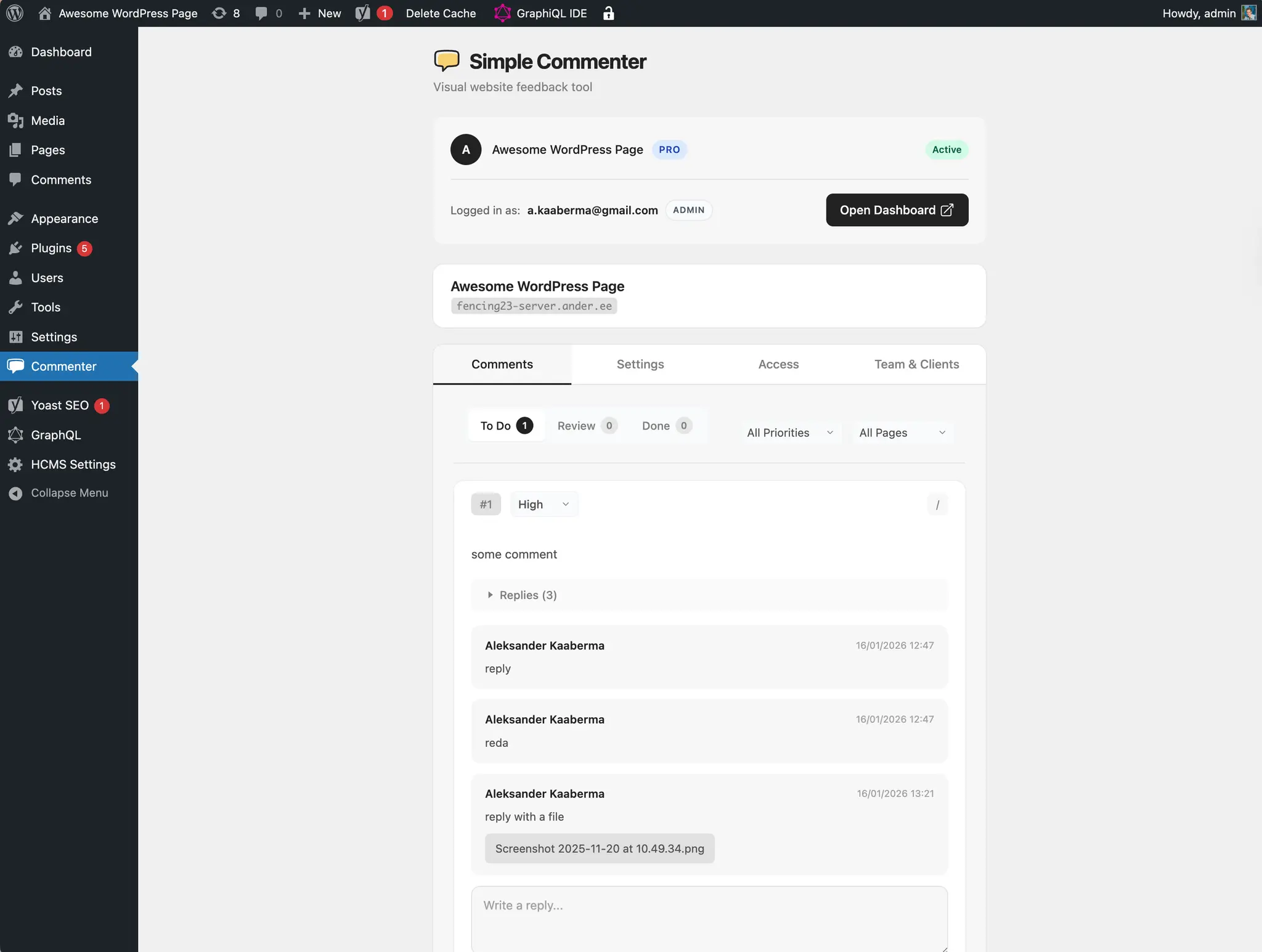
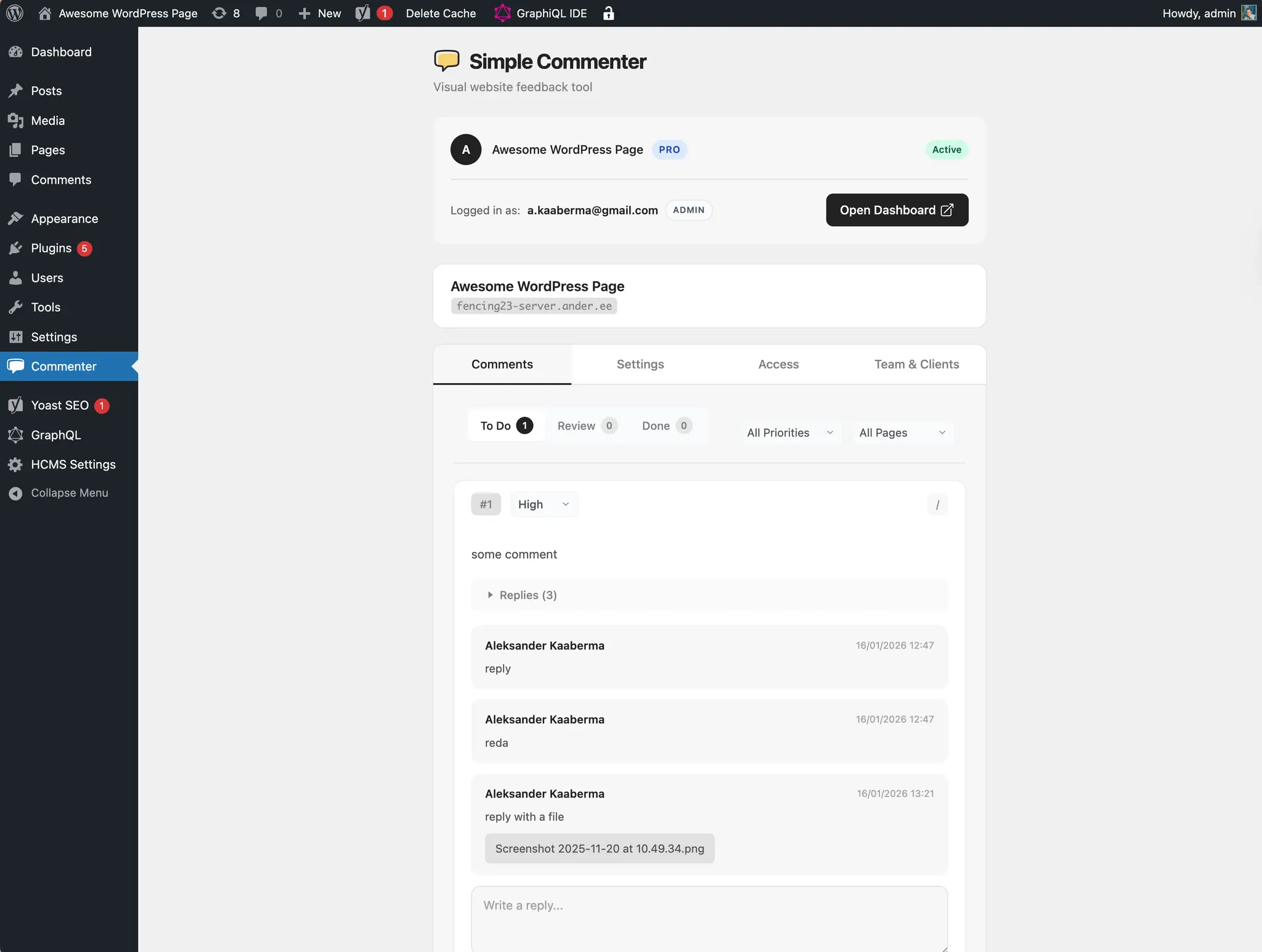
What sets it apart from the installer plugins on this list is the admin side. The plugin has its own Feedback inbox inside WP admin, with a board view, search, sorting, and filters by page, priority and tag. You reply, change status, add tags, mark comments as team-only, archive and restore, and open screenshots and attachments without leaving WordPress. A dashboard widget shows status counts and the latest feedback, and the admin bar shows the count. Access is two questions, who sees the widget and who can leave feedback, with options for everyone, people with the link, logged-in WordPress users or specific roles.
Every comment carries the page URL, browser, operating system, viewport, screen resolution and the last JavaScript errors from the visitor's page, which saves the "which browser were you on" email. The same project is available in the hosted dashboard, where comments sync to Slack, Trello, Asana, ClickUp, Linear, Jira, Monday, GitHub, email and webhooks, and an MCP server lets Claude Code or Cursor read and reply to feedback. When you create the account from WordPress you choose where the workspace lives, Europe, the United States or Australia.
Key features:
- Clients comment without an account, logged-in WordPress users are signed in automatically
- Feedback inbox, board view, replies, statuses, tags and archive inside WP admin
- Widget visibility and commenting rights by role, link or logged-in status
- Automatic page, browser, viewport and console error context on every comment
- Hosted dashboard with Slack, Trello, Asana, ClickUp, Linear, Jira, Monday, GitHub, email and webhook sync
- MCP server for AI coding tools
- Works on localhost, staging, password-protected and live sites
Pricing:
The plugin is free. The service has a 14-day free trial with no credit card, and the installed widget needs a paid plan after the trial. See current plans and prices for team allowances, billing periods and currencies. Clients never need a paid seat.
Pros:
- Lowest client friction on this list, and the only plugin here that also signs in your WordPress team automatically
- Feedback is managed inside WordPress, not only installed from it
- Technical context captured without the client doing anything
Cons:
- Smallest install base on this list at 200+ active installs, it is the newest plugin here
- Feedback is stored in the hosted service, not in your WordPress database, so there is no fully self-hosted option
- The widget needs a paid plan once the trial ends
Atarim#
Built for: WordPress agencies managing many client sites
Best for: Agencies that want client feedback plus a task and project layer across all their WordPress sites, and are comfortable with a hosted dashboard and credit-based pricing.
Atarim started as a visual collaboration plugin for WordPress agencies. The directory listing now leads with an "AI Agency for WordPress" pitch, editing pages, fixing code, updating plugins and SEO, but the feedback workflow agencies know is still there. A client clicks the spot they mean and types a note. The note is pinned to that element and carries a visual snapshot of the page plus the URL, browser, screen size and the element itself. The listing says anyone can leave feedback with no WordPress login, including on staging pages.
An Atarim account is required for the collaboration features. Tasks sync to the hosted Atarim dashboard, which is where the agency manages them across sites, and the plugin adds an on-site sidebar and task centre so the team can work from the page too. If you run dozens of client sites and want one inbox for all of them, this is the shape Atarim is built around. If you want feedback to stay inside each WordPress install, it is not.
Key features:
- Click-to-comment feedback with a snapshot, URL, browser, screen size and element attached
- No WordPress login for reviewers
- Hosted dashboard that collects tasks from every connected site
- On-site sidebar and task centre for the team
- AI features for editing and maintenance, billed in credits
Pricing:
- Free plan with one site and 200 one-time credits
- Pro $67 per month, with annual billing advertised as saving 20%, up to 1,000 projects and 100 seats, 5,000 credits a month
- Enterprise, custom pricing with SOC 2, SSO and SAML
Source, Atarim pricing, checked October 2026. The page gives no dollar figure for annual Pro, so confirm the annual price before comparing.
Pros:
- One dashboard across many client sites
- Reviewers need no login
- Free plan to try on a single site
Cons:
- Pricing mixes a seat plan with AI credits, so the real cost depends on how much of the AI layer you use
- One paid tier below Enterprise
- Feedback lives in the hosted dashboard, not in WordPress
SureFeedback (formerly ProjectHuddle)#
Built for: Agencies that want a self-hosted feedback system on their own WordPress install
Best for: Teams that want the feedback database on their own server, and are happy to run a dashboard site plus a child plugin on every client site.
SureFeedback grew out of ProjectHuddle and comes in two separate editions. The self-hosted edition is a paid dashboard plugin you install on one WordPress site of your own, plus the free SureFeedback Client Site child plugin on each client site, which syncs that site to your dashboard. The child plugin still carries the slug projecthuddle-child-site and has 5,000+ active installs, the largest count among the visual plugins on this list, though a share of those will be long-running ProjectHuddle sites. Clients pick an area of the page and comment directly on it. The listing says no login or registration is required if the client is logged into their own site, and you can allow guests to comment as well.
The Cloud edition is a hosted service connected through the SureFeedback Cloud connector plugin, which has 30+ active installs and requires a SureFeedback Cloud account. Do not mistake the connector for the self-hosted plugin, they are different products with different prices. The SureFeedback alternatives guide covers the trade-offs between the two in more depth.
Key features:
- Self-hosted dashboard with the feedback stored in your own WordPress database
- Child plugin syncs client sites to the dashboard
- Clients comment when logged into their own site, guests optional
- Cloud edition available as a separate product
- 7-day money-back guarantee on self-hosted licenses
Pricing:
The self-hosted pricing page, checked October 2026, lists Starter for 1 dashboard site at $99 with $119 a year shown beside it, Professional for 3 dashboard sites at $139 and $159, and Business for 5 dashboard sites at $169 and $199. The page does not label which figure is the current price and which is the renewal, so confirm that before buying. The Cloud pricing page lists Starter at $199 for the first year and $299 a year after, Professional at $349 then $499, and Business at $699 then $999, with a 7-day free trial.
Pros:
- The only visual plugin here that keeps the feedback database on your own server
- Largest install base among the visual plugins
- Yearly license rather than a monthly seat bill
Cons:
- You host, update and back up the dashboard site yourself
- Two editions with two price lists is confusing, and older ProjectHuddle reviews do not describe today's Cloud product
- The page you review runs the vendor's script, so test your own site for layout changes before rolling it out
Marker.io#
Built for: In-house product teams · QA teams · Larger brands with many sites
Best for: Teams that want every piece of feedback to become a ticket in Jira, Linear, Asana or another tracker, with console logs and browser details attached.
The Marker.io plugin has 4,000+ active installs and was last updated in December 2025. It loads the Marker.io widget on your site, and that is its whole job. Marker.io is not a pin-comments-on-the-page tool. A reporter opens the widget, captures the screen, fills in what is effectively a ticket form, and the report lands in the Marker.io dashboard and whichever tracker you connected. There are no comment threads anchored to a button, and reviewers do not see what others already reported.
What you get in exchange is the richest bug report on this list. Depending on the plan, each report carries the screenshot, browser and OS details, console logs and network requests, so a developer can start on "this page is broken" without a follow-up call. Reporters do not need a paid seat, which the pricing page calls unlimited free reporters.
Key features:
- Screenshot and browser context on every report, developer tools on eligible plans
- Two-way sync with Jira, Linear, Asana, Trello, ClickUp, Monday and more
- Unlimited reporters without paid seats
- SSO, audit logs and SOC 2 on higher plans
Pricing:
- Starter $39 a month billed annually or $59 monthly, 3 users and up to 10 projects
- Team $149 a month billed annually or $199 monthly, 15 users and up to 50 projects
- Agency $99 a month billed annually or $129 monthly, 15 members and 50 active client projects
- Business, custom
- 15-day free trial, no credit card
Source, Marker.io pricing, checked October 2026.
Pros:
- Best debugging context in the category
- Reporters are free
- Integrations-first, it does not try to replace your tracker
Cons:
- No pinned comments on the page, every report is a new ticket
- Duplicate reports because reviewers cannot see existing ones
- Plugin last updated in December 2025, check compatibility with your WordPress version
BugHerd#
Built for: QA teams · Teams that triage feedback on a kanban board
Best for: Teams whose reviewers are already on the team and who want automatic screenshots and a board out of the box.
The BugHerd plugin has 3,000+ active installs and was updated in September 2026. Like Marker.io's plugin it installs the widget, and the work happens in BugHerd's hosted dashboard. Every comment gets an automatic screenshot plus browser, screen size and OS, and comments land on a kanban board where you assign them to people. Two-way sync with Jira, Asana, Linear, ClickUp and Monday is available on Premium and above.
The catch for client work is access. BugHerd has a public feedback option meant for anonymous site visitors, but in our earlier test clients and internal reviewers had to log in through BugHerd's hub before commenting. If everyone leaving feedback is on your team, that is a non-issue. If you want to send a client a staging link and have them start commenting, test this flow before you buy.
Key features:
- Automatic screenshots and technical details on every comment
- Kanban board with assignment
- Two-way integrations on Premium and above
- Script, Chrome extension and WordPress plugin installation
Pricing:
- Standard $50 a month, or $42 a month billed annually, 5 members
- Studio $80 a month, or $67 billed annually, 10 members
- Premium $150 a month, or $125 billed annually, 25 members
- Custom plan on request
- Free trial offered, length not stated on the pricing page
Source, BugHerd pricing, checked October 2026. The page lists additional member prices inconsistently, so confirm the per-seat rate for your billing period.
Pros:
- Screenshots that capture the page state, including open dropdowns
- Board and assignment without extra setup
- Mature product with a large review base
Cons:
- Reviewers log in through BugHerd before commenting
- Heavily branded widget until the higher plans
- Per-seat pricing grows quickly
Feedbucket#
Built for: Agencies · QA teams · Teams that live in a PM tool
Best for: Teams that want no-signup client comments with automatic screenshots and want everything piped into Jira, Trello, Asana or similar, and do not need to manage anything inside WordPress.
The Feedbucket plugin has 1,000+ active installs and is a clean one-click installer. Comments, members and settings live in the Feedbucket app. The product itself is one of the better ones in the category. Clients open the link and comment without an account, every comment gets an automatic screenshot pinned exactly where it was placed, and video feedback and screen recording are included. The integration pool covers most project management tools, and the whole product is built around being the layer between your site and that tool.
The dashboard reflects that intent. You can filter by tag and page, but there is no board or priority view, so if you wanted Feedbucket to be your home for triage without piping feedback elsewhere it feels thin. One default to change on day one, every comment requires a title unless you switch that off in settings.
Key features:
- No client signup, comment from a link
- Automatic screenshots pinned to the comment
- Video feedback and screen recording
- Wide integration pool
- Developed in the EU
Pricing:
- Pro $49 a month, 2 team members, unlimited client reporters
- Business $89 a month, 25 team members
- Enterprise, custom
- Yearly billing advertised as saving 20%
- 14-day free trial, no credit card
Source, Feedbucket pricing, checked October 2026.
Pros:
- Accurate, fast screenshots
- Strong integration story
- Fair entry price for the feature set
Cons:
- The plugin is an installer only, nothing is managed inside WordPress
- Pro includes only 2 team members
- Thin native dashboard
User feedback WordPress plugins for surveys and forms#
These two are not visual feedback plugins. They answer the other half of the search, a user feedback WordPress plugin that asks visitors questions. They are here because they sit on the same search results page and people pick the wrong category more often than you would expect.
UserFeedback#
Built for: Marketing and product teams asking visitors questions
Best for: Sites that want surveys, polls, NPS and feedback forms shown as a widget or embedded with a shortcode, with the results inside the WordPress dashboard.
UserFeedback is by far the most installed plugin on this list at 200,000+ active installs, and it does a different job from everything above. You build a survey, a rating or a feedback form, show it as a popup widget or embed it with a shortcode, and read the results inside WP admin. Comment boxes exist as follow-up questions, for example asking why a visitor gave a rating. There is no click-on-an-element commenting, and no pinned screenshots.
The free Lite version is what the install count measures. Pro adds question templates, more question types, device and page-level targeting, advanced notifications and integrations such as Google Sheets, Slack and webhooks, with CSV export.
Pricing:
- Lite, free on WordPress.org
- Plus $49.50 for the first year for 1 site, Pro $99.50 for 5 sites, Elite $149.50 for 25 sites
- The page states these are introductory prices and renewals are charged at full price, $99, $199 and $299 a year
- 14-day money-back guarantee
Source, UserFeedback pricing, checked October 2026.
Pick it if you want to know what visitors think. Skip it if you want a client to point at a headline and say "this one".
Jotform Feedback Button#
Built for: Sites that already use Jotform
Best for: Adding a floating feedback button that opens a form, with responses stored in your Jotform account.
The Feedback Button by Jotform has 600+ active installs. It adds a small floating button to every page. Clicking it opens a Jotform form of your choice without leaving the page, and submissions land in your Jotform account. You can customise the button's colours, text and position, and the form can include a file upload so people attach a screenshot. There is no on-page annotation and no pinned comment. It is a form with a nicer entrance.
Pricing:
- The plugin is free, a Jotform account is needed
- Jotform Starter is free with 5 forms and 100 submissions a month
- Bronze $39 a month or $34 a month billed annually, Silver $49 or $39, Gold $129 or $99, Enterprise custom
Source, Jotform pricing, checked October 2026.
Pick it if you already build forms in Jotform and want a feedback entry point on every page. Skip it if your reviewers need to show you where on the page the problem is.
Is there a free WordPress feedback plugin?#
Yes, but "free" means different things on this list, so here is the honest version.
- Free plugin and free service. UserFeedback Lite is free with no account needed beyond WordPress, and it is a survey tool. Jotform's Feedback Button is free and works with Jotform's free Starter plan, up to 5 forms and 100 submissions a month.
- Free plan for visual feedback. Atarim's free plan covers one site with 200 one-time credits. SureFeedback's child plugin is free, but it only works with the paid self-hosted dashboard plugin or a Cloud account.
- Free plugin, paid service after a trial. Simple Commenter, Marker.io, BugHerd and Feedbucket are all free to install, and each needs a paid plan once the trial ends. Simple Commenter and Feedbucket give 14 days with no card, Marker.io 15 days with no card, BugHerd a trial of unstated length.
- Free without installing anything. If you want to feel what click-to-comment is like before touching a client site, Simple Commenter's free website feedback tool runs the same widget on any URL you paste in, no signup, no install.
If the budget is zero and you need pinned visual comments from clients, Atarim's free plan on one site is the only option here that is both free and visual. Everything else free on this list is a survey or a form.
How to choose a WordPress feedback plugin#
You build sites for clients and want feedback managed inside WordPress. Two plugins do this. Simple Commenter keeps replies, statuses, tags and people in WP admin while the same project runs in a hosted dashboard with integrations. SureFeedback self-hosted keeps everything on your own dashboard site, including the database, at the cost of hosting and maintaining it. Compare the actual management workflow, not whether a plugin has an installer. Start with the WordPress feedback plugin page and the installation guide for ours.
You want feedback to flow into Jira, Trello or Asana and do not care about WP admin. Feedbucket and Marker.io are built for exactly that. Feedbucket keeps pinned comments on the page and gives clients a no-signup link. Marker.io turns every report into a ticket with console logs and network requests attached and skips on-page comments entirely.
Your reviewers are your own QA team. BugHerd's board and automatic screenshots are hard to beat when everyone commenting already has an account, and its hub login is no obstacle in that setup.
You run many client sites and want one inbox for all of them. Atarim's hosted dashboard collects tasks from every connected site, and its free plan lets you try one site first.
You want to know what anonymous visitors think. UserFeedback. Or the Jotform button if your forms already live there.
Whatever you shortlist, test it as the client, not as the administrator. Open the staging site in a private window, leave a comment, find the reply, and see what the client sees. That ten minutes tells you more than any feature table, including this one.
Frequently asked questions#
What is the best WordPress feedback plugin? It depends on the job. For visual client feedback pinned to page elements, Simple Commenter, Feedbucket and Atarim let clients comment without an account, and Simple Commenter and SureFeedback self-hosted manage that feedback inside WordPress. For bug reports that become tracker tickets, Marker.io and BugHerd. For visitor surveys, UserFeedback. The comparison table at the top shows install counts, client access and starting prices side by side.
Is there a free WordPress feedback plugin? Yes. UserFeedback Lite and Jotform's Feedback Button are free, and both are form or survey tools. Atarim has a free plan for one site with one-time credits. Simple Commenter, Marker.io, BugHerd and Feedbucket are free plugins that need a paid plan after a trial. See the free section above for the detail.
Do my clients need an account to leave feedback on a WordPress site? Not with Simple Commenter, Atarim or Feedbucket, where a client opens the link and comments. SureFeedback skips the login when the client is already logged into their own WordPress site, and you can allow guests. Marker.io reporters submit without a paid seat. BugHerd's public feedback is for anonymous visitors, and in our earlier test named reviewers had to log in through its hub.
Which WordPress feedback plugins keep the data in my own database? SureFeedback self-hosted stores feedback on your own dashboard site. UserFeedback stores survey results in WordPress. The others, including Simple Commenter, store feedback in the vendor's hosted service and show it to you inside WordPress or in their dashboard.
Do these plugins work on staging and password-protected WordPress sites? The visual plugins load a script inside your site, so they run wherever the page runs, including localhost, staging and password-protected installs. Simple Commenter's plugin states this explicitly, and Atarim's listing mentions staging pages. Whether a reviewer can reach the page is a question for your password protection, not the plugin.
What is the difference between a feedback plugin and a survey plugin? A visual feedback plugin lets a known reviewer point at a specific element and leave a comment there, with the page and browser context attached, and it works like a conversation. A survey plugin asks anonymous visitors structured questions and gives you aggregate results. Agencies and QA teams need the first. Marketing and product teams usually need the second, and some sites need both.
Final thoughts#
Most "best WordPress feedback plugin" lists mix survey widgets with client review tools and leave you to work out which is which. The split is the whole decision. Once you know whether your feedback comes from clients pointing at a page or from visitors answering questions, the shortlist is two or three plugins long.
Among the visual plugins, decide next whether you want feedback managed inside WordPress or in a hosted dashboard, and whether your clients will tolerate creating an account. Those two answers rule out most of the list on their own.
Simple Commenter is our plugin, and it is the one we built for agencies that want clients commenting without an account and feedback handled from WP admin. The plugin page and the installation guide show exactly what that looks like, and the 14-day trial needs no card. Run it on a real staging site with a real client before you decide, and do the same with whichever alternative you shortlist.
Found this useful? Add us as a preferred source and Google will show you more of our guides in Search and AI Overviews.